Purpose
The purpose of this job aid is to explain the CAT2 Comp Balance Check and how it will work when adverse weather is recorded.
With the changes to the Adverse Weather policy effective 1/1/2015, an employee is not allowed to use Adverse Weather Leave if the employee has available Comp Leave.
A validation in the CAT2 will prevent a Time Admin from keying Adverse Weather Leave (A/A 9545) in the timesheet if there is an available balance in any of the Comp Leave quotas for the requesting employee. The validation considers current balances and also takes into account any Approved Leave keyed prior to the A/A 9545 entry on the timesheet.
Examples
If an employee has Comp Balances to cover the amount of Adverse Weather leave keyed, the following error will generate, and the entry should be changed to Approved Leave (A/A 9000).
Comp balance(s) available for 80000469. *00000 hours of A/A 9000 should be recorded instead of A/A 9545 (Adverse Weather)
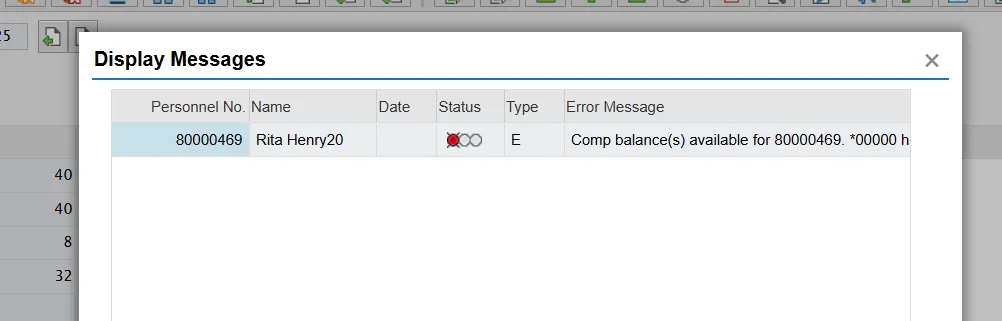
If an employee has Comp Balances to cover a portion of the Adverse Weather leave keyed, the following error will generate, and the employee should record Approved Leave (A/A 9000) for the amount of Comp Leave remaining and record the remainder of the absence as Adverse Weather leave (if management approves).
Comp balance(s) available for 80000469. *2.00 hours of A/A 9000 should be recorded instead of A/A 9545 (Adverse Weather)
If an employee does not have any Comp Balances, the following warning/informational message will generate. This message is a reminder that the manager must approve the use of Adverse Weather leave based on provisions outlined in the Adverse Weather policy.
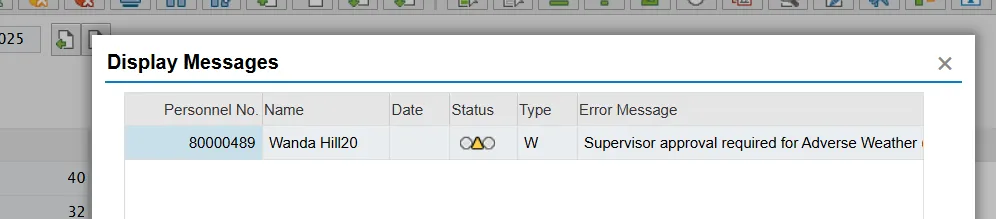
Keep in mind that the entire error message text will not display for the two errors in the initial pop-up window. Only a portion of the message will display. By double clicking on the message itself, the full text will be displayed in a separate pop-up window as shown below.
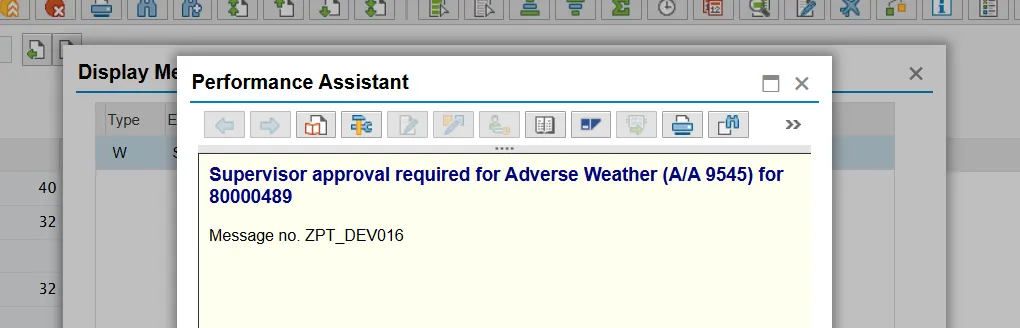
Note: Please note that employees keying time in ESS will be presented the same errors and warnings.