Purpose
This document provides important processing reminders and instructions for eligible employees that received a 7/1/26 Legislative Increase (LI). Included in this document are details about how the LI Mass Program processes the LI action and how the program calculates the new salary. General instructions for Leave of Absence (LOA) and salary corrections impacting the 7/1/26 LI are also provided.
Important Notes and Reminders
- Review ALL records for accuracy after the LI Mass Program is run, especially any employee with a future dated salary impacting action and employees that have transferred from another agency.
- Be mindful of payroll dates and deadlines.
- ALWAYS review the employee actions in PA20 before processing any PCR action.
- Do NOT attempt to process a new salary impacting action or insert any salary impacting action with an effective date prior to 7/1/26. This would be considered an insert. Inserting an action will result in the 7/1/26 action being overwritten. This WILL cause payroll impacting issues and can prevent an employee from being paid.
- Submit tickets to BEST ASAP. Please follow instructions for ticket requirements listed in the OM/PA Ticket Request Guide (Job Aid GN-9) available on the OSC website. Five or more employees can be submitted by spreadsheet.
- Approved PCRs are required for any salary change or correction.
- Any questions about LI position funding are to be directed to your OSBM partner.
- Mass Salary Action Spreadsheets must be submitted to BEST no later than 8/17/26 to ensure they are processed for August payroll.
How the LI Program Works and Calculates the New Salary with Examples of Select Actions
How the LI Mass Program Works
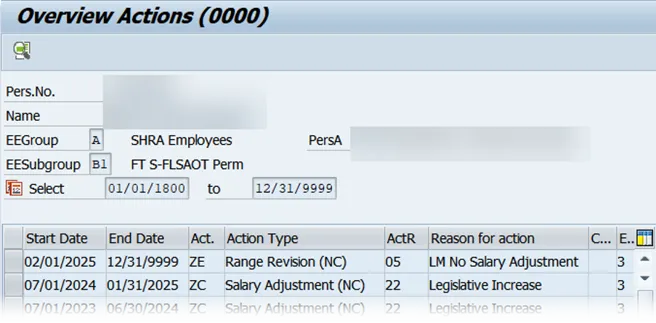
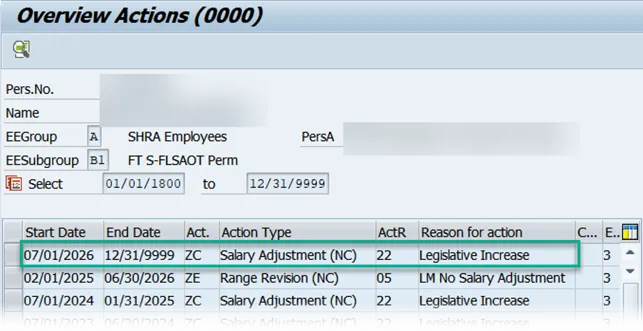
- When the LI Mass Program is run, all eligible employees will receive a 7/1/26 Salary Adjustment (ZC) Legislative Increase (22).
Before the LI Mass Program is run:
After the LI Mass Program is run:
How the LI Mass Program Calculates the New Salary
- The 7/1/26 salary is calculated on 6/30/26 salary for eligible employees. Most employees will receive a 3% increase. Note that 3% of the 6/30/26 salary equals the amount $1,285.
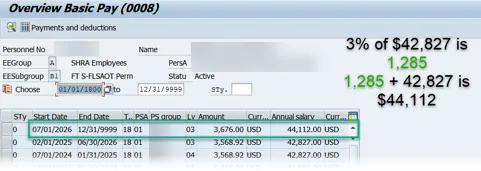
- New Hires, Reinstatement-Return to Work, and Temp to Perms dated 7/1/26 or later do not receive an LI action.
- If an eligible employee is separated, no action is needed because the system will recalculate.
- No special processing is required for employees on, or reinstated from LOA because this action does not impact IT0008 (Basic Pay).
General Instructions for Actions Impacting the 7/1/26 LI:
|
LOA PCRs Effective |
Agency Action |
BEST Action |
|---|---|---|
| (Z3) Leave of Absence (Z2) Reinstatement from LOA |
Agency must submit a ticket to BEST requesting the LOA or Reinstatement from LOA action to be inserted. | BEST will insert the LOA or Reinstatement from LOA action. |
|
Non-LI Salary Impacting PCRs |
Agency Action |
BEST Action |
|---|---|---|
| (ZC) Salary Adjustment (Z2) Reinstatement* (Z7) Non-Beacon to Beacon (Z1) Promotion (Z8) Transfer *Note: Does not include (Z2) Reinstatement from any LOA |
Agency must submit a ticket to BEST with PCR number of original action. A new PCR is not required. | If the salary impacting action after the LI creates an overpayment, BEST can change the salary back to the amount on the original PCR. |
|
Non-LI Salary Impacting PCRs |
Agency Action |
BEST Action |
|---|---|---|
| (ZC) Salary Adjustment (Z2) Reinstatement* (Z7) Non-Beacon to Beacon (Z1) Promotion (Z8) Transfer *Note: Does not include (Z2) Reinstatement from any LOA |
1. Create a new, fully approved, PCR with the new correct salary. 2. Agency must submit a ticket to BEST to correct the salary. |
BEST will correct the salary amount on IT0008 and instruct the agency to set PCR to complete. |
|
Salary Corrections for New Hire |
Agency Action |
BEST Action |
|---|---|---|
| (ZO) New Hire (Z7) Non-Beacon to Beacon |
1. Create and work Salary Adjustment - Correct New Hire Salary PCR. 2. Submit a ticket to BEST if there is a future dated action ahead of the New Hire action or if hard stop error is encountered. |
If ticket is submitted due to a future action or hard stop error, BEST will review and provide instructions to the agency. |
|
Appointment Change Reminder |
Agency Action |
BEST Action |
|---|---|---|
| (Z9) Appointment Change (11) Probation to Perm | Must be current date | N/A |
Note: For any action not listed, please submit a ticket with details to BEST and instructions will be provided.