Purpose
The purpose of this report description is to explain how to generate the Bereavement Leave report.
Report Description
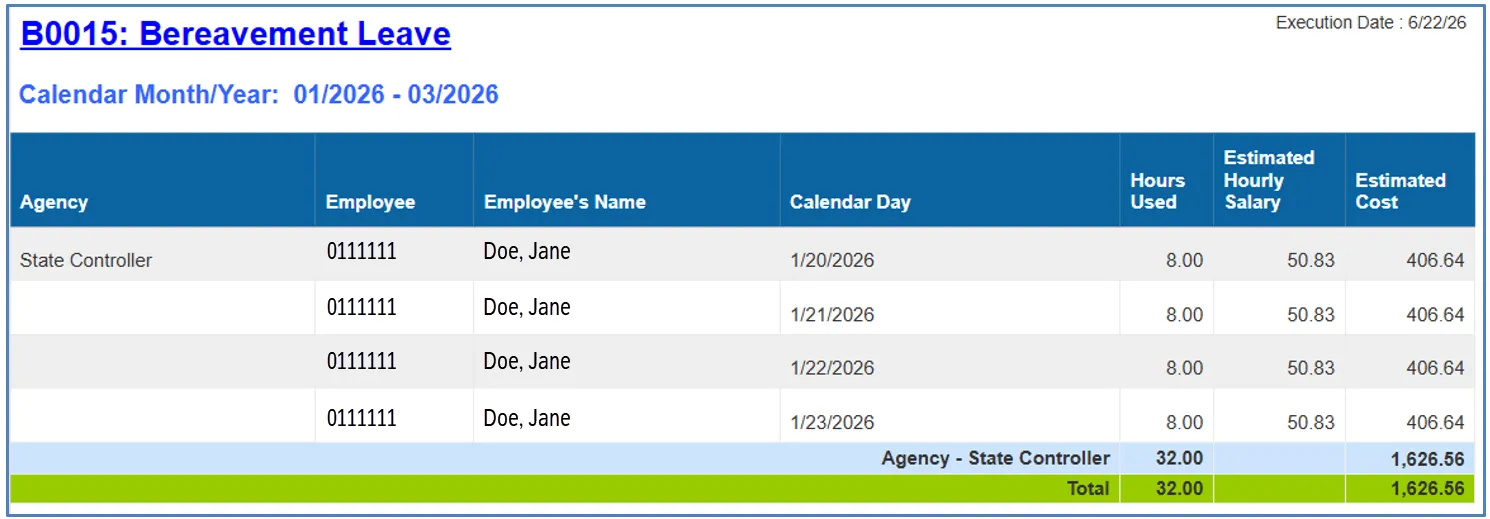
This report shows Employees who have been granted Bereavement Leave. It provides Hours Awarded, Hours Used, Estimated Hourly Salary, and Estimated Cost by Personnel Area. Additional data elements such as Gender, Ethnicity, Age Range, and Job are also available for additional analysis.
Report Location
OSHR Executive Oversight
Report Uses
Executive Order 325 and the Bereavement Leave Policy apply to cabinet agencies, as well as any other state agency or university that voluntarily adopts the executive order’s measures. Employees are eligible for bereavement leave if they hold a permanent, probationary, or time-limited appointment in a participating agency or university and work full-time or part-time at half-time or more. OSHR will use the implementation and use of bereavement leave to the Office of the Governor by October 1 of each year.
How to Generate This Report
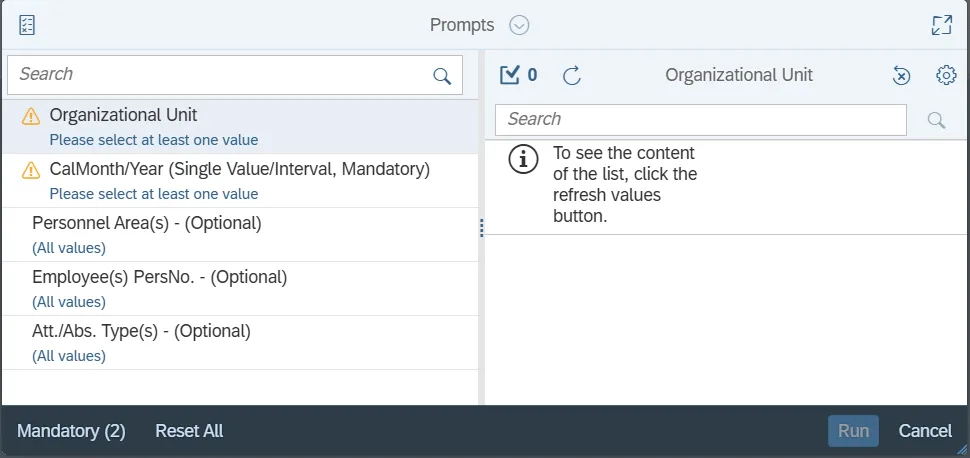
This report is generated after selecting values for the mandatory prompts. All mandatory prompts must have values selected before the Run Icon can be used to generate the report. Mandatory prompts can be identified as mandatory by the exclamation mark inside of the yellow-orange triangle, the square with the checkmark, or the display of (Mandatory). Detailed instructions for interaction with each prompt can be found on the OSC website at Web Intelligence Prompts | NCOSC.
The Mandatory prompts for this report are:
- Organizational Unit
- CalMonth/Year (Single Value/Interval, Mandatory)
This report can also be further limited by utilizing the Optional prompts to further limiting the amount of data that retrieved into the body of the report. Optional prompts are indicated as optional in parentheses beside the prompt.
The Optional prompts are:
- Personnel Area(s) - (Optional)
- Employee(s) PersNo. - (Optional)
- Att./Abs. Type(s) - (Optional)
NOTE: Since the system has a large number of employees, using broad wildcard searches can be very slow and may result in an error if the search exceeds the system limit. If the employee number is not known and you must do a name search, narrow down the search by using the wildcard with specific text strings when looking for an employee by name such as:
- John*Smith*
- *Smith
- If the employee number is known, it is best to use the manual entry field in Employee(s) PersNo. - (Optional) to enter the selection.
Initial Layout
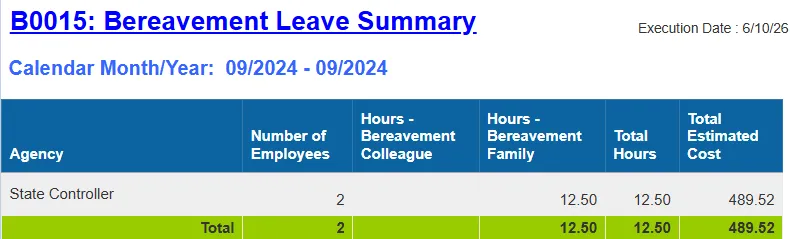
Report lists employees that have taken Bereavement Leave within the time period corresponding to date range selection on the prompt. Below is a sample report rendering.
Available Objects
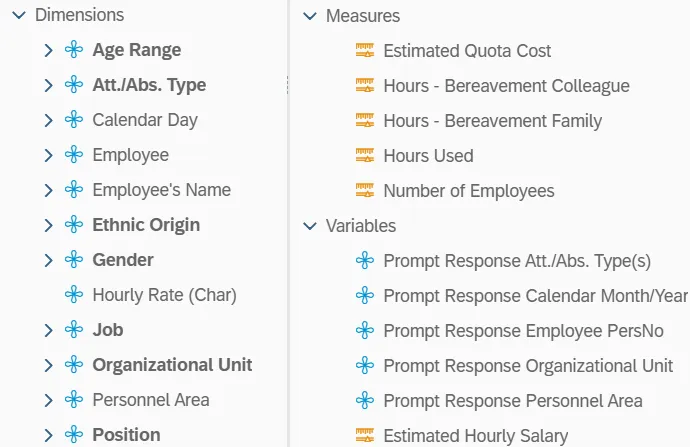
This is a list of the available objects that can be added to the report, from the Document Dictionary once in the Design mode:
Dimensions
- Age Range
- Att./Abs. Type
- Calendar Day
- Employee
- Employee’s Name
- Ethnic Origin
- Gender
- Hourly Rate (Char)
- Job
- Organizational Unit
- Personnel Area
- Position
Measures
- Estimated Quota Cost
- Hours – Bereavement Colleague
- Hours – Bereavement Family
- Hours Used
- Number of Employees
Variables
- Prompt Response Att./Abs. Type(s)
- Prompt Response Calendar Month/Year
- Prompt Response Employee PersNo
- Prompt Response Organizational Unit
- Prompt Response Personnel Area
- Estimate Hourly Salary
Special Report Considerations/Features
- The ‘CalMonth/Year’ Month/Year prompt is driven by leave usage. Data returned reflects Bereavement Leave usage in the time period corresponding to date range selected on the prompt.
- Estimated Hourly Salary is calculated as annualized salary divided by 2080.
- Estimated Quota Cost is calculated as Hours Used times Estimated Hourly Salary.