Purpose
The purpose of this job aid is to explain the steps to run ZSEV, Severance Pay Calculations.
There are 3 steps to complete this process.
Step 1. Type ZSEV in the Command field on the SAP Easy Access screen and press J. The Severance Pay Calculations screen is displayed.
Image
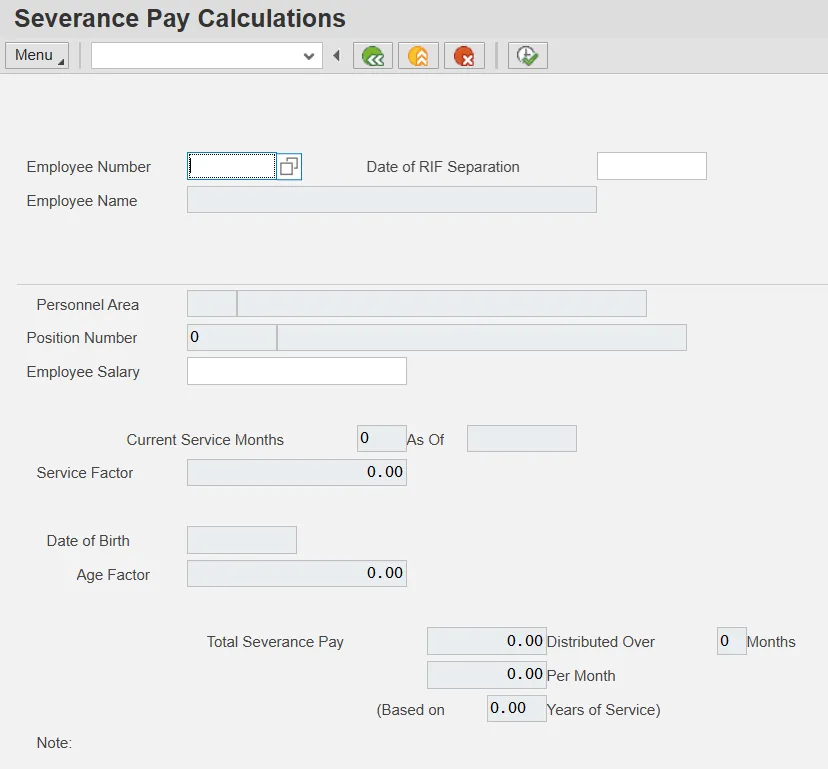
Step 2. Enter an employee number in the Employee Number field.
Step 3. Enter the RIF separation date in the Date of RIF Separation field and press Enter.
Example
Image

Note: Be sure to read any notes at the bottom of the screen.
Note: You can change the date and employee salary for projected calculations. It automatically changes service months.