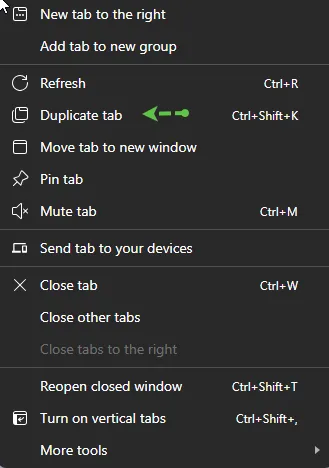
Q: How do I open another window in WebGUI?
A: Simply right click on your mouse and select either Duplicate or Duplicate tab depending on your browser.
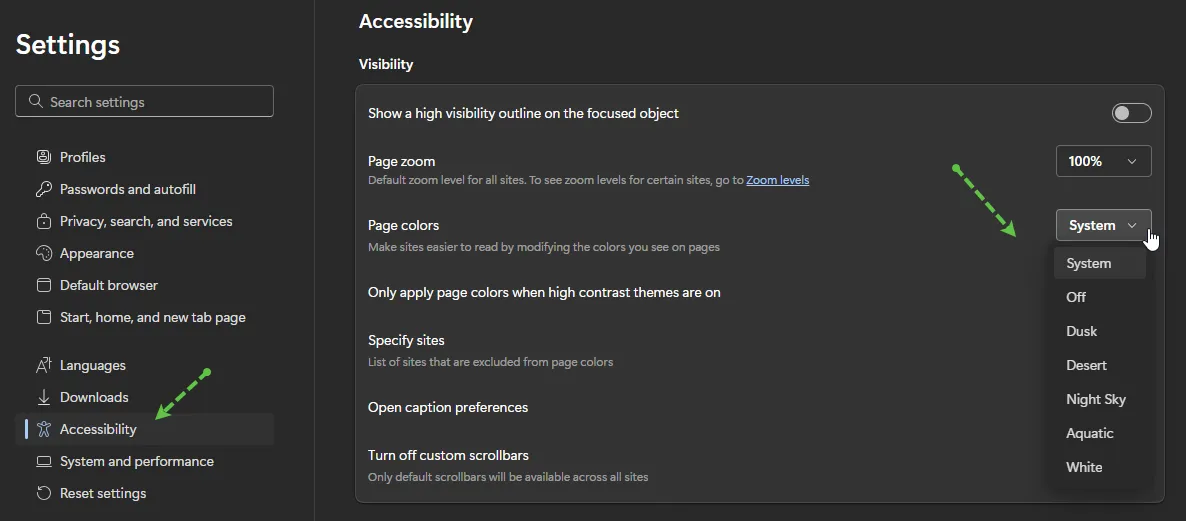
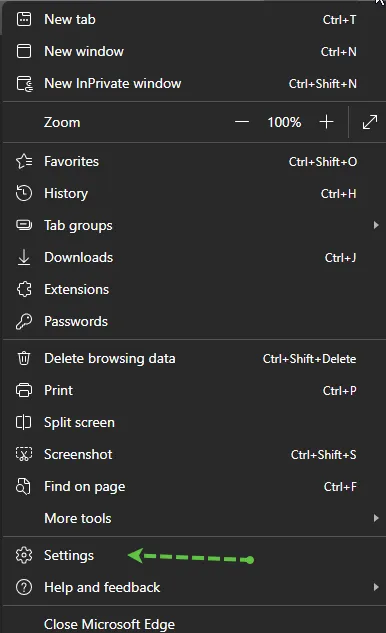
Q: Is there a way to change the display settings in WebGUI like there was under the Customize Local Layout -> options in SAP GUI?
A: The traditional theme changes that were available in desktop GUI are not available in WebGUI, However, accessibility browser theme settings would need to be managed through the supported Edge browser directly. You may access those settings as shown below:
Q: How do I advance past a Warning Messaging in WebGUI vs Desktop GUI?
A: In SAP Desktop GUI, users often click the green checkmark icon to proceed past warning or soft-error messages.
In SAP WebGUI, that icon may not appear. In these cases:
- Press Enter on the keyboard to continue.
- Ensure the cursor is active inside the SAP screen.
- If nothing happens, try clicking inside a field and pressing Enter again.