NOTE: This document is for historical information only. Agencies are no longer able to make these adjustments.
Purpose
The purpose of this Business Process Procedure is to allow agencies to adjust time worked hours for any employee who recorded too many or not enough hours during conversion. This is a one-time entry only valid on 4/1/2008.
Trigger
To adjust the pre-SAP time worked hours for impacted employees.
Business Process Procedure Overview
Infotype 2012 subtype ZWDJ allows agencies to adjust the time worked hours for impacted employees. This record can be a negative value if too many hours were reported, and the number needs to be reduced. The hours of time worked that were already reported on the timesheet in the Integrated HR-Payroll System have been counted, so this 2012 entry is an adjustment to add or reduce the hours. It does not replace the previous count of hours.
For example:
- If 8.5 hours of time worked was not reported, create an IT2012-ZWDJ for 8.50 hours.
- If 3 hours too much time worked was reported, create an IT2012-ZWDJ for -3.00 hours.
To check what was already counted, run transaction code [PT_BAL00] for Day Balances code 3699 on 3/31/2008. Instructions are included here.
Tips and Tricks
Infotype 2012 subtype ZWDJ only works on 4/1/2008 - you will not be able to choose this subtype if your date is not 4/1/2008.
Procedure
There are 8 steps in this process.
Step 1. Access Transaction PT_BAL00 to check what hours were already counted.
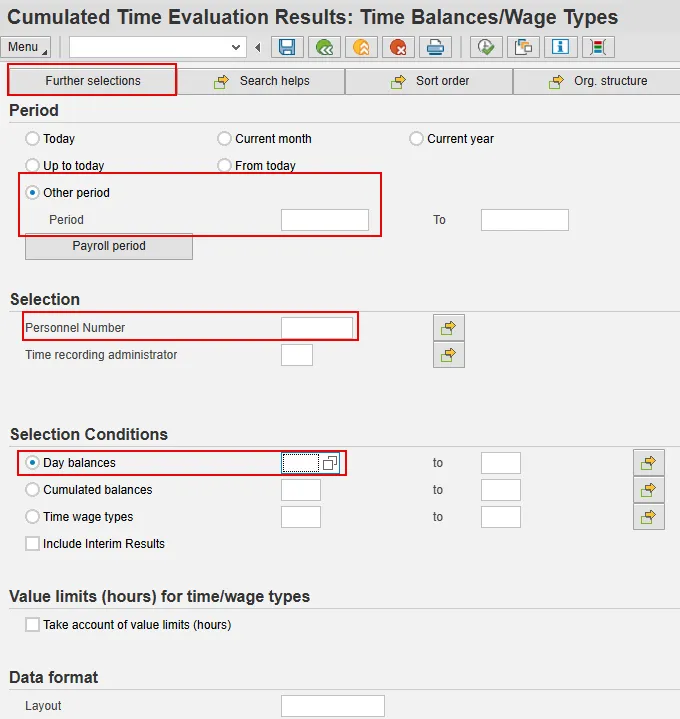
Step 2. Enter the employee personnel number in the Personnel Number field and select Enter on your keyboard.
Step 3. Under the Period section, for Other period, enter date of 3/31/2008.
Step 4. Under the Selection Conditions section, in the Day balances field, enter Time Type 3699 (Elig Hours for OT).
Step 5. If you want to add the Organizational Unit field to your screen to filter on, you may*. (Or you can simply use the personnel number you have already entered to run the report.)
* To add the Organizational Unit field, at the top of the screen, click the Further selections button. Under Choose Selection fields, Selection Options, double click on Organizational unit. The field will be moved to the Selection fields column.
Information: You can move any of these Selection options fields to the Selection fields column which will populate the field on the main screen and allow you to enter filter criteria.
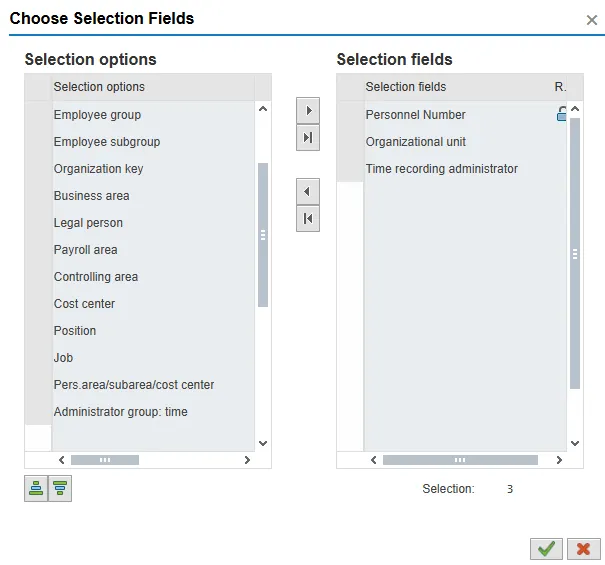
Step 6. Click the Continue (Enter) button.
Step 7. Click Execute (F8) button.
Information: The details per person are displayed for 3/31/2008.
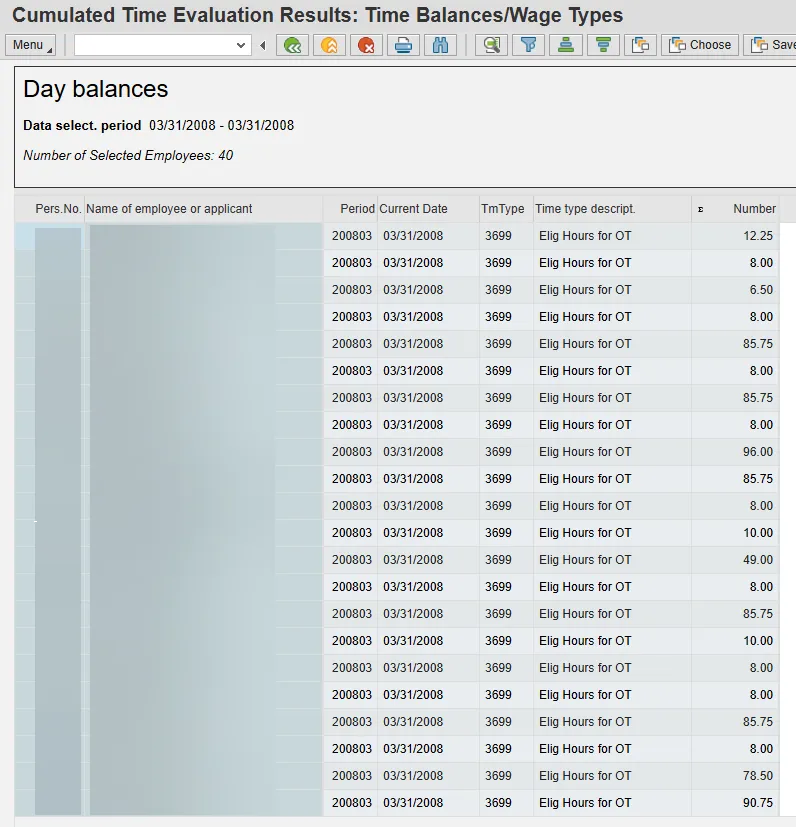
Step 8. Click the Back (F3) button.
The next step is to create the adjustment reason to add or subtract the appropriate number of hours.
There are 12 steps in this process.
Step 1. Access transaction PA30.
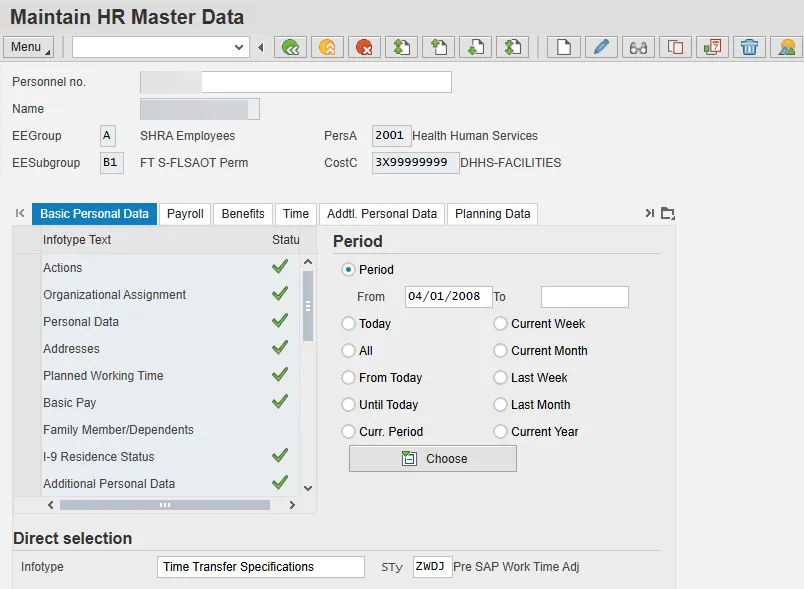
Step 2. Enter the employee personnel number in the Personnel no. field.
Step 3. Click Enter. Confirm this is the correct person for whom to make the adjustment.
Step 4. Under Period, in the From field, enter 4/1/2008.
Step 5. Under Direct selection, in the Infotype field, enter 2012 (Time Transfer Specifications).
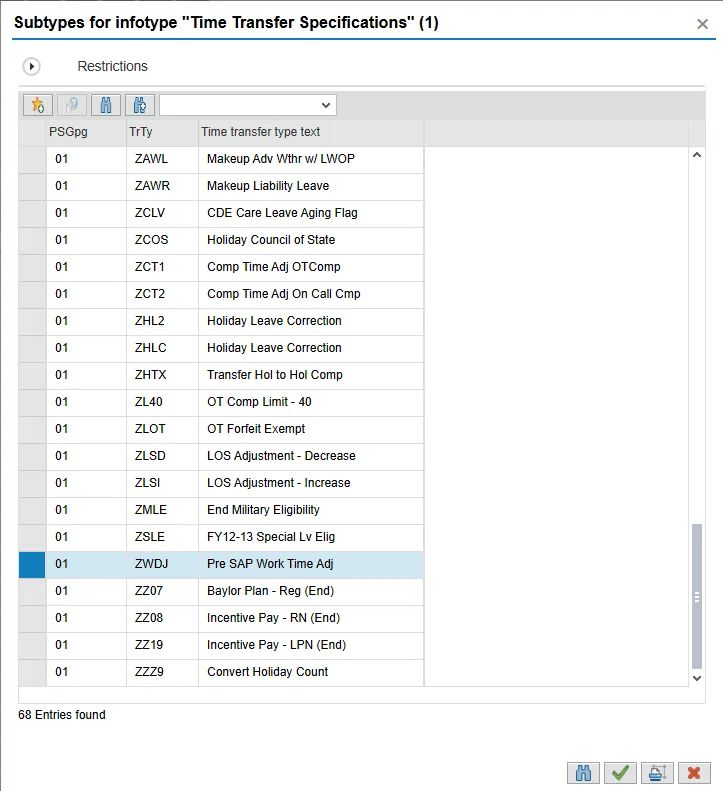
Step 6. Under Direct selection, in the STy field, use the matchcode to select subtype ZWDJ and then click the Copy button.
Remember: You will only be able to use Subtype ZWDJ on the date of 4/1/2008. If you did not use the date of 4/1/2008 for the Period, you will not be able to see the subtype ZWDJ on this list.
Step 7. Click the Create (F5) button.
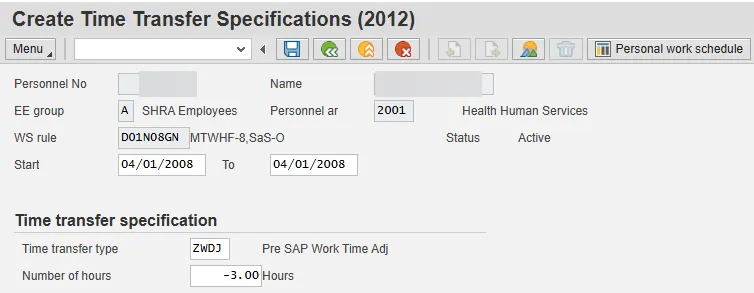
Step 8. In the Number of hours field, enter the number of hours to be adjusted, positive or negative (-).
For example:
- If 8.5 hours of time worked was not reported, enter 8.50 hours.
- If 3 hours too much time worked was reported, enter -3.00 hours (as in the screen shot).
Step 9. Enter to validate your data.
Step 10. Select Save (Ctrl+S) button to save your data.
Step 11. Select the Overview (Shift+F8) button to view the record created.
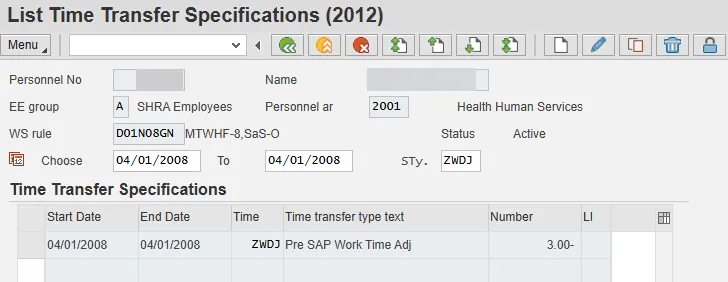
Step 12. Click the Back (F3) button.
The system task is complete.