Purpose
The purpose of this Quick Reference Guide (QRG) is to provide a step-by-step guide of how to manage work areas in the North Carolina Financial System (NCFS).
Introduction and Overview
This QRG covers the process of managing work areas. Manage Work Areas provides the tools and processes necessary to define, organize, and maintain specific operational spaces within a plant or facility. Effective management of work areas ensures optimal resource allocation, streamlined workflows, and the flexibility to adapt to changing operational requirements.
Create Work Areas
To manage work areas in NCFS, please log in to the NCFS portal with your credentials to access the system. There are 10 steps to complete this process.
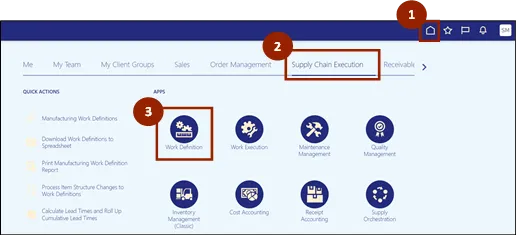
Step 1. Begin from the Home page, or click the Home icon.
Step 2. On the Home page, select Supply Chain Execution.
Step 3. Within the Supply Chain Execution tab, select Work Definition.
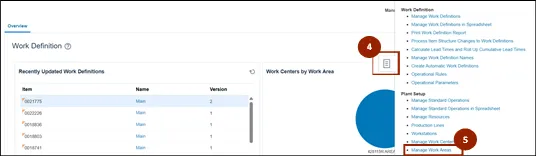
Step 4. From the Work Definition page, click the Task icon.
Step 5. Select Manage Work Areas under Plant Setup in the Task menu.
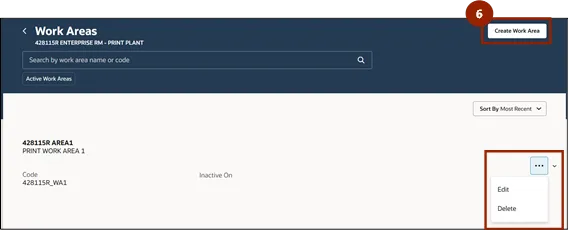
Step 6. On the Work Areas page, select Create Work Area.
Note: Select the ellipsis icon and select Edit or Delete to edit an existing Work Area.
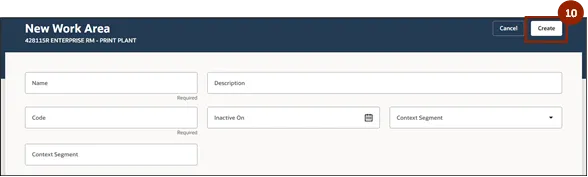
Step 7. Enter a unique name for the Work Area in the Name field.
Step 8. Enter a unique code for the Work Area in the Code field.
Step 9. Enter a description of the Work Area in the Description field.
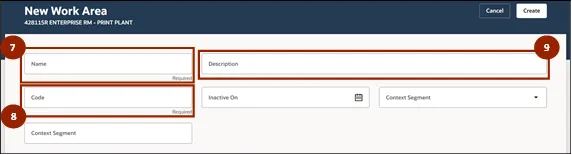
Step 10. Select Create to complete the process.
Wrap-Up
NCFS users use the steps in this QRG to navigate to the Manage Work Areas page and create new work areas or update existing work areas.
Additional Resources
- Virtual Instructor Led Training (vILT)
- Web-based Training (WBT)