Purpose
The purpose of this Business Process Procedure is to explain how to identify employees with positive wages greater than 90 days and/or negative wages crossing calendar years in a payroll run in the Integrated HR-Payroll System.
Trigger
Use this procedure to identify employees with positive wages > (greater than) 90 days and/or negative wages crossing calendar years in a payroll run. The SAP system does not calculate the employee and employer retirement contributions on these positive and negative wages in a payroll run per the Department of State Treasurer, Retirement Systems Division reporting guidelines.
Business Process Procedure Overview
If the employee’s wages have been underreported and the period since then has been more than 90 days, the agency must notify the employee and work with them in completing Form 466, Purchasing Retirement Credit for Unreported Service Omitted through Error. The agency should submit the completed form to the NC Department of State Treasurer, Retirement Systems Division to verify the employee’s eligibility to purchase. The Retirement Systems Division will calculate the cost to purchase the service and mail a cost statement with further instructions to the employee and the employer.
If negative wages are identified which cross calendar years with the exception of December adjustments made in January, the agency must submit a completed Form 316, Employer Request for a Refund of Contributions Reported to the Retirement System in Error to the NC Department of State Treasurer, Retirement Systems Division. Only the employee retirement contributions erroneously reported to the Retirement System in prior calendar years will be refunded to the employee directly. The employer contributions reported in error in prior calendar years will not be refunded.
Access Transaction
Via Transaction Code: PC00_M99_CWTR - Wage Type Reporter
Various Used:
- Agency LATE ORBIT Payments
- ORBIT Earnings w/PERNR & Name
Procedure
Use these procedures to retrieve a list of the employees with positive wages greater than 90 days and/or negative wages for prior calendar years.
There are 10 steps to complete this process.
Step 1. Enter PC00_M99_CWTR in the Command field on the SAP Easy Access screen, or select the transaction from the Favorites Folder.
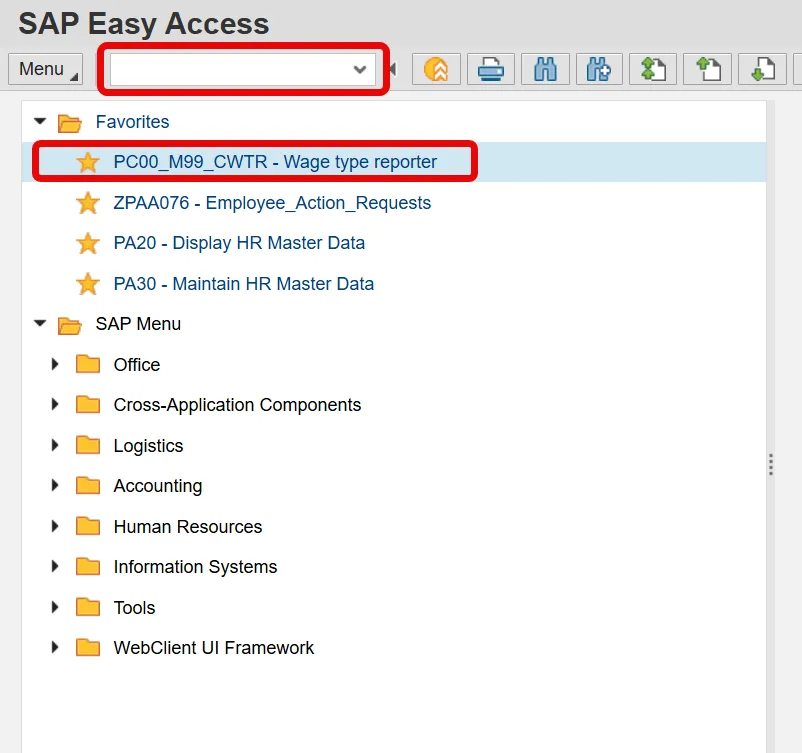
Step 2. Click Enter.
Step 3. Click the Get Variant icon.
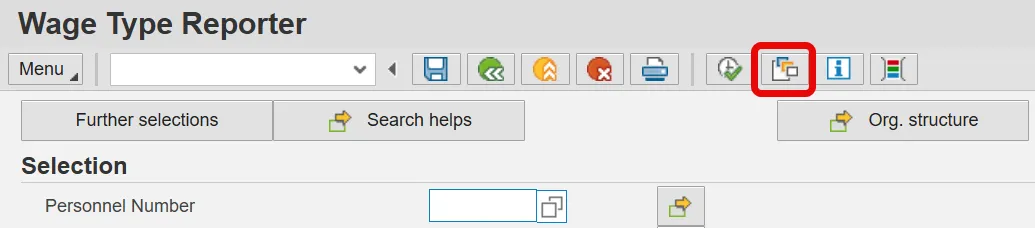
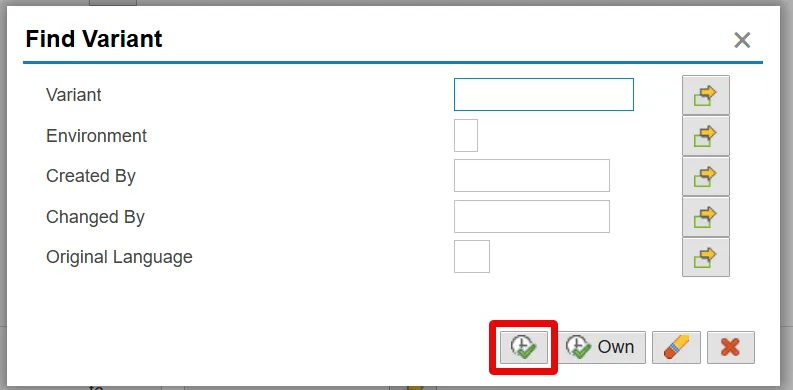
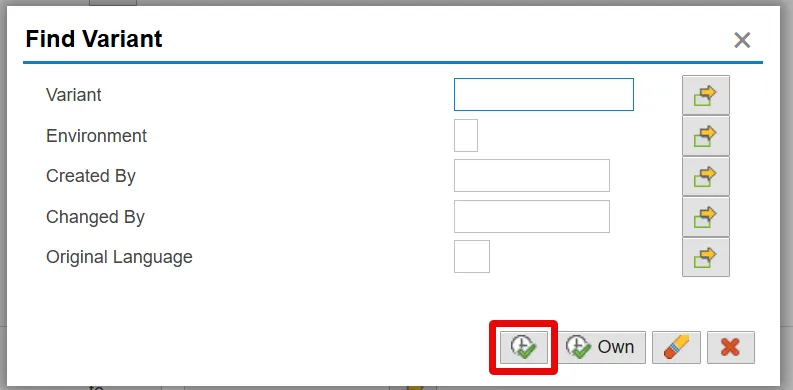
Step 4. Remove your personnel number from the Created By field in the pop-up window and click the Execute button.
Step 5. Select the appropriate Agency LATE ORBIT Payments variant.
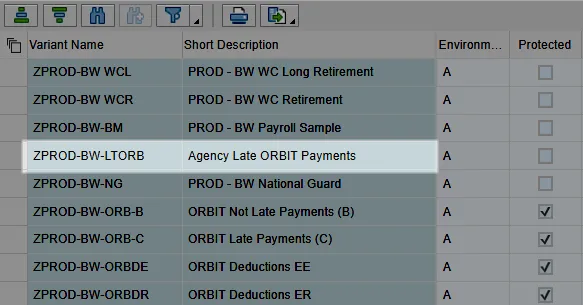
(monthly)

(bi-weekly)

Step 6. Click Enter.
Step 7. Update the fields in the Selection area.
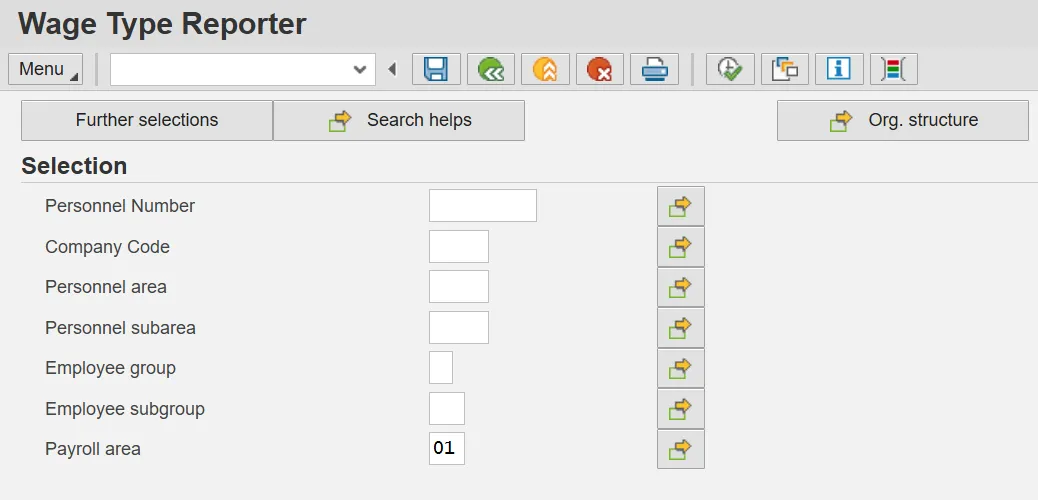
Note: You may click on “Org structure” if you would like to run the Wage Type Reporter for a periodical Org. Unit.
| Field Name | Description | Values |
|---|---|---|
| Company Code | NC01 for all agencies except Transportation, which is NC02. |
Enter Value in Company Code. Example: NC01 |
| Personnel area | Code identifying the agency and division associated with the position. |
Enter value in Personnel Area. Example: 2001 |
| Personnel subarea | Organizational entity which represents part of a personnel area characterized by personnel administration, time management, and payroll criteria. |
Enter value in Personnel subarea. Example: NC01 (7day Norm) |
| Employee group | Employee’s working classification (e.g. permanent, temporary, probationary, etc.). |
Enter value in Employee group. Example: A |
| Employee subgroup | Code identifying the employees exempt, non-exempt, or other working status. |
Enter value in Employee subgroup. Example: A1 |
| Payroll area |
Code identifying the payroll area or frequency of payroll 01 for Monthly or 04 for Bi-Weekly |
Enter value in Payroll area. Example: 01 |
Note: The more selection criteria selected, the narrower your report results.
Step 8. Click the Payroll Period button.

Step 9. Update the fields in the Payroll Period section.
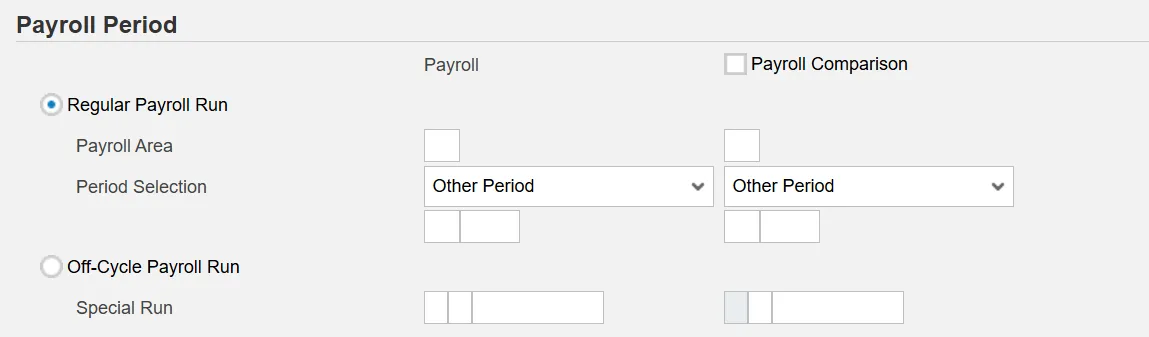
Regular Payroll Run
- Payroll Area: Code identifying the payroll area, or frequency of payroll (01 for Monthly, 04 for Bi-Weekly)
- Period Selection: Period identifying the payroll time frame (Current Period or Other Period)
Off-Cycle Payroll Run
- Special Run: Period identifying the off-cycle payroll run.
- Payroll Type
- Payroll Identifier
- Off-Cycle Payment
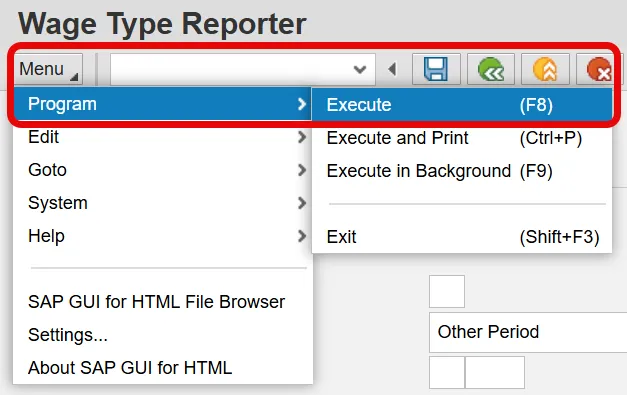
Step 10. Click Execute or Execute in Background from the program menu.
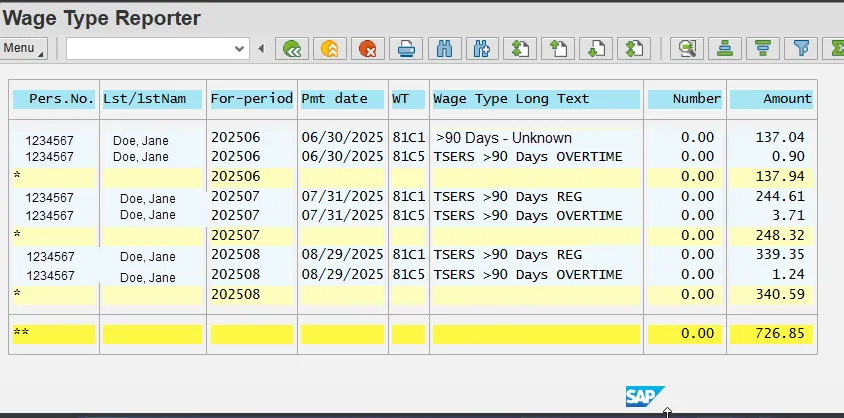
In the sample Wage Type Reporter above, Personnel Number 1234567 has Wage Types >90 Days in the June 2025 Payroll Period in the For-period(s) as follows:
| Pers.No. | For-period | Pmt date | WT | Wage Type Long Text | Amount |
|---|---|---|---|---|---|
| 1234567 | 202506 | 06/30/2025 | 81C5 | TSERS >90 Days OVERTIME | 0.90 |
| 1234567 | 202507 | 07/31/2025 | 81C1 | TSERS >90 Days REG | 344.61 |
| 1234567 | 202507 | 07/31/2025 | 81C5 | TSERS >90 Days OVERTIME | 9.71 |
| 1234567 | 202508 | 08/29/2025 | 81C1 | TSERS >90 Days REG | 339.35 |
| 1234567 | 202508 | 08/29/2025 | 81C5 | TSERS >90 Days OVERTIME | 1.24 |
In the sample Wage Type Report above, Personnel Number 1222222 has a Wage Type >90 Days in the October 2020 Payroll Period in the For-period(s) as follows:
| Pers.No. | For-period | Pmt date | WT | Wage Type Long Text | Amount |
|---|---|---|---|---|---|
| 1222222 | 202506 | 06/30/2025 | 81C1 | >90 Days – Unknown | 137.04 |
For the employees to receive service/salary credit for the positive wages > 90 days, a Form 466, Purchasing Retirement System Credit for Erroneously Omitted Service or Purchasing Contributions for Underreported Salary must be completed on each employee listed on the Wage Type Reporter who meets the eligibility requirements specified by law for purchases. The agency must notify the employee(s) and work with them on completing the form. Once the employee(s) has completed Sections A through E, the agency must provide the employee(s)’s compensation in Section F for each month underreported. The agency will submit the completed form(s) to the Department of State Treasurer, Retirement Systems Division to verify the employee(s) eligibility to purchase and DST will prepare cost statement(s). The employee(s) and employer will receive a cost statement letter from the Retirement Systems Division.
For the wages submitted to the Retirement System in error for prior calendar year(s), a Form 316, Employer Request for a Refund of Contributions Reported to the Retirement System in Error must be completed on each employee listed on the Wage Type Reporter. The negative wages and correct salary must be listed separately for each pay period in Section D. A brief explanation of why the refund is being requested must be included on the form. As indicated on the form, employer contributions reported in error in prior calendar years will not be refunded. Only employee retirement contributions erroneously reported to the Retirement System in prior calendar years will be refunded. A check for the erroneously reported prior calendar year employee contribution only will be made payable to the employee in a lump sum distribution and will be mailed directly to the employee’s most recent address in ORBIT.
For Wage Type 8000 (> 90 Days – Unknown) - The agency must determine the pay period(s) included in the Wage Type > 90 Days – Unknown total amount to accurately report the employee’s compensation which was underreported and/or erroneously reported. An additional Wage Type Reporter must be run on each employee to make this determination.
Procedure
Use these procedures to obtain the details of the > 90 days - unknown wages for an employee.
There are 9 steps to complete this process.
Step 1. Enter PC00_M99_CWTR in the Command field on the SAP Easy Access screen.
Step 2. Click Enter.
Step 3. Click the Get Variant.
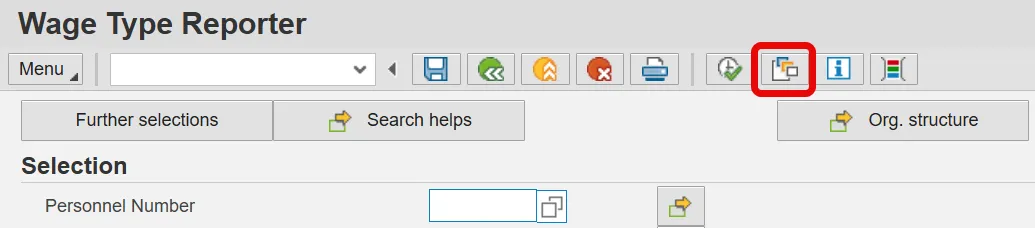
Step 4. Remove your personnel number from the Created By field in the pop-up window and click on the Execute.
Step 5. Select the appropriate ORBIT Earnings w/PERNR & Name variant.
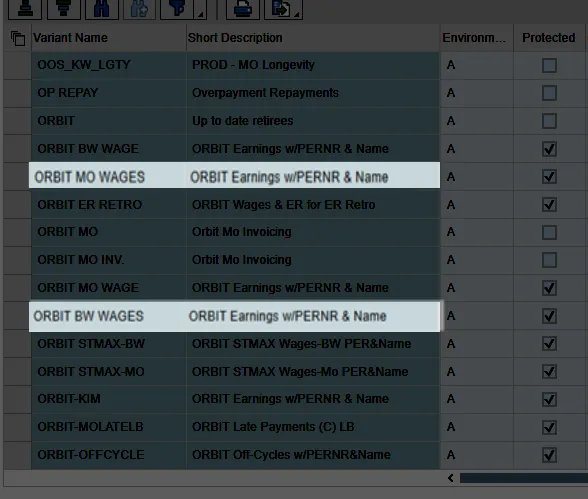
(monthly)

(bi-weekly)

6. Click Enter.
7. Enter the Personnel Number of the employee with the Wage Type 8000, > 90 Days – Unknown.
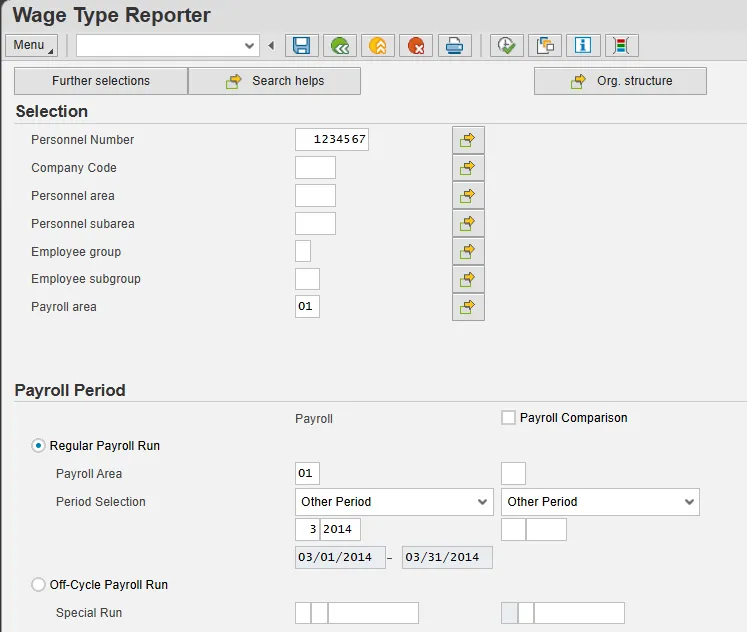
Step 8. Enter the same Payroll Period used when the variant such as ZPROD-MO-LTORB: Agency Late ORBIT Payments was run previously.
Step 9. Click Execute.
Wage Type Reporter – Variant: ORBIT Earnings w/PERNR & Name
(Personnel Number 1234567)
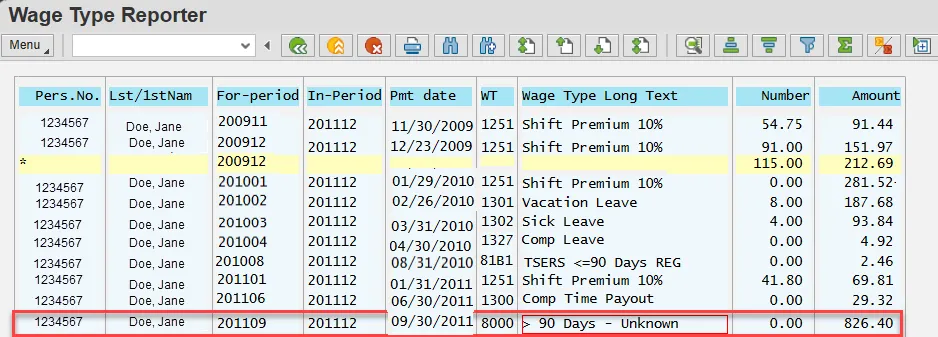
In the sample Wage Type Reporter above, Personnel Number 1234567 has wages >90 Days in the December 2011 Payroll Period in the For-periods as follows:
| Pers.No. | For-period | Pmt date | Wage Type >90 Days per For-Period | Pay Type |
|---|---|---|---|---|
| 1234567 | 200911 | 11/30/2009 | 91.44 | REG |
| 1234567 | 200912 | 12/23/2009 | 151.97 | REG |
| 1234567 | 201001 | 01/29/2010 | 281.52 | REG |
| 1234567 | 201002 | 02/26/2010 | 187.68 | REG |
| 1234567 | 201003 | 03/31/2010 | 93.84 | REG |
| 1234567 | 201008 | 04/30/2010 | 4.92 | REG |
| 1234567 | 201101 | 08/31/2010 | 2.46 | REG |
| 1234567 | 201106 | 01/31/2011 | 69.81 | REG |
| 1234567 | 201109 | 06/30/2011 | 29.32 | ANNLEAVE |
| Total: | 912.96 | |||
Note: Wages are reported to the Retirement System under pay types as defined by ORBIT. Only wages earned under certain wage types are retirement eligible.
The Payroll Job Aid, Wage Types Reported to ORBIT, lists the wage types that are retirement eligible, and under which pay type they are reported to the Retirement System.
Wage Type Reporter – Variant: ORBIT Earnings w/PERNR & Name
(Personnel Number 1222222)
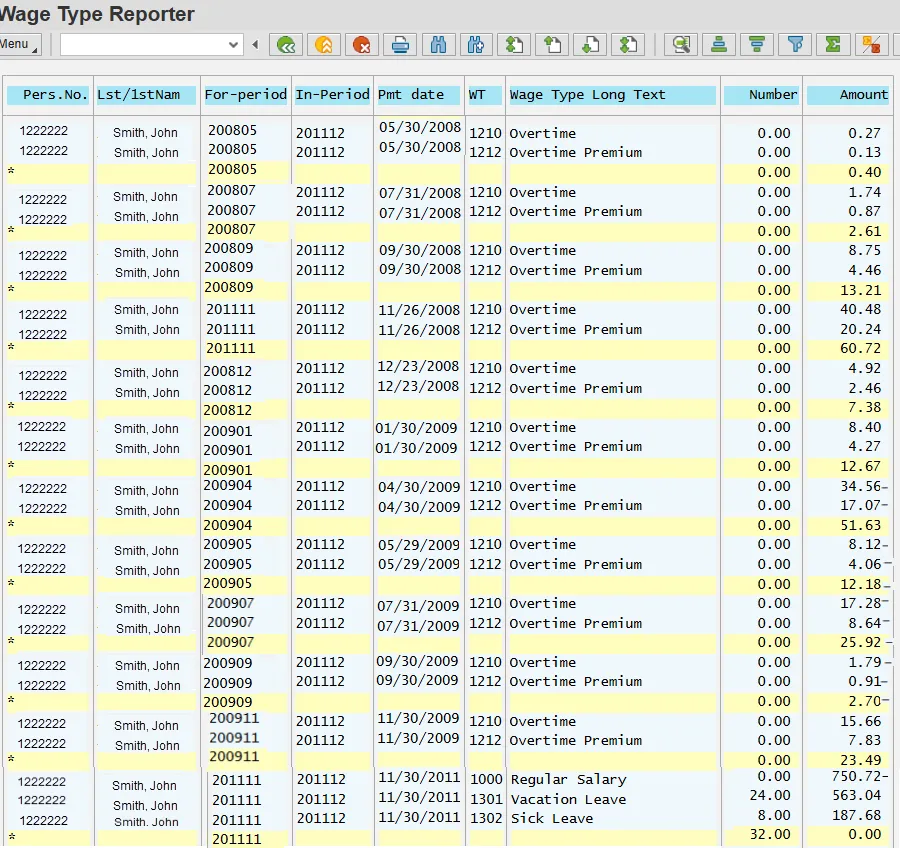
In the sample Wage Type Reporter above, Personnel Number 1222222 has wages >90 days in the December 2011 Payroll Period in the For-periods as follows:
| Pers.No. | For-period | Pmt date | Wage Type >90 Days per Period | Pay Type |
|---|---|---|---|---|
| 1222222 | 200805 | 05/30/2008 | .40 | OVERTIME |
| 1222222 | 200807 | 07/31/2008 | 2.61 | OVERTIME |
| 1222222 | 200809 | 09/30/2008 | 13.21 | OVERTIME |
| 1222222 | 200811 | 11/26/2008 | 60.72 | OVERTIME |
| 1222222 | 200812 | 12/23/2008 | 7.38 | OVERTIME |
| 1222222 | 200901 | 01/30/2009 | 12.67 | OVERTIME |
| 1222222 | 200904 | 04/30/2009 | 51.63 | OVERTIME |
| 1222222 | 200905 | 05/29/2009 | -12.18 | OVERTIME |
| 1222222 | 200907 | 07/31/2009 | -25.92 | OVERTIME |
| 1222222 | 200909 | 09/30/2009 | -2.70 | OVERTIME |
| 1222222 | 201101 | 01/31/2011 | 0 | |
| Total: | 107.82 | |||
Once the wages >90 days have been determined per For-period, the appropriate form(s) must be completed and mailed to N.C. Department of State Treasurer, Retirement Systems Division.
In the examples above:
Personnel Number 1234567: The agency must contact the employee regarding the positive wages underreported. If the employee elects to purchase the contributions for the underreported salary, Form 466 must be completed and mailed to the Retirement Systems Division.
Personnel Number 1222222: The agency must contact the employee regarding the positive wages underreported for periods 200805, 200807, 200809, 200811, 200812 and 200901. If the employee elects to purchase the contributions for the underreported salary, Form 466 must be completed and mailed to the Retirement Systems Division. Also, the agency must complete Form 316 since there are negative wages for periods 200904, 200905, 200907 and 200909.
------------------------------------------------------------------------------------------------------------------------------------
Note: Wages are reported to the Retirement System under pay types as defined by ORBIT. Only wages earned under certain wage types are retirement eligible.
The Payroll Job Aid, Wage Types Reported to ORBIT, list the wage types that are retirement eligible, and under which pay type they are reported to the Retirement System.
Additional Resources
NC Department of State Treasurer/Retirement & Savings/Government Employers
NC Department of State Treasurer/Retirement Systems/Forms