Purpose
The purpose of this job aid is to give an overview of time entry in the Integrated HR-Payroll System and describes positive time/actual pay, positive time/exception pay, and negative time pay.
All employees impacted by the Integrated HR-Payroll System are categorized into one of three time-entry groupings:
- Positive Time/Actual Pay: Positive time/actual pay employees must record all hours, including hours worked and leave taken. Failure to record time will result in the employee not being paid. Employees can enter time via the Time Tile within FIORI, a paper timesheet, or an agency-specific time interface.
Note: This method of time capture applies to all temporary employees, regardless of the agency for which the employee works. It is important to be aware that all temporary employees must enter time to receive payment. All temporary employees will be paid on a bi-weekly basis and will receive pay two weeks (one pay cycle) after each timesheet has been submitted and approved following the end of the pay cycle.
- Positive Time/Exception Pay: This means the employee must enter all time worked, as well as any absence or leave time used. The employee will continue to receive pay normally unless exceptions are entered into the system. Employees can record time and absences using via the Time Tile within FIORI, a paper timesheet, or an agency-specific time interface.
Note: All employees who are subject to FLSA must be positive time reporting.
- Negative Time: This means the employee must record only variations from their normal schedule, such as leave taken.
Weekly Time Entry
All employees are strongly encouraged to enter time on a weekly basis. This is recommended even for employees on a monthly pay period or if agency does not require weekly time entry. There are benefits that will work in the employee’s favor if time is entered weekly:
- Employees will receive premium pay sooner. Once time is entered and approved, premium pay will be paid out in the next available payroll.
- Employees will accrue leave on a more accurate and timely basis.
- Time statements and quota overviews will be up-to-date instead of reflecting an old balance because time has not been updated.
Employees should contact their manager or HR representative to be sure they know their agency’s policy on how often they should enter time.
Integrated HR-Payroll Attendance/Absence (A/A) Types
The attendance/absence (A/A) Types are used when coding time in the Fiori Portal, on a payroll time sheet and in the Integrated HR-Payroll System. A/A types are available from a drop down on Time Entry screens in the Fiori Portal and the Integrated HR-Payroll System. If you are not sure which A/A type to use during a given situation, please contact your agency’s Time Administrator.
Inactive A/A types can only be used for the period of time specified as valid (please see TM-03 Attendance Absence Type Overview) and may generate retroactive calculations.
Active A/A Type
| Code | Name |
|---|---|
| 9000 | Approved Leave |
| 9100 | Bonus Leave |
| 9128 | CDE Comp Leave |
| 9200 | Sick Leave |
| 9238 | Parental Leave (8 wks) |
| 9239 | Parental Leave (4 wks) |
| 9300 | Holiday Leave |
| 9400 |
Leave Without Pay |
| 9500 | Time Worked |
| 951 | Remote Callback |
| 9512 | Liability Leave Make-Up |
| 9514 | Work During Emergency Closing |
| 9515 | Travel Time 1X |
| 9516 | Callback |
| 9517 | On-Call |
| 9530 | OMAL – Non-Discretionary |
| 9531 | OMAL - Discretionary |
| 9532 | OMAL – Emergency Closing |
| 9533 | OMAL – Relief Efforts |
| 9534 | OMAL - Medical |
| 9545 | Adverse Weather Leave |
| 9550 | Civil Leave – Jury Duty |
| 9560 |
Community Service Leave |
| 9565 | Community Service Tutoring |
| 9566 | Literacy Volunteer Leave |
| 9570 | Educational Leave |
| 9571 | Personal Observance Leave |
| 9620 | Military Training Leave |
| 9630 | Military Active Duty |
| 9680 | Injury Absence WC |
| 9685 | Injury Leave |
| 9690 | Investigatory Leave |
| 9718 | Special Bonus FY2018 |
| 9719 | Special Bonus FY19-20 |
Inactive A/A Types
| Code | Name |
|---|---|
| 9513 | CDE 1.50 Worked |
| 9518 | CDE 1.25 Worked |
| 9519 | CDE 1.20 Worked |
| 9520 | CDE 1.10 Worked |
| 9521 | CDE 1.05 Worked |
| 9540 | Other Mgmt. Approved Leave |
| 9547 | Administrative Leave-CDE** |
| 9548 | State of Emergency Leave |
| 9549 | CDE Care Leave |
| 9580 | FFCRA Employee Care |
| 9581 | FFCRA Family Care |
| 9582 | FFCRA w/Care Leave Supp* |
| 9583 | FFCRA EFMLEA |
| 9584 | FFCRA EFMLEA w/Care Lv* |
| 9585 | CDE Eldercare/No TLW |
| 9586 | CDE Eldercare/No TLW w/CL* |
| 9587 | CDE Elder/No TLW 1/3 |
| 9588 | CDE Elder/No TLW w/CL 1/3 |
| 9681 | CDE Injury Absence WC |
| 9710 | Flexible Furlough leave |
| 9711 | FY2012–2013 Special Leave |
| 9712 | Special Leave |
*The Integrated HR-Payroll System will supplement 1/3 of pay with CDE Care Leave automatically. There are several helpful documents on OSC’s HR-Payroll Help Documents page found by filtering on COVID19.
**Agencies should verify with their management staff if they have an approved OSHR exception to use A/A 9547 after 8/14/22.
Minutes/Decimals Conversion for Time Entry
All agencies can use up to two decimal places (1/100th increments) to record time. By adopting the smallest common increment, each agency will be able to manage time consistently.
| Minutes | Decimals |
|---|---|
| 1 | .02 |
| 2 | .03 |
| 3 | .05 |
| 4 | .07 |
| 5 | .08 |
| 6 | .1 |
| 7 | .12 |
| 8 | .13 |
| 9 | .15 |
| 10 | .17 |
| 11 | .18 |
| 12 | .2 |
| 13 | .22 |
| 14 | .23 |
| 15 | .25 |
| 16 | .27 |
| 17 | .28 |
| 18 | .3 |
| 19 | .32 |
| 20 | .33 |
| 21 | .35 |
| 22 | .37 |
| 23 | .38 |
| 24 | .4 |
| 25 | .42 |
| 26 | .43 |
| 27 | .45 |
| 28 | .47 |
| 29 | .48 |
| 30 | .5 |
| 31 | .52 |
| 32 | .53 |
| 33 | .55 |
| 34 | .57 |
| 35 | .58 |
| 36 | .6 |
| 37 | .62 |
| 38 | .63 |
| 39 | .65 |
| 40 | .67 |
| 41 | .68 |
| 42 | .7 |
| 43 | .72 |
| 44 | .73 |
| 45 | .75 |
| 46 | .77 |
| 47 | .78 |
| 48 | .8 |
| 49 | .82 |
| 50 | .83 |
| 51 | .85 |
| 52 | .87 |
| 53 | .88 |
| 54 | .9 |
| 55 | .92 |
| 56 | .93 |
| 57 | .95 |
| 58 | .97 |
| 59 | .98 |
| 60 | 1 |
Leave Offsetting
THE RULE:
Leave is to be used to cover the gap between hours worked and the minimum expected work hours.
In the past, agencies have handled leave off-setting in different ways. If an employee takes Monday off but then works a full 40 hours between Tuesday and Friday, some agencies do not require the employee to record time off for Monday, while others do. The OSHR Leave Offsetting policy states that if employees work additional hours outside their normal schedule in a work week in which they also have scheduled or taken time off, the additional time worked "offsets" the time that the employee intended to cover with available leave. Therefore, the number of leave hours originally charged must be reduced by the number of additional hours worked. The employee in the example above will not be required by any agency to take leave for Monday as long as they have worked 40 hours between Tuesday and Friday.
Leave Hierarchy – Approved Leave
All absences recorded as A/A type 9000 - Approved Leave will be subject to this Leave Hierarchy which is set by OSHR policy. The Leave Hierarchy reflects the order in which leave balances will be deducted when an entry for an Approved Leave Absence is approved. At the point of entry, the quotas are checked in succession until enough quota is found to cover the recorded absence. The system will return a message ‘no quota available’ if it has checked each bucket and not found a balance to cover the absence.
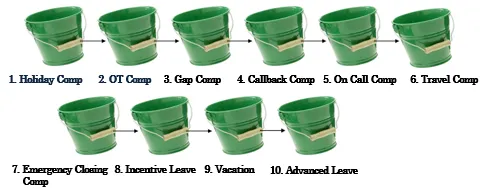
The quotas will be deducted automatically in this order:
Current Approved Leave Hierarchy |
| 22 – Holiday Comp |
| 20 – Overtime Comp |
| 21 – Gap Hours Comp |
| 23 – Callback Comp |
| 26 – On Call Comp |
| 24 – Travel Comp |
| 27 – Emergency Closing Comp |
| 29 – Incentive Leave |
| 10 – Vacation Leave |
| 31 – Advanced Vacation Allowed |
Note: Sick leave does not fall within the Approved “vacation” leave hierarchy. There is no change in policy regarding sick leave; employees will continue to accrue and take sick leave the same way as always. If employees deplete their sick leave, and require more time off, hours will be deducted first from voluntary shared leave and then from advanced sick leave (if approved).
For more information about OSHR Leave policies, please refer to the OSHR website.