Purpose
The purpose of this job aid is to explain how to read the Remuneration/Pay Statement in the Integrated HR-Payroll System.
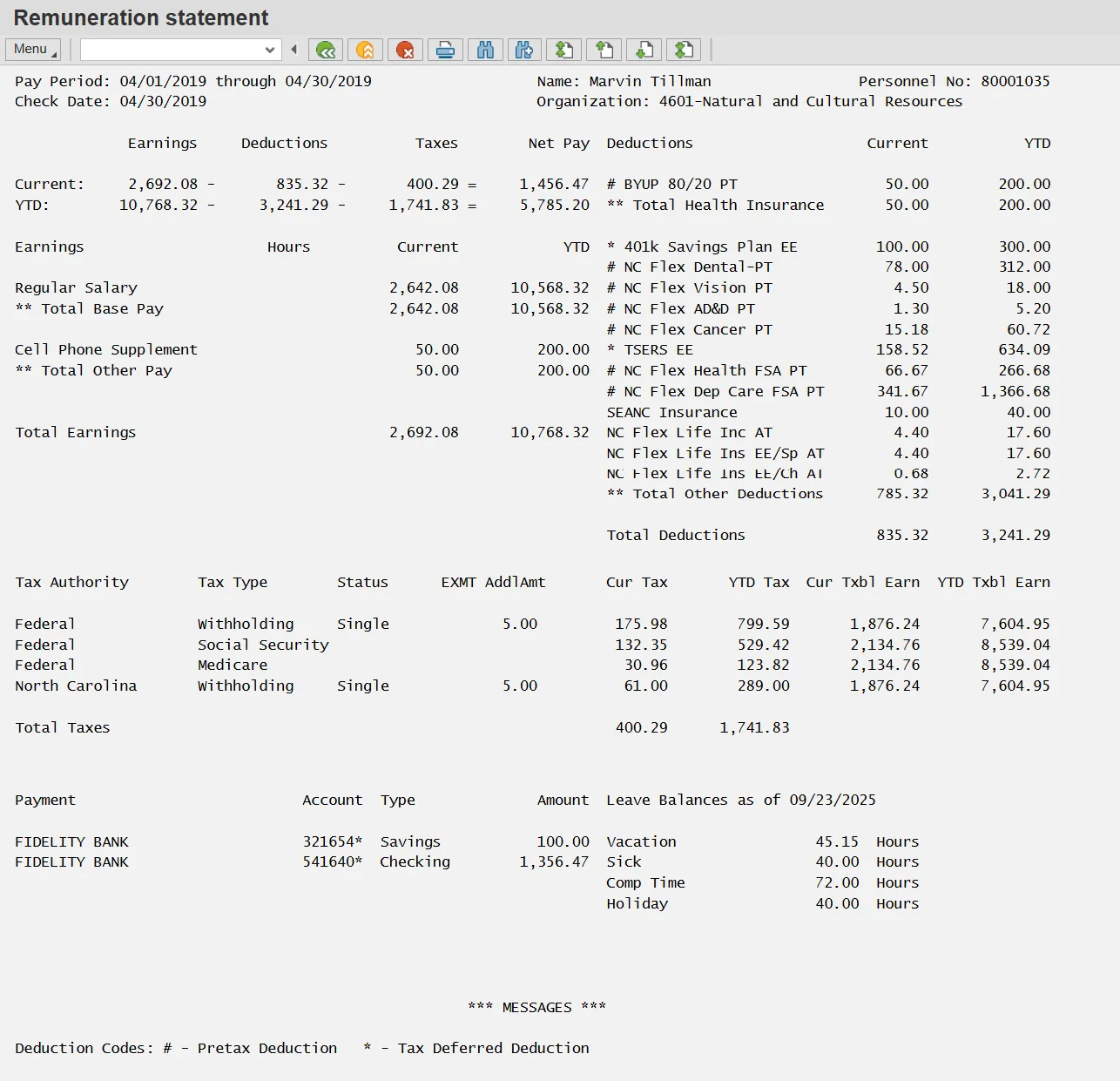
For illustration purposes the Pay (printed Remuneration) Statement shown is divided into several sections. Each section is explained on subsequent pages. NOTE: Do not show employees their remuneration/pay statement prior to pay day.
Header

Pay Period – The beginning and ending payroll period dates. This corresponds to base pay or salary but may not be the same as the overtime period. Overtime periods, particularly with law enforcement and other 28-day employees, are determined by individual agencies for specific groups of employees. Employees should check with their agency regarding the overtime period being paid in a particular payroll. The overtime period dates are not shown on the statement due to the wide variety within the state agencies.
Check Date - The date either the check was issued or the direct deposit was processed.
Employee Name – Name of employee
Organization – The Org Unit Name (Agency, Department, etc.) and Org Unit number to which the employee is assigned
Personnel No. – The Integrated HR-Payroll System number from the Retirement system assigned to the employee
Current and YTD

Current - The amounts in the various categories represent only the current Pay Period.
YTD – For the current year, YTD is from Agency go-live until the current pay period. In subsequent years, it will be based on the calendar year (from January – current pay period)
Earnings - Total Base Pay plus Total Other Pay
Deductions - Benefit premiums, retirement contributions, Agency specific benefits, etc.
Taxes – Federal, state, local taxes for this pay period. The amount may vary from month to month based on earnings.
Net Pay - Earnings minus Deductions minus Taxes. Net Pay is the amount that employees receive in their paychecks for this pay period (also known as “take home” pay).
Total Base Pay

Earnings – The type of earnings associated with the amount paid (regular salary, leave, etc.)
Hours – The number of hours associated with each Earnings type
Current/YTD – see above explanation
Regular Salary – Regular Salary “Hours” will display the hours entered for the pay period only for part-time and DOT employees; for other employees, it will be blank (because hours are not calculated for regular salary). The amount is the portion of the employee’s salary minus the dollar amounts allocated to leave taken that pay period. In some pay periods, the Regular Salary amount may increase as a result of offsetting any negative leave hours and amounts (as explained below in Negative numbers).
Vacation Leave – The number of hours entered and approved for Approved Leave taken (code A/A 9000). The dollar amount under Current is the number of leave hours taken times the hourly rate of pay (even if the employee is not an hourly employee). The hourly rate for non-DOT employees is derived from the annual pay (IT0008 Basic Pay) divided by 2,080 hours. DOT is figured dividing the annual pay by 2,088 hours (for years 2008 and 2009). On IT0008 the Salary Amount button can be used for the hourly calculation on all employees except DOT.
Sick Leave – The number of hours entered for sick leave taken (code A/A 9200). The dollar amount under Current is the number of sick leave hours taken times the hourly rate (as explained above in Vacation Leave).
Paid Holiday – The number of hours and dollar amount that the employee was paid for holiday(s). The Integrated HR-Payroll System automatically enters a line item on the Pay statement for the holiday and makes an assumption that the employee took off that day unless an entry is made otherwise. If the employee takes the Holiday as assumed, the Holiday shows as Holiday hours used and paid (positive numbers, as shown above). If the employee works the holiday, the hours and pay may show as either positive or negative numbers depending upon when Holiday work hours were released and approved as outlined below:
- If the hours worked on the Holiday were released and approved before payroll cutoff, the Holiday premium line item will show in the Total Other Pay section (See Section 3). No Holiday leave is displayed.
- If the hours worked on the Holiday were released and approved after payroll cutoff, the hours and pay show as negative numbers in the next pay period (next Pay Statement). In this case, the Integrated HR-Payroll System makes a correction by reallocating the hours from Holiday Leave to Regular Salary. When negative hours or dollar amounts are shown in the holiday line item, there is no negative impact to the employee’s Total Base Pay.
Comp Leave – The number of hours and associated dollars for comp time the employee used (code A/A 9000).
Total Base Pay – the sum of the Regular Salary, plus pay for Leave (including Holiday). If the employee did not take Leave and a Holiday does not occur in the pay period, the employee’s Regular Salary will exactly match the Total Base Pay. The total base pay should be very close to the same figure from pay period to pay period. Pay calculations for leave will not always match up with the pay period an employee takes leave. Variations could occur when an employee’s time is not approved prior to the payroll cutoff date, or because the employee takes leave after the payroll cutoff date.
A Note About Negative Numbers
A negative number of hours and associated dollar amounts on any leave type may appear because either:
- A correction was made to leave in a prior pay period. This may be for error correction, timesheet changes, or quota changes. For example:
- The employee coded time to 9200 (Sick) on a previous pay period that should have been coded to 9000 (Approved Leave). The appropriate correction is made after payroll cutoff. Those hours and the associated dollar amount will be removed from Sick Leave (shows as negative) and added to the appropriate leave quota in the Approved Leave Hierarchy (for example, Vacation).
- The employee coded time to 9200 (Sick) on a previous pay period that should have been coded to 9500 (Time Worked). The appropriate correction is made after payroll cutoff. In this case, those hours and the dollar amount will be removed from Sick Leave (shows as negative) and the amount added back to Regular Salary.
- Time was entered after payroll cut off that was different from what the system anticipated would be entered. For example:
- In November, the payroll cut off is 11/21. In the November pay statement, the system pays the employee 16 hours of holiday pay for Thanksgiving and the day after Thanksgiving, making the assumption that the employee will take the holiday time off. However, on 11/28, the employee enters 8 hours of time worked (9500) for the day after Thanksgiving (a holiday). In the December pay statement, the system will move 8 hours (shows as negative) from Holiday pay and adds 8 hours to Holiday Premium pay.
Total Other Pay

Overtime – Overtime hours the employee worked based on position settings, overtime work schedule rules, employee eligibility and employee assigned overtime period. Normally, the number of hours paid for overtime would display in the “Hours” column. In this example, the overtime pay was for an adjustment to the hourly amount paid on a previous overtime period.
Important: Overtime periods for salaried employees usually match the pay period. However, for 28-day employees, the overtime period dates usually do not match the pay period dates. Employees should check with their respective agencies to understand their overtime period dates and when overtime is paid.
Shift Premiums – Additional compensation when an employee in certain classes works evening, night or weekend shift. The percentages may vary depending upon the position settings and agency. In this illustration, the Shift Premium percentage was 10%. When the employee works shifts with different percentage rates, each shift premium is shown as a separate line item. However, if the shifts are paid at the same percentage rate, only one line item will show for Shift Premium.
Additional Hours Pay – may include pay from several categories:
- Civil leave
- Other Management Approved leave
- A Part-time employee worked more than his or her scheduled hours
- An employee on a 28-day cycle worked more than 160 hours but fewer than 171—the hours greater than 160 up to but not including 171 are paid in Additional Hours Pay (anything 171 and over is overtime if there is no leave offsetting)
- A full-time employee entered hours worked (A/A 9500) during a holiday week that exceeded the scheduled work hours minus the holiday hours. This does not include hours worked on the holiday (see Paid Holiday section). For example, the employee worked 36 hours the week of Labor Day holiday and coded 8 hours on the holiday as 9300. In this case, the employee was expected to work 32 hours (40 hours minus 8 hours). The 4 extra hours will be paid in Additional Hours Pay.
On Call Pay – the number of hours and associated pay that the employee is paid to be on call and report for work in the event of an emergency.
Pre-SAP Shift Pay Other - Money that was owed an employee prior to the Integrated HR-Payroll System for the category specified (in this example, Shift Pay Other)
Annual Longevity – The lump sum payment for longevity which is paid once a year.
Additional Types of Other Pay Not Illustrated
- PPO Pre Plan Refund PT - Medical plans are paid one month in advance. If a change is made, the Integrated HR-Payroll System refunds the employee for the premium paid in advance.
- Holiday Premium - hours and associated pay for employees who are required to work on designated holidays.
Total Other Pay - the sum of all supplemental pay (overtime, shift premium, additional hours etc.). Total Other Pay plus Total Base Pay equals Total Earnings. NOTE: Total Other Pay could include monies from a previous pay period. This happens if the time was not entered and approved before payroll cutoff or an employee works supplemental hours in the days after payroll cutoff.
Total Earnings

Total Earnings – Sum of Total Base Pay and Total Other Pay (premium pay total). Total Earnings is located immediately after Total Other Pay.
Total Health Insurance, Total Other Deductions and Total Deductions
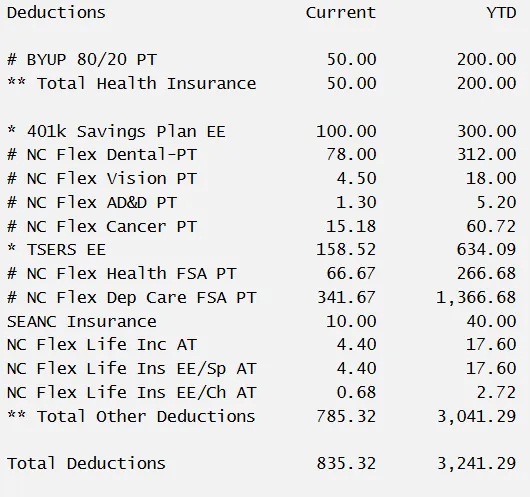
Total Deductions is the sum of total health insurance deductions and total other deductions. Each deduction may have either an * or # deduction code to the left of the deduction name:
# = pretax deduction
*= tax deferred deduction
Deductions Types include:
- TSERS EE – Teachers’ and State Employees’ Retirement System (previously called “Retirement”).
- LEORS - Law Enforcement Officer Retirement System
- FSA - Flexible Spending Account
- DDCFSA – Dependent Day Care Flexible Spending Account
- HCFSA – Health Care Flexible Spending Account
- AD&D – Accidental Death and Dismemberment
- SEANC – State Employees Association of North Carolina
- ARAG Group – legal insurance
- Combined Campaign – donations to local, state, national and global charitable organizations
- SECU – State Employees’ Credit Union
Total Taxes

Total taxes equal taxes paid based on the employee’s taxable earnings for current pay period. Year-to-date totals are also shown. The amounts may vary each pay period depending upon earnings. Claimed exemptions for Federal and State taxes are shown, as well as any additional tax monies that the employee may have elected to have withheld from each paycheck (AddlAmt).
Note: once an employee has reached an earnings cap, such as for social security, the Integrated HR-Payroll System automatically will cease withholding that particular tax for the remainder of the tax year. At that time, the Cur Tax will be blank for that tax type until the next calendar year begins again.
Payments
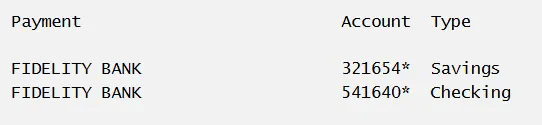
The financial institutional to which the direct deposit was sent, the account number, the account type and the amount deposited.
Leave Balances
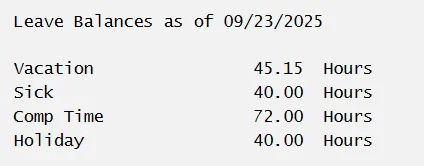
Note: The Leave Balances in the various Leave Types as of the day the statement was printed. Be aware that even if a statement is printed for a prior period, the balances will still reflect the balances as of the date the statement was printed and not the balance as of the pay period.
Messages

Various messages pertinent to all State employees, such as explanations regarding:
- Deduction codes
- +/- adjustments
- Legislative Increase (LI) payment