Purpose
The purpose of this job aid is to provide definitions for the data fields found in the SAP ERP reports available in the Integrated HR-Payroll System.
The Integrated HR-Payroll system has several reports that can be run from within, known as ERP reports. These reports have a consistent set of data fields that can be filled in to filter the results of the reports.
Note: Not all reports will have all fields as shown in the screenshot below.
Image
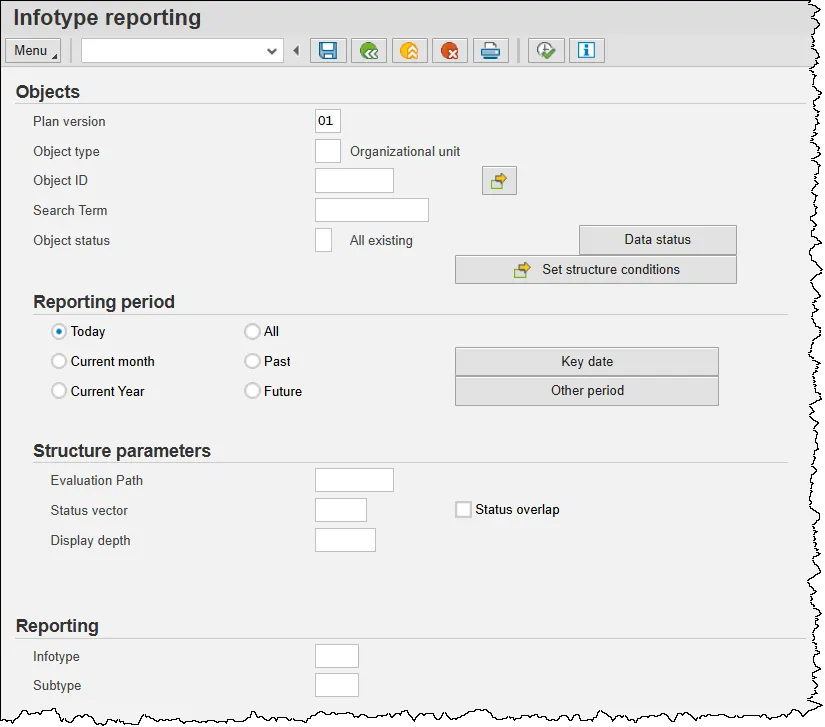
Objects Fields
- Plan Version – Defaults to ‘01’ (Current Plan) and should not be changed.
- Object Type – Defines the type of object that is being reported upon. The most used ones are:
- C – Job
- O – Organizational Unit
- S – Position
- 7A – Agency
- 7B – Branch
- 7D – Division
- 7L – Section with Branches
- 7S – Section without Branches
- Object ID – The 8-digit number that identifies a specific OM Object.
- Search Term – Allows for searching for an object by name rather than by Object ID.
- Object Status – Defaults to ‘All existing’. Can be changed to find data specifically in one of the following statuses:
- 1 – Active
- 2 – Planned
- 3 – Submitted
- 4 – Approved
- 5 – Rejected
Reporting Period
Make selections within the Reporting Period section to filter the report results by date.
Structure Parameters Fields
- Evaluation Path – In organizational reporting, evaluation paths are the key to finding and displaying what you are looking for. Evaluation Paths provide instructions to the programs and user interfaces on which object types are to be included in searches. They use relationships between objects to navigate through the organizational plan and select data along the way for display.
Evaluation paths can be very simple, defined by the relationships between one object and another. For example, an evaluation path may simply show the positions that are assigned to an organizational unit. In this case, the singular relationship between these two objects may be all that is needed to find the link and display the two object types. However, evaluation paths can also be quite complex, using multiple objects and relationships to connect the dots along the way. - Status Vector – The Status Vector and Status overlap fields are used in conjunction with one another. Because organizational plan data may be created in multiple status values, it can be useful to narrow down reporting to only the active status (value 01) for reporting an actual data in productive use, or on another status value (for example 02 for planned) for reporting on proposed data.
- Display Depth – The display depth for the structure determines how much data is displayed in the report results. Many enterprise structures can contain significant levels in the organization. In situations where you may want to only display the highest levels of the organization, the parameter is very useful. The report of program processes all data in the organizational plan; however, only the number of levels of data specified in this field are actually shown.
Reporting Fields
- Infotype – Data can be input to filter results to one specific infotype within the object being reported upon.
- Subtype – Data can be input to filter results to one specific infotype and subtype combination within the object being reported upon.