Purpose
The purpose of this job aid is to explain how to change a date on an employee’s record to accurately reflect their career with the State. The date specification is changed on an employee's record and is processed via transaction code PA30. Always use COPY to keep a record of the historical date specifications.
The Date Specification
- Stores date types that are used by Time Evaluation and date types that are relevant for other HR functions.
- Usually maintained within an Action or via PA30.
Date Specifications
- 01 – Original Hire Date
- 02 – Agency Hire Date
- 03 – Last Day Worked
- 04 – Judicial Anniversary Date (specific Judicial employees)
- 06 – Notification of RIF
- 07 – Lottery Anniversary Date
- NR – 457 Catch-Up Date
- BF – Benefit Elig Date
- 08 – Supplemental Hire Date
01 – Original Hire Date - An employee's Original Hire Date will represent the date the employee was first hired by the State. This date will remain the same throughout the employee's State career and should not be changed.
02 – Agency Hire Date - An employee's Agency Hire Date is initially set to the employee's hire date. This date type is maintained when an employee is reinstated following a leave of absence or transfers from one State agency to another State agency. If an employee is hired at Judicial or North Carolina Education Lottery (NCEL), then the following date types are also maintained to track agency specific service.
03 – Last Day Worked – represents the employee’s final day of work prior to a separation from the State.
04 – Judicial Anniversary Date – represents the date an employee is hired into or transfers to Judicial specific jobs. The anniversary date will be used to manage agency-specific service.
06 – Notification of RIF – The date an employee is officially notified that his/her current position will no longer be available. This date also represents the beginning of the 12-month period of RIF eligibility and benefits.
07 – Lottery Anniversary Date – represents the date on which an employee is hired or transfers to NCEL. The anniversary date will be used to accrue an employee’s personal leave days each year and to manage agency- specific service.
08 – Supplemental Hire Date – represents the date the Supplemental Staff was hired or reinstated.
NR – 457 Catch-Up Date – An employee’s normal retirement date represents the date at which the employee will turn 65 and is thus eligible for additional contributions into his or her 457 Savings Plan. Date type NR will be created only if an employee is eligible and requests to make additional 457 contributions. (Created by BEST Benefits Only)
BF – Benefit Elig Date – The first time the employee is hired as a Perm/Prob/TmLtd (01) or Temp (08) for those groups are truly when an employee potentially becomes eligible for benefits.
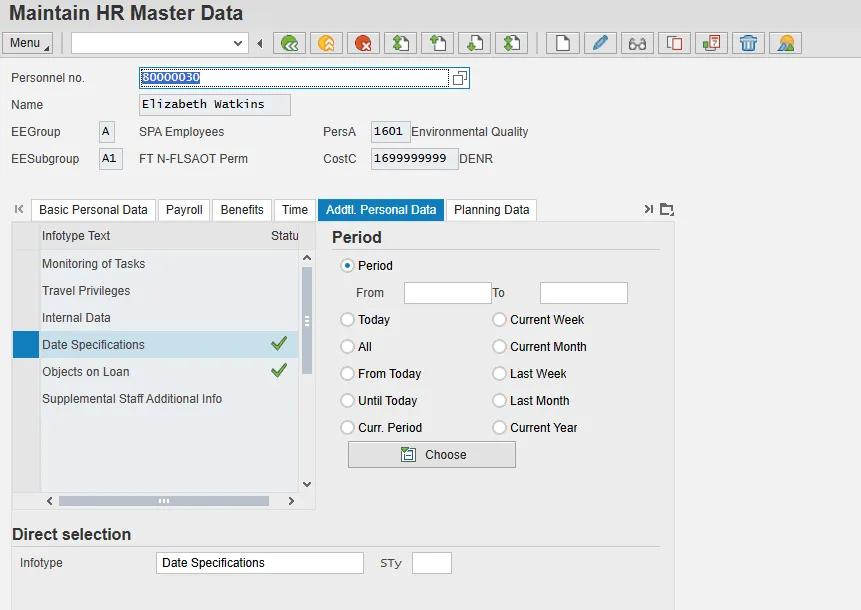
There are 7 steps to complete this process.
Step 1: Highlight Date Specifications or Enter 0041 in the Infotype field.
Step 2: Click the Copy button.
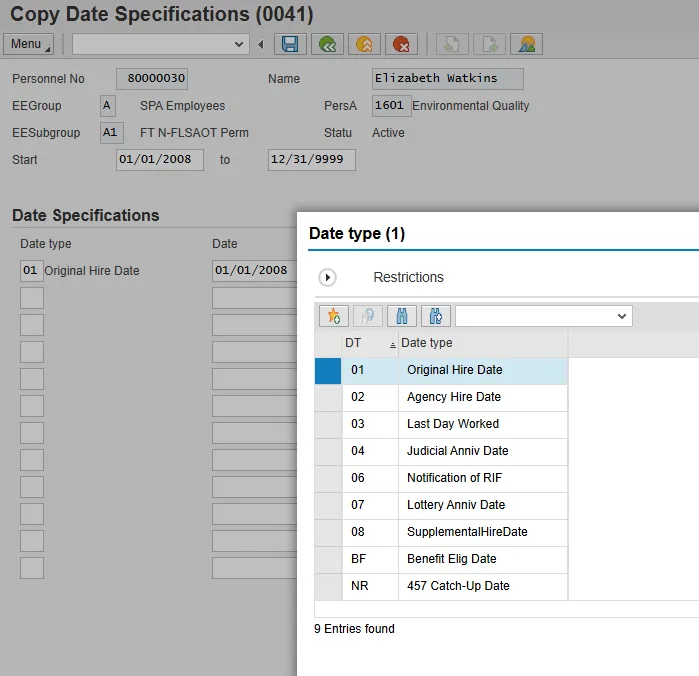
Step 3: Enter the Start date.
Step 4: Choose appropriate Date type.
Step 5: Click the Enter button.
Step 6: Click the Save (Ctrl+S) button.
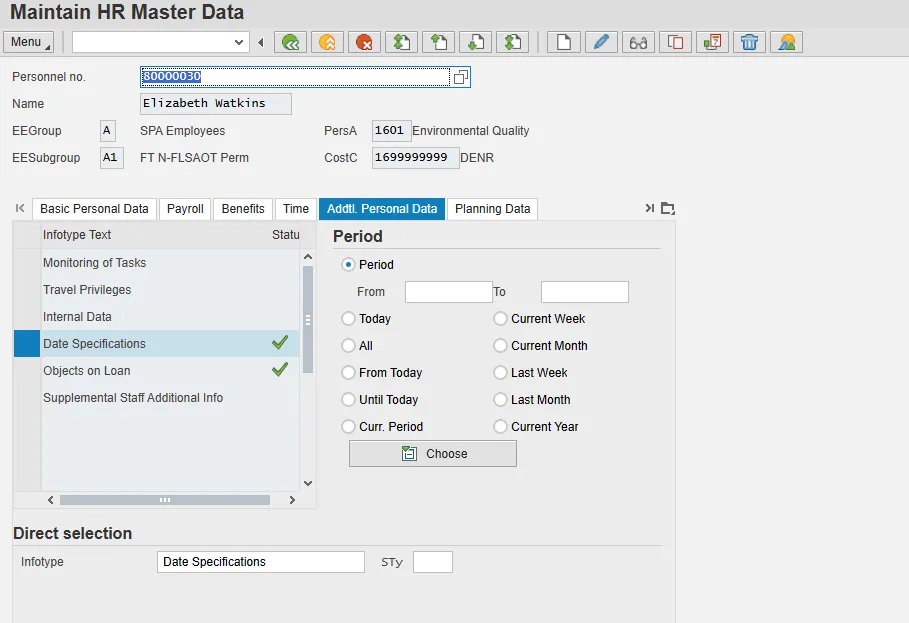
Step 7: Click the Back (F3) button.
Dynamic
| Action | Defaulted Dates Types (Agency may change date based on OSHR/Agency Policy/Guidelines) |
|---|---|
| Z0 - New Hire | 01 – Original Hire Date |
| Z7 - Non-Beacon to Beacon | 02 – Agency Hire Date |
| ZS – Adjusted Hire Date |
04 – Judicial Anniv Date (for specific Judicial Jobs) BF – Benefit Eligible Date |
| ZG - Separation |
03 – Last Day Worked (defaults date from PCR) BF – Benefit Eligible Date |
| Z2 – Reinstatement/Reemployment (from LOA) | Copies existing date types with effective date of action. Agency can change date types if required. |
| Z2 – Reinstatement/Reemployment (from Separation) |
01 – Original Hire Date (does not change) 02 – Agency Hire Date 04 – Judicial Anniv Date (for specific Judicial Jobs) 07 – Lottery Anniv Date (All of Lottery except Temps) - Remove BF – Benefit Eligible Date (does not change) |
| Z8 – Transfer (within Agency) | Copies existing date types with effective date of action. Agency can change date types if required. |
| Z8 – Transfer (Agency to Agency) |
01 – Original Hire Date (does not change) 02 – Agency Hire Date 04 – Judicial Anniv Date (for specific Judicial Jobs) BF – Benefit Eligible Date (does not change) |
| Z8 – Transfer (Temp to Perm) |
01 – Original Hire Date (does not change) 02 – Agency Hire Date 04 – Judicial Anniv Date (for specific Judicial Jobs) BF – Benefit Eligible Date |
Action Change on Date Specifications
Supplemental Staff
| Z0 – New Hire |
08 – Supplemental Hire Date BF – Benefit Elig Date |
| Z2 – Reinstatement – Return to Supplemental |
08 – Supplemental Hire Date BF – Benefit Elig Date |
| Z8 – Transfer – Perm to Temp |
08 – Supplemental Hire Date BF – Benefit Elig Date |
Note: IT0041 was created November 1, 2013 for all Supplemental Staff.
Critical! Use caution when adjusting the validity dates of the copied record. If the validity dates are set to dates in the past, then the dates will be used in any retro-calculations triggered by Time Evaluation. If the only change to the record involves adding another date type, then use the current date as the new validity From date and 12/31/9999 as the new validity To date.