Purpose
The purpose of this job aid is to suggest a standard payroll financial reconciliation process to compare three separate reports which should all have the same total payroll expense amounts:
- The payroll expense amount by budget code per the North Carolina Financial System (NCFS),
- The amount posted by agency and budget code in the general ledger (NCAS as shown in XPTR), and
- The total payroll expense by Business Area processed by the Integrated HR-Payroll System as shown in ZFIR018.
Use of the recommended Integrated HR-Payroll System ZFIR018 report along with NCFS and NCAS data will allow agencies to view and reconcile the payroll cash amount requisitioned by OSC as shown in NCFS; to the agency posted payroll expense as shown in the NCAS general ledger; to the total payroll expense processed by the Integrated HR-Payroll System.
The goal is for each agency to create and document a process that allows them to detect, research, and correct payroll related cash discrepancies.
In the Integrated HR-Payroll system, it is advisable for the person(s) responsible for the financial payroll reconciliation process to have access to needed payroll, financial, and human resources information – within Segregation of Duties constraints. There are two options for making this data available to the reviewer: allow security access for the reviewer to create reports from all three of the functional areas (payroll, finance, and human resources) or have representatives from these areas provide the reviewer with the data. Each agency will need to decide how to approach this requirement.
Step One – Compare NCAS CMCS Requisition Amount by Agency and Budget Code to NCFS
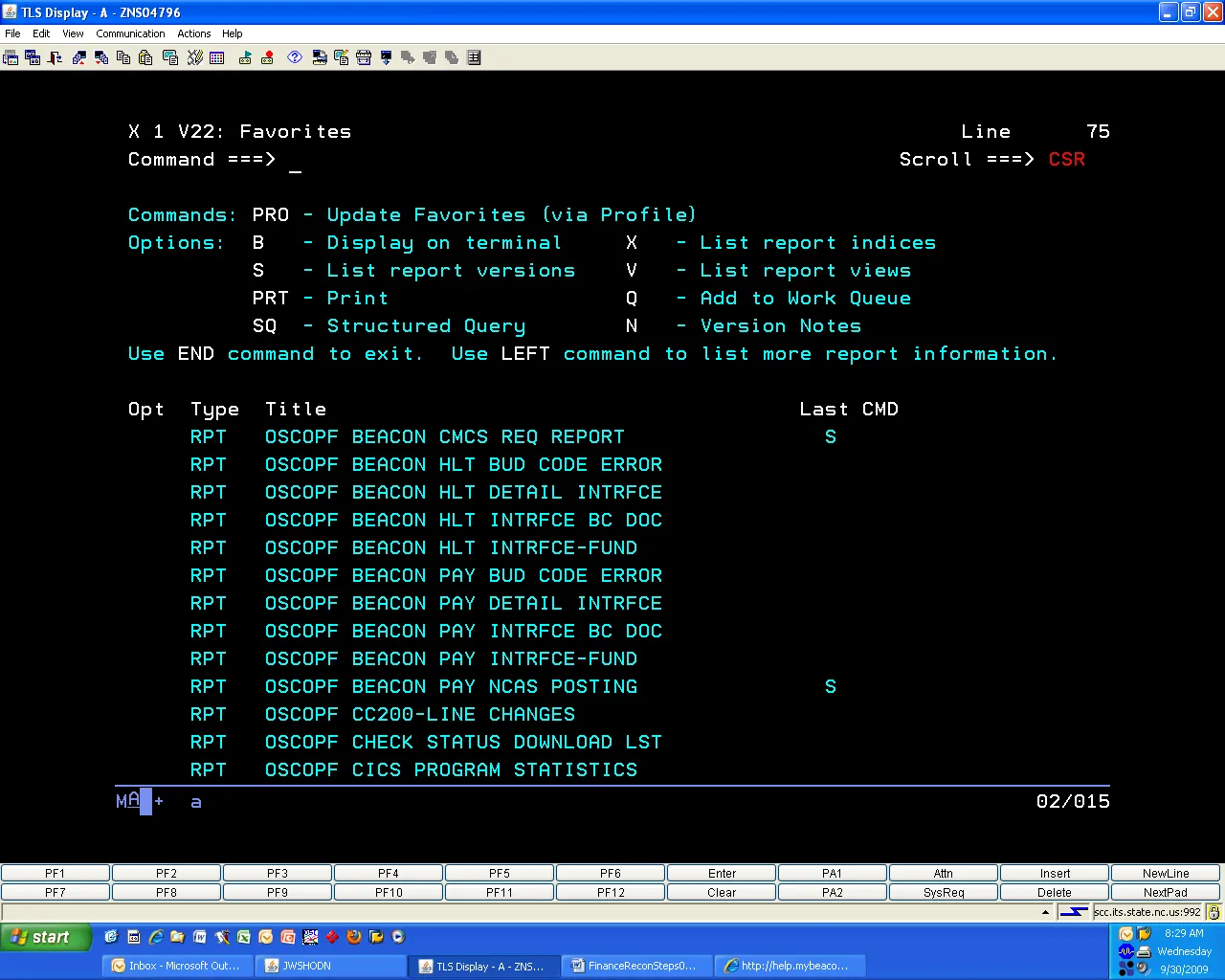
The reviewer should look daily for the report OSCOPx BEACON CMCS REQ REPORT to determine if there has been a cash requisition request generated by the Integrated HR-Payroll System payroll expense posting. If there has been a posting, then compare the NCAS amount to the amount(s) shown on FBR Daily Disbursements (Requisition) Report.
A daily check of XPTR is necessary because in addition to the published monthly and biweekly payroll calendar pay dates, the Integrated HR-Payroll System runs off cycle payroll postings. After a payroll run is processed, NCFS generates a requisition for the amount of agency dollars necessary to pay OSC for the agency expense generated in the payroll run(s). The FBR Daily Disbursement (Requisition) Report summarizes the payroll expense totals by budget code. A good practice is to add all the agency budget code amounts together to calculate the total agency payroll expense due to OSC.
The OSCOPx BEACON CMCS REQ REPORT summarizes payroll expense data first by agency and next by each budget code within that agency. The date of the NCAS reports will be the date the NCFS requisition is posted.
It is recommended that the first reconciliation of NCAS to NCFS is made at the total agency expense level and the next reconciliation made at the budget code levels.
Several reports that are additional detailed data sorts of the same information as OSCOPx BEACON CMCS REQ REPORT are described at the end of this document. These reports show all account and center detail for the entries that make up the total requisition amount.
Step Two – Compare NCFS Requisition Amounts to NCAS
OSCOPX BEACON PAY NCAS POSTING - REPORT OF CURRENT PAYROLL POSTING TRANSACTIONS
Reviewers should run this report to show NCAS payroll totals by Budget Code and to view entries that are headed for the suspense account if no corrective action was taken prior to payroll finalization. If data errors are shown as suspense entries, then there is a difference between the SAP and NCAS accounting treatment for that particular entry. If no action is taken, the entry will remain in the suspense account. Error text is from the GL820-1 GL/FICS REPORTS and will be familiar to those with Batch Proof analysis experience.
The reviewer needs to determine if the proper next step is to make a journal entry correction to NCAS; validate an account/center combination in NCAS; update other NCAS data; or to correct Integrated HR-Payroll System funding information.
The report OSCOPx BEACON HLT BUD CODE ERROR and OSCOPx BEACON PAY BUD CODE ERROR will list inconsistencies between SAP and NCAS also. This report is generated only if an inconsistency exists; therefore, the production of this report is intermittent.
Some common causes and resolutions for error descriptions are below:
- INVALID ACCT DIST (Center not found) – funding approver needs to create cost distribution in the Integrated HR-Payroll System using transaction PO13.
- INVALID BUDGET CODE – most likely cause is an incorrect internal order that does not correspond to the SAP fund/center that has been selected by the agency; correction is for the funding approver to update the cost distribution in the Integrated HR-Payroll System using transaction PO13.
Also, reviewers can use the BI149 report to find NCAS vs BEACON SAP account and funding discrepancies.
Step Three – Compare NCFS Requisition Amounts to ZFIR018
Use the Integrated HR-Payroll System transaction ZFIR018 to view the agency posted payroll expense by Business Area, SAP Account Number, Cost Center, Internal Order, Employee, etc. The total report amount by Business Area should match:
- The NCFS Requisition amount (sum of all agency Budget Codes in Step One)
- The NCAS Account Summary (2xxxxx liability accounts in Step Two)
- The NCAS Account Line Item detail (53xxxx expense accounts in Step Two)
If there are any discrepancies between these amounts, the reviewer should create a ticket with BEST.
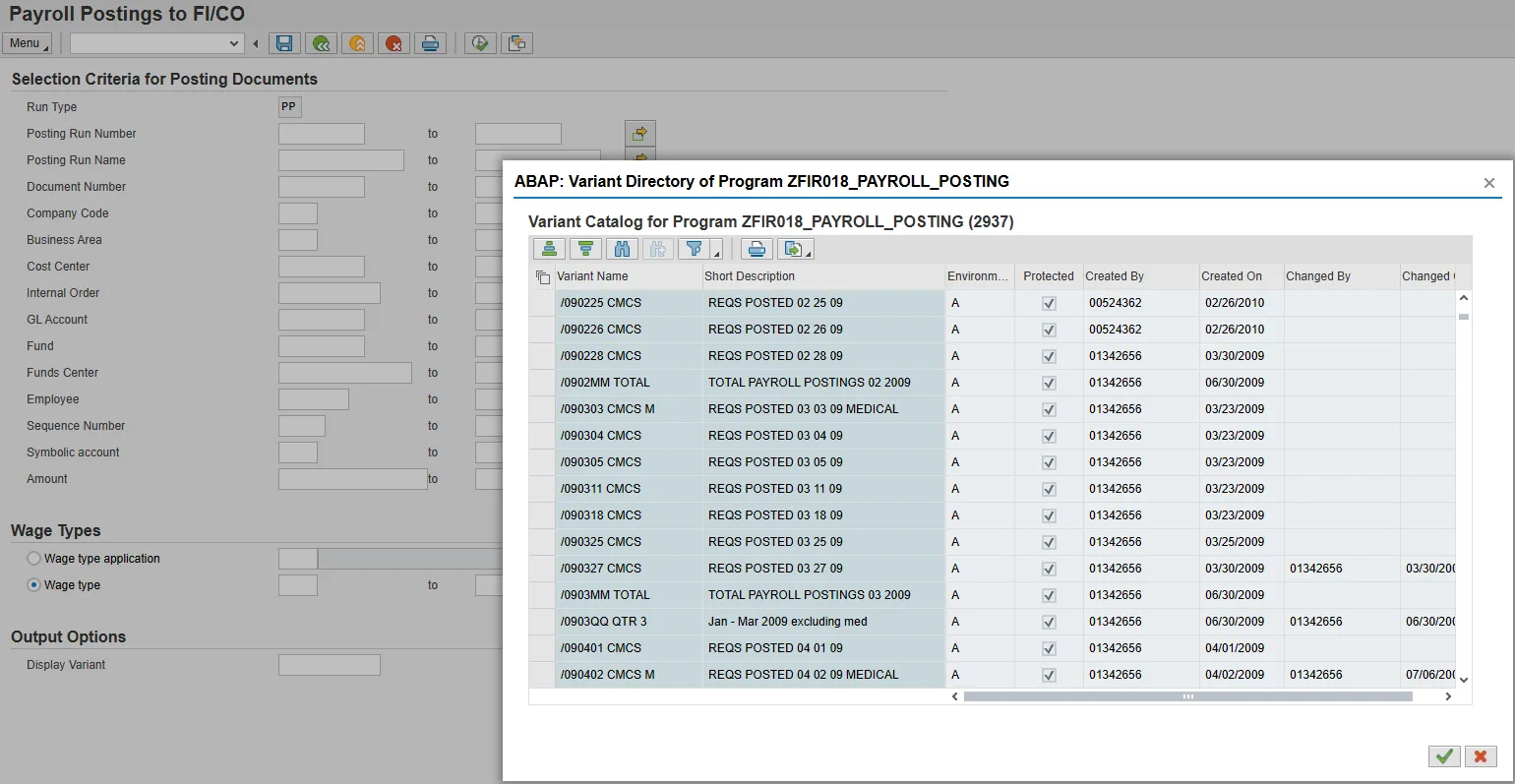
Variants for all payroll posting runs are created after each payroll for agency use. The variants are named to match the day the requisitions post in NCFS. The variants contain the payroll run numbers for the posting entries for that day. After selecting the variant, the agency will need to key in the required fields for their own agency business area, cost center, etc. for what they wish to see. Placing XX* (XX is the agency identifier) in the Fund field will show total agency expenditures for that date and must tie to the total requisitions in NCFS for that payroll, and the total posted to NCAS.
Variants are set up for each payroll run, including off cycle runs. Variants also exist for: Monthly amounts that contain all payroll expenses (excluding health benefits) that have posted during the month; Health benefits (medical) that post at the first of each month; Quarterly amounts with all payroll expenses excluding health benefits; Quarterly for just Health benefits; and a Fiscal Year annual. Names are:
| /090731 CMCS | REQS POSTED 07 31 09 | (Payroll posting) |
| /0907MM TOTAL | TOTAL PAYROLL POSTINGS 07 2009 | (Monthly posting) |
| /090804 CMCS M | REQS POSTED 08 04 09 MEDICAL | (Health Insurance posting) |
| /0906QQ QTR 4 | Apr - June 2009 excluding med | (Quarterly excluding medical) |
| /0906QQ QTR 4M | Apr - June 2009 Medical | (Quarterly medical) |
| /0906YY FY8-9 | FY 7/08- 6/09 Excludes Medical | (FY Annual excluding medical) |
| /0906YY FY8-9M | FY 7/08- 6/09 MEDICAL | (FY Annual medical) |
The naming convention shows variants in the order created. If desired, the user can click on the sort in descending order button to bring the most recent variant (by year) to the top of the list.
Reminder- Posting of the health benefits in the Integrated HR-Payroll System occurs on the same day as the payroll posting date but the health benefit entries (account 53156x) are future dated to the next month in NCAS. This is the reason for setting up separate variants for each. The payroll runs must match to the date in NCAS, not the actual Integrated HR-Payroll System pay date.
Important Note: If there is a ZFIR entry for Fund xx9999999 or Cost Center xx99999999– these will not post to an NCAS account and will be sent to the agency suspense account. The agency must determine the method needed to create a valid cost distribution in the Integrated HR-Payroll System that will post to NCAS. If the employee is active, the transaction PO13 “Cost Distribution” line should be updated; if the employee has separated, the transaction PA30, infotype 0027 must be created to reflect a valid cost distribution. If not corrected prior to payroll finalization, these expenses will post to the suspense account and need to be corrected through a manual journal voucher entry in NCAS.
Integrated HR-Payroll System/CMCS Requisition Detail Reports:
After learning the payroll expense budget code amounts directly from NCFS, view the additional account line item detail information in the XPTR report named “OSCOPx BEACON CMCS REQ REPORT.”
OSCOPx BEACON HLT DETAIL INTRFCE and OSCOPx BEACON HLT INTRFCE-FUND should be viewed jointly with both agency total and budget code subtotals in mind.
OSCOPx BEACON HLT DETAIL INTRFCE - The liability account 211930 will be the total agency expense for the monthly State Health Plan invoice. The sum of the expense accounts 53156x will show the detail by center.
OSCOPx BEACON HLT INTRFCE-FUND - Shows only the expense accounts; amounts are by budget code, subtotaled by fund. Information shown is much less detail than the report above.
The related pair of reports OSCOPx BEACON PAY DETAIL INTRFCE and OSCOPx BEACON PAY INTRFCE-FUND is organized in the same fashion.
OSCOPx BEACON HLT INTRFCE BC DOC - Account document detail in the state health plan interface file
OSCOPx BEACON PAY INTRFCE BC DOC - Account document detail in the payroll interface file
Both of these reports are grouped by the Budgetary Control Document IDs that contain the account line item entries posted to the ledger.
The account line item detail from all the above NCAS XPTR reports should be compared to the expense amounts posted to NCFS as well as Integrated HR-Payroll System reports. Note that the date of these: OSCOPx BEACON PAY BUD CODE ERROR and OSCOPx BEACON HLT BUD CODE ERROR reports will be a day earlier than the corresponding NCFS requisition is posted. All of these reports show both the liability accounts 211240 for payroll expense and 211930 for the state health plan expense as well as the 53xxxx expense account line items.
See below for a screen shot of ZFIR018 and a sample of variant selections:
See below for an XPTR screen shot of System related reports (P region shown):