Purpose
The purpose of this job aid is to define the terms and concepts related to quota management of time/leave entries in the Integrated HR/Payroll System.
Quota management is the task that involves time/leave entries into Integrated HR/Payroll System and the resulting entitlements. Some of the terms and definitions you may see are as follows:
- Quota – A balance reflecting an employee’s entitlement for Leave
- Quota Type – 2-digit code in SAP that indicates the type of quota. eg., sick (15), holiday comp time (22)
- Cross Application Time Sheet (CATS) – Acronym in SAP for the time sheet used by Time Administrators to enter or correct time
- Attendance/Absence Type (A/A Type) – A code that reflects the nature of an employee’s absence or attendance. Absence codes are for time off – sick, vacation, bonus, etc. Attendance codes reflect time worked - regular work, make up time, etc.
- Positive Time or Negative Time – Describes the requirement to enter all time worked and leave taken (Positive time) or to record exceptions from their normal work schedule only (Negative time)
- Time Evaluation – The Nightly Time Evaluation run processes time rules and readies approved time for use for Payroll processing.
Some of the more common quota types are listed below (this is not a comprehensive list):
| Quota Type | Quota Text |
|---|---|
| 10 | Vacation Leave |
| 05 | Sick Leave |
| 20 | Overtime Comp Time |
| 21 | Gap Hrs Comp Time |
| 22 | Holiday Comp Time |
| 23 | Callback Comp Time |
| 24 | Travel Compensatory Time |
| 26 | On-Call Comp Time |
| 27 | Emergency Closing Comp Time |
| 28 | Communicable Disease Comp Time |
| 29 | Incentive Leave |
| 31 | Advanced Vacation Leave Allowed |
| 32 | Advanced Sick Leave Allowed |
| 40 | Holiday Leave |
| 50 | Bonus Leave |
| 56 | Special Bonus FY2018 |
| 57 | Special Bonus FY19-20 |
| 61 | Adv weather # hours owed |
| 65 | Community Service Leave |
| 66 | Community Service - Tutoring |
| 67 | Literacy Volunteer Leave |
| 71 | Personal Observance Leave |
| 80 | Received Shared Leave |
| 85 | Military Leave (Training) |
Leave
Leave Hierarchy
All absences recorded as ‘9000 - Approved Leave’ will be subject to the Vacation Leave Hierarchy.
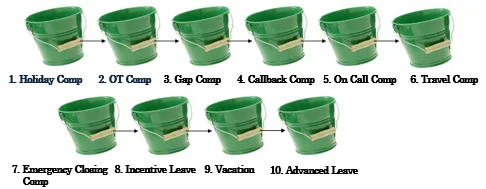
The Leave Hierarchy reflects the order in which leave balances will be deducted when an entry for an Approved Leave Absence is approved and transferred at night. At the point of entry, the quotas are checked in succession until enough quota is found to cover the recorded absence. The system will return a message ‘no quota available’ if it has checked each bucket and not found a balance to cover the absence.
The quotas will be deducted automatically in this order:
- Holiday Comp
- OT Comp
- Gap Comp
- Callback Comp
- On-Call Comp
- Travel Comp
- Emergency Closing Comp
- Incentive Leave
- Vacation
- Advanced Leave
For more information about OSHR Leave policies, please refer to the OSHR website.
The Sick Leave Hierarchy represents the order in which the system will deduct quotas when an entry of 9200 is recorded.
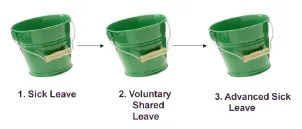
Like the Approved Leave Hierarchy, the quotas are checked at the point of entry, and the quotas are deducted when time is approved and transferred.
Positive vs. Negative Time
It is important to recognize the distinction between actual and exception pay and positive vs. negative time.
- Actual pay – Employee receives pay for time reported only. If no time is reported then no pay is received. Temporaries and NCDOT employees are actual pay.
- Exception pay – Employee receives full pay unless Leave Without Pay is reported.
- Positive time reporting – Always applies to employees subject to Fair Labor Standards Act (FLSA). All time must be reported.
- Negative time reporting – Can apply only to employees who are exempt from FLSA. Only exceptions have to be reported.
- Note: Exempt employees can be set as Positive time reporting. This may be necessary to maintain a consistent agency-wide time reporting structure.
Leave Offsetting
THE RULE:
Leave is to be used to cover the gap between hours worked and the minimum expected work hours.
Entries made for Leave with a quota in excess of the minimum required work hours for the overtime period will result in an extra accrual to the employee’s leave quota, equal to the excess amount. For excess leave without a quota, the excess reported hours are simply ignored.
For more information about the offsetting policy consult the OSHR Leave policies.
The following three leave types will not be offset -- Holiday, Civil and Other Management Approved Leave.
Leave restoration will be first taken, first restored. If a weekly employee takes Approved Leave on Monday, and then a day of Sick Leave on Tuesday, and then works an extra eight hours on Wednesday, the Approved Leave from Monday will be the first to be restored.
Note: Leave Offsetting is done within an Overtime (OT) period. For normal, 40-hour, personnel, Leave Offsetting will be done within the 7-day OT period. For 28-day employees, leave offsetting will be done within the 28-day overtime period.
Holiday Leave
Positive Time Employees:
- Will see holiday leave appear in their quotas 30 days prior to the holiday.
- May take the holiday from that date forward up until 30 days after the holiday.
- May observe the holiday on the day it naturally occurs. This 60-day holiday period is designed to provide flexibility for agencies with 24x7 operations.
- If the holiday falls on a regularly scheduled workday and the employee is off, the employee should record 9300, Holiday Leave.
- If the employee works on the Holiday, the employee will record work hours, will receive equal time off, up to eight hours, and the relevant holiday premium pay. The unused Holiday Leave (9300) will be converted to Holiday Comp Time through Time Evaluation.
- If the holiday falls on a non-scheduled workday, the employee can record their holiday leave (9300) on another scheduled work day, an absence they should arrange with their supervisor.
Non-FLSA Subject employees who record exceptions only:
- The only exception for these employees is if they WORK on the holiday. Otherwise, it will be assumed that they had the benefit of the holiday.
Some agencies allow the employees who normally work 4x10 to work a 5x8 schedule in the week of a holiday. This will not require a change to the employee’s work schedule.
Quota Accruals
Who, When, and What
THE RULE:
An employee will accrue their leave when they have achieved 50% of their payroll period.
- Employees who are Positive Time must demonstrate that achievement by recording time.
- Employees who record only their exceptions (Negative Time) will receive their accruals based on their planned Working Time.
NOTE: The Integrated HR/Payroll System recommends weekly time entry to ensure timely and accurate accruals. Agencies adopting monthly entry deadlines for their Positive Time Recording population will see a delay in the monthly accruals.
Who accrues?
- Employees with an employer/employee non-temporary relationship with the State.
When do Employees Accrue?
- Positive time employees must record time worked or leave for 50% of their scheduled work days in the pay period to accrue in that period.
- The accrual date depends on the number of work days, as derived from the employee’s work schedule.
- Employees with intermittent LWOP could conceivably accrue later in the month.
What counts for accrual?
- Any approved entry that puts the employee in a pay status for that day will count towards the 50% achievement.
What do they accrue? - Hours and minutes, in decimals.
What is prorated?
- Annual Leave and Sick Leave are prorated for part-time employees. Community Service leave is prorated for new hires starting after mid-January.
NOTE: Only time entries that place the employee in a pay status are counted toward achievement of 50%. Any entry for Leave without pay (LWOP – A/A type 9400) will delay the accrual of leave until the employee meets 50% of the period in a pay status.
Quotas – Recording Leave
- Employees accrue leave when the time has been earned based on approved timesheet entries. Leave may not be taken before it is earned. Time must be entered, approved and evaluated before the accrual will be done.
- Leave earned on the 15th may not be applied to an absence on the 10th.
- Quotas cannot be negative. Employees and Time Administrators cannot record more leave than the employee has available on that date.
- Leave Administrators have the responsibility to research Quota problems and make appropriate adjustments.
NOTE: It is within the agency’s discretion to permit a Leave Administrator to adjust the validity date or deduction date. This would be unusual but can be done. It is not standard practice.
Advanced Leave
Agencies can elect to Advance leave in accordance with OSHR Policy. Typically this is rare and for a specific purpose, not vague or casual. A Leave Administrator, with management approval, would create an Advanced Leave Quota for the hours awarded.
The Advanced Leave Quota will be consumed when the employee records an absence that deducts from that Quota.
The system will generate a Liability for the employee based on the hours taken. It will recover future accruals towards that liability until it is satisfied.
Advanced Leave is subject to the limits in the OSHR Policy manual.
- As leave is accrued, it will be used to satisfy an outstanding Advanced Leave liability of the same type (i.e., vacation accruals will be used to pay back vacation advances).
- If an employee has an outstanding Advanced Leave liability and works extra hours, the extra hours will be used to pay back the liability until it has been satisfied.
The recovery of liabilities is reflected on the Time Statement.
Adverse Weather
- Absence due to adverse weather is entered using the Adverse Weather Leave A/A type – 9545.
- During Time Evaluation, this A/A type will cause the creation of an adverse weather liability.
- During subsequent Time Evaluation, the system will check for the Adverse Weather Make-up A/A type – 9512 as well as regular hours worked in excess of the required minimum hours.
- The adverse weather liability will be reduced accordingly when either is present.
Quota Overview Snapshot
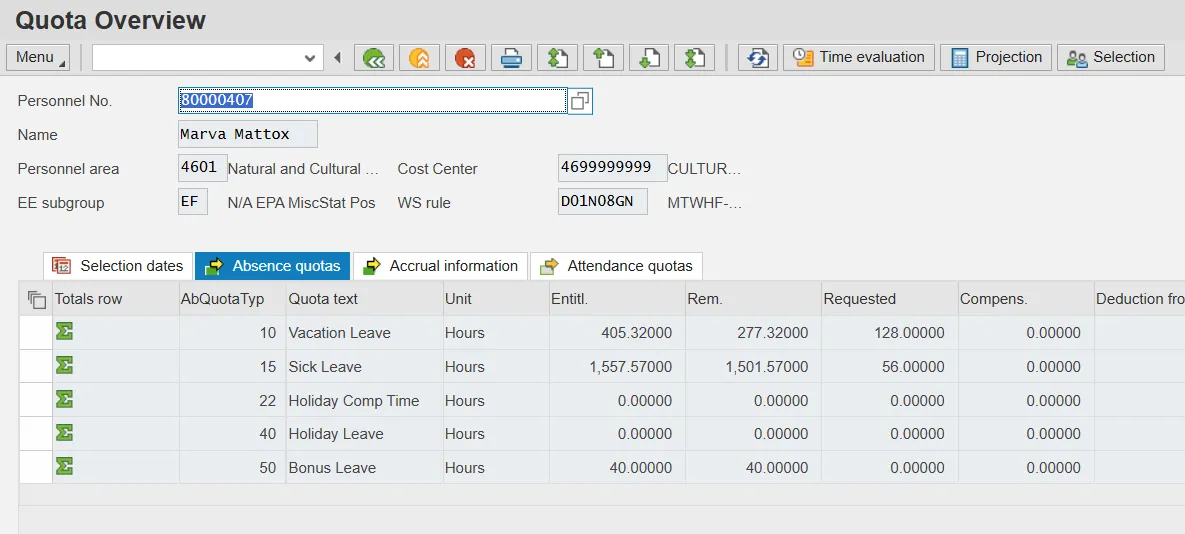
The Quota Overview (PT50) transaction has several key tabs:
- Selection dates – tab allows user to choose the period of time they wish to view
- Absence quotas – tab shows quota types and their balances (shown above)
- Accrual information – tabs shows accrual information
- Attendance quota tab – not in use at this time
On the Absence quotas tab there are several columns showing key values:
- Entitlement – what is added to the quota balance through accruals, offsets, or adjustments during the display period
- Remaining – hours left for use by employee
- Requested – hours deducted
On the Accrual Information tab:
- Generated – calculated by the system and ready to be moved into employee’s quotas during next Time Evaluation
- Transferred – moved into employee’s quota and available for use
Quota Adjustments
Quota adjustments can be used to:
- Correct quota errors
- Advance leave
- Convert Community Service Leave to Community Service Leave Tutoring
- Manage Received Shared Leave donations and returns
Quota adjustments are done by selecting the Quota subtype and then entering the number of hours.
Use transaction – Maintain Time Data - PA61 to make quota adjustments. TM-50 PA61 Quota Adjustments is available as a resource for this process on the OSC Training website.
Infotype 2013
- Subtype 10 – Vacation
- Subtype 15 – Sick Leave
- Subtype 31 – Advanced Vacation
- Subtype 32 – Advanced Sick
Note: The list above is a partial list of Quotas. A complete list can be viewed in SAP.
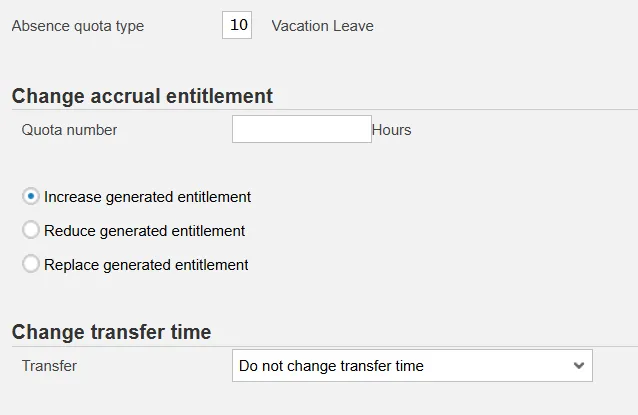
Leave Administrators have the following options that are allowed by the system:
- Increase
- Reduce
- Replace (do not use!)
The Leave Administrator also must choose a transfer option. The recommended selection “Do not change transfer time” ensures the quota adjustment is processed correctly. In the past “Only transfer quota correction immediately” was used for quota adjustments. All existing records with this selection should NOT be changed.
Transfer Immediately means that it will transfer with the next run of Time Evaluation.
The quota balance will reflect the change after Time Evaluation has been run.
Community Service Leave Tutoring Option
Employees accrue 24 hours of Community Service Leave (CSL) annually.
Full time employees may opt to convert their 24 hours of community service leave (CSL) to 36 hours of community service tutoring. This conversion is performed by creating a quota correction to reduce quota 65 to zero hours and another to increase quota 66 to 36 hours.
Tutoring leave should be taken in one-hour increments.
- Employees who elect tutoring must use A/A Type 9565.
- CSL must be used between January 1st and December 31st within the calendar year.
Community Service Leave Literacy Volunteer Option
Employees accrue 24 hours of Community Service Leave (CSL) annually.
Full time employees can opt to convert their 24 hours of community service leave (CSL) to 45 hours of Literacy Volunteer Leave. This conversion is performed by creating a quota correction to reduce quota 65 to zero hours and another to increase quota 67 to 45 hours.
- Employees who elect literacy volunteer leave must use A/A Type 9566.
- Literacy Volunteer Leave must be used between January 1st and December 31st within the calendar year.
Voluntary Shared Leave
The Voluntary Shared Leave (VSL) process is administered with Quota Adjustments.
The process is as follows:
- A Voluntary Shared Leave Event must be established.
- The date of the event should reflect the start date of the employee’s confinement or disability.
- There is no system check for eligibility.
- A Donation must be processed.
- The Recipient must be credited.
Note: BEST Shared Services will manage donations when the Donor and Recipient are in different State agencies.
A Leave Administrator will process leave donations within their agency. Donations are usually Vacation Leave. If the Recipient is related to the Donor, the Donor can elect to donate Sick Leave.
For clarification on who can donate to whom and the limits on the amount of leave that can be donated, refer to the OSHR Policy Manual online.
Detailed work instructions are available on the OSC Training website for the VSL process. Go to Training/Help and search for Voluntary Shared Leave.
Unused leave, in excess of 40 hours, must be returned to ACTIVE employees, on a pro-rated basis at the end of the Shared Leave event. Leave administrators can manage the return of leave to Donors if all Donors are in the Recipient’s agency.
If leave is to be restored to people outside the agency, then the Leave Administrator must contact BEST Shared Services.
The VSL Event must be ended by changing the To date filed in the VSL event.
Quota Troubleshooting
- CATS_DA (Display Working Times): To review employee’s recorded working times and leave usage (minus offsets)
- PA51 (Display Time Data): Used to review service dates and other key time infotypes
- PT50 (Quota Overview): Check balances and accrual details