Purpose
The purpose of this Job Aid is to explain the aging and deduction records contained on Infotype (IT) 9901. The B0202: Comp Time Aging Report and the B0210: Liability Leave Report (both available in BI) are summary level reports of the information provided on the IT9901 records. The IT9901 records can be examined for a specific employee to understand the details of the accrual, deduction, and expiration of aged balances.
IT9901 is a custom infotype designed specifically to track the aging and usage of leave and leave liability balances. IT9901 handles the aging of various compensatory times and holiday entitlements, which are first accrued and later deducted via absences or expirations. IT9901 also handles leave liabilities, which are first incurred and later repaid.
IT9901 has several relevant subtypes:
- 6000 – OT Compensatory Time
- 6005 – Holiday Compensatory Time
- 6010 – On Call Compensatory Time
- 6015 – Holiday Leave Time
- 6020 – Gap Hours Compensatory Time
- 6025 – Callback Compensatory Time
- 6030 – Emergency Closing Compensatory Time
- 6035 – Communicable Disease Compensatory Time
- 7000 – Liability Leave
IT9901 records are viewable via PA20 or PA61 but cannot be manually maintained in these transactions. Time Evaluation is solely responsible for the generation of the IT9901 records.
IT9901 records are best viewed using the Overview functionality for a particular subtype as shown below.
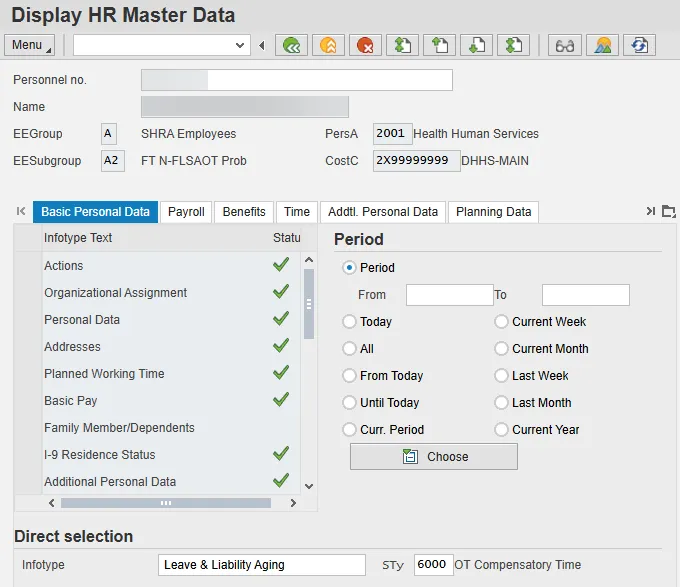
Click the Overview icon.
The Overview displays all the available information for each record.
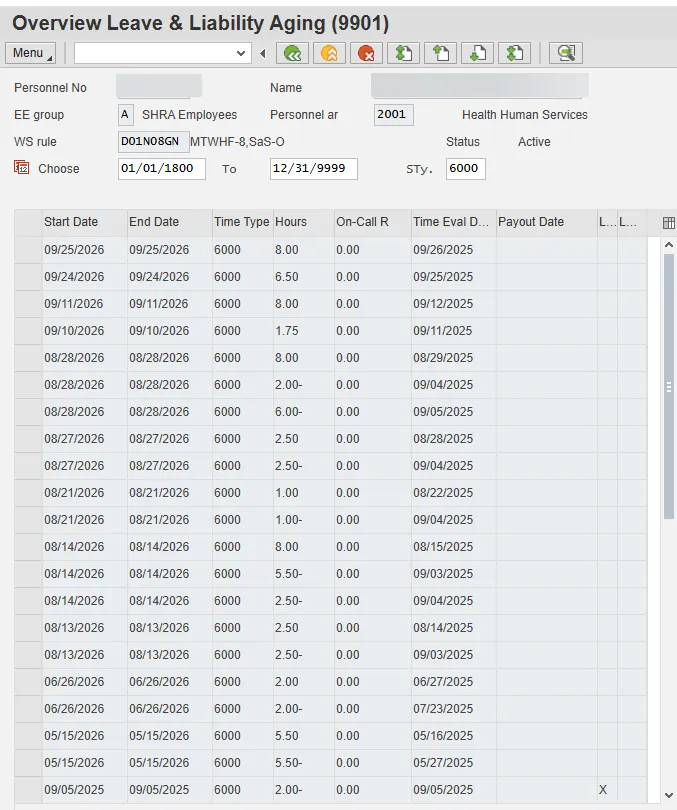
Drilling down to the detail view of each record does not provide any more information than what is shown using the Overview view. For analysis, the best practice is to use the Overview view.
Each line item shown on the overview screen represents an aging record or a deduction to an aging record. The column layout is as follows:
- Start Date & End Date – These dates represent the age out or expiration date for each record. The Start Date and End Date are always the same.
- Time Type – The Time Type column represents the IT9901 subtype for the record. Note that these Time Types are not related to the Time Types generated in Time Evaluation.
- Hours – The Hours column represents the number of hours aged or used for each record.
- On-Call Rate – The On-Call Rate column is populated only for subtype 6010 records (On Call Compensatory Time) and subtype 7000 records (Liability Leave). For subtype 6010 records, this column contains the on-call rate assigned to the employee’s position on the date of the on-call comp accrual. For subtype 7000 records, this column is used to set a special indicator to differentiate between the Adverse Weather Liability and the CDE Care Leave Liability. The special indicator for the Adverse Weather liability is 1.00 and for the CDE Care Leave liability it is 2.00. For all other IT9901 subtypes, this column will show 0.00.
- Time Evaluation Date – The Time Evaluation Date column shows the calendar date in which the record was generated.
- Payout Date – The Payout Date column shows the calendar date in which the record aged out. The age out date represents various quota activities and/or payment depending on the subtype and EE type. For example, the age out date represents the payout date for an aged OT Comp balance for a subject employee. For a non-subject employee, the age out date represents the date that an aged OT Comp balance expires and is no longer available for use. For holiday entitlements, the age out date represents the date an unused holiday entitlement rolls to Holiday Comp.
- Liability – The Liability column (the first “L” column) indicates that an aging record represents a liability. For the compensatory and holiday leave subtypes, records flagged with liabilities signal that an employee has overdrawn his/her available leave with the related time entry or quota adjustment on a particular date.
- Lock indicator – The Lock indicator column (the second “L” column) indicates that the aging record is locked.
In the overview screen, the IT9901 records are listed in chronological order according to Start/End Date (expiration date). By scrolling down, the other IT9901 records are viewable.
OT COMPENSATORY TIME (SUBTYPE 6000)
PREREQUISITES
For an employee to earn and use OT Comp, the employee’s position must be set as eligible for OT Comp and not be flagged for immediate payout. For employees eligible for OT Comp but flagged for immediate payout, any overtime earned is not aged - it is sent directly to Payroll for compensation. For employees eligible for OT Comp who are not eligible for immediate payout, the Comp Aging Limit, as specified on the position setting, is used when generating aging records. For most employees this limit is set to 365 days. Some agencies, however, do use shorter aging limits, such as 30, 60 or 90 days.
OT COMPENSATORY TIME ACCRUAL RECORDS
An OT Comp accrual record is generated when overtime hours are recognized during an employee's overtime period. The aging record is generated on the day in which the employee exceeds the expected hours for the period. The highlighted records below represent accruals for OT Comp.
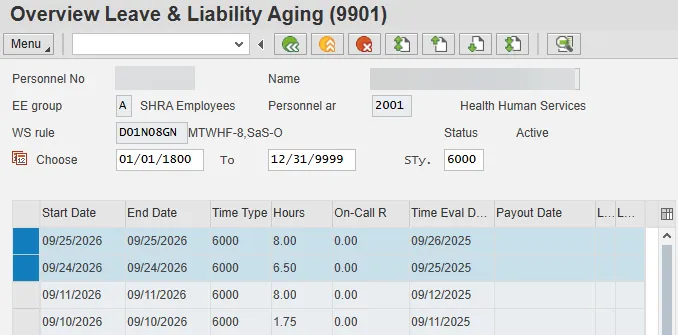
For OT Comp accrual records, the Time Evaluation Date represents the day the overtime hours were earned. The highlighted records above represent 6.5 hours of OT Comp earned on 9/25/2025 and 8.0 hours of OT Comp earned on 9/26/2025. The Start/End Date for OT Comp accrual records represents the specified aging limit applied to the record. In the example, the employee has a 365-day aging limit, so the 6.5 hours earned on 9/25/2025 are set to age out on 9/24/2026, and the 8.0 hours earned on 9/26/2025 are set to age out on 9/25/2026.
An OT Comp accrual record is also generated when an IT2013 (Quota Corrections) is created to increase an employee’s OT Comp quota.
OT COMPENSATORY TIME DEDUCTION RECORDS
OT Comp deduction records are generated when an absence deducts from OT Comp. The highlighted record below represents an OT Comp deduction record.
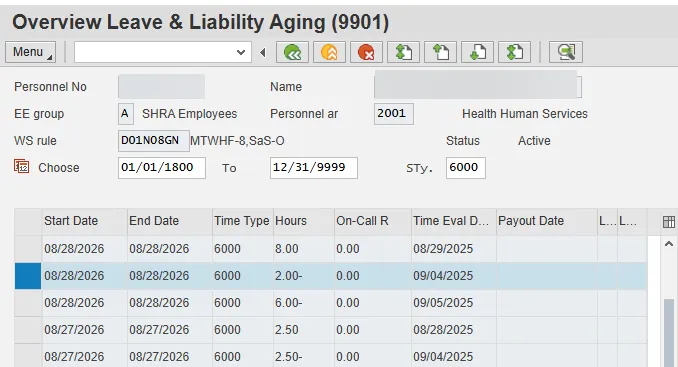
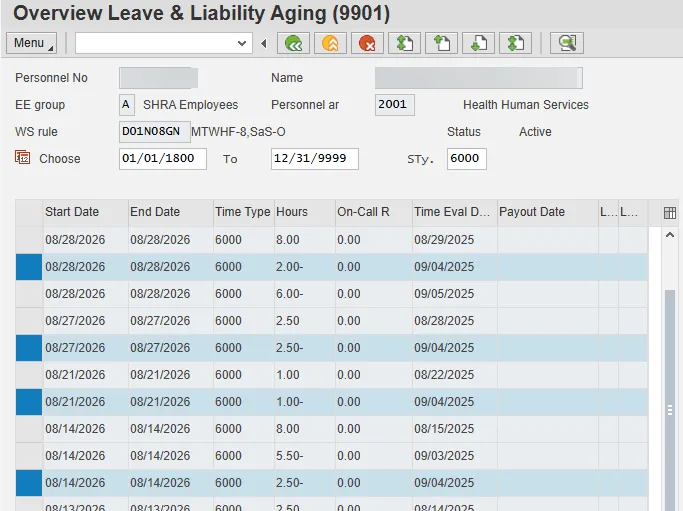
Deduction records are characterized by a negative Hours value. The Time Evaluation Date represents the absence date in which the employee consumed the quota. The highlighted record above represents two hours of OT Comp used on 9/4/2025. When a quota deduction is processed, it is applied against the oldest aging record available that has not yet expired or been consumed. The Start/End Date of a deduction record will match the aging record for the entitlement consumed. In the above example, the Start/End Date is 8/28/2026, indicating that the OT Comp quota deducted on 9/4/2025 consumed an accrual set to age out on 8/28/2026.
In some cases, a single day’s absence can consume multiple aging records. In further review of the absence keyed on 9/4/2025 in the above example, the employee used a total of 8.0 hours of OT Comp on that day (see below) which resulted in four separate aging records being reduced. An identical Time Evaluation Date for the highlighted deduction records indicates that a total of 8.0 hours of OT Comp was consumed on 9/4/2025. This 8.0 hour absence was applied against aging records set to age out on various dates in August 2026.
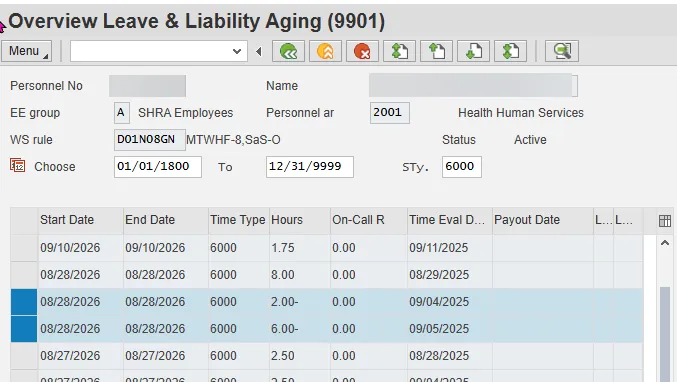
An alternative way to view deduction records is to view the deductions applied against an aging record. The highlighted record below shows that 2.0 hours from a 9/4/2025 absence were deducted from an 8/28/2026 aging record and an absence on 9/5/2025 was also deducted from this aging record. The total of these two deductions is 8.0 hours, which corresponds to the value of the related accrual record.
OT Comp deduction records are also generated when an IT2013 (Quota Corrections) is created to decrease an employee’s OT Comp quota or when an IT0416 (Time Quota Compensation) is created to pay out unused leave at separation.
EXPIRING AN OT COMPENSATORY TIME RECORD
If an aging record is not consumed prior to the age out date, the remaining balance of the accrual record is expired. When a record expires, a date is populated in the Payout Date column. This date will always match the Start/End Date of the original accrual record. The highlighted records below represent an expiring accrual. Only 2.0 hours of the original 7.25 hour accrual have been consumed prior to the age out date of 4/7/2023. Thus, on 4/7/2023, the remaining 5.25 hours are expired as indicated by the line item with the 4/7/2023 payout date.
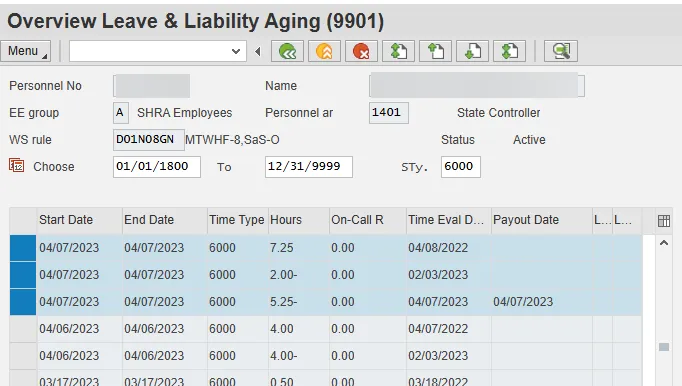
When OT Comp records expire, the outcome of the expiration is dependent on the FLSA status of the employee. For subject employees, the hours that expire are removed from the quota bucket and sent to Payroll for compensation. For non-subject employees, the hours that expire are simply removed from the quota bucket.
LIABILITY OT COMP RECORDS
Scenarios can exist where an employee's OT Comp balance drops below zero. These scenarios represent liability situations. On the IT9901 records, a liability situation is represented when the Liability flag is tagged to an IT9901 record. The liability flag is an 'X' in the first 'L' column, as shown below. For liability records, the Time Evaluation Date represents the date on which the employee drops below zero for OT Comp. The Start/End Date of a liability record is the same as the Time Evaluation Date. Finally, the Hours column will show the hours that the employee overdrew. In the example below, the employee used 8.0 hours of OT Comp on 11/10/2025 when there was no remaining entitlement for OT Comp.
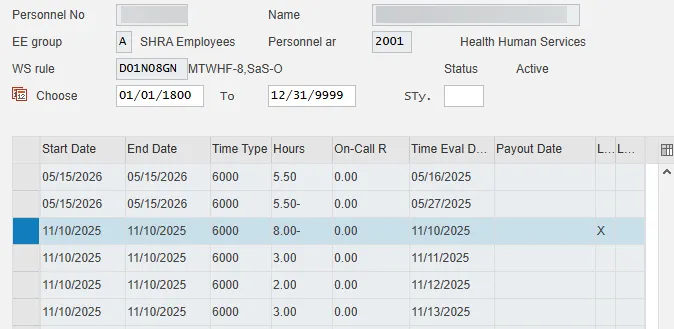
In OT Comp liability situations, the employee's next accrual will not generate a normal aging record. Instead, the accrual will be used to repay the liability. As shown below, the employee from the example above earns 3.0 hours OT Comp on 11/11/2025.
Those hours generate an IT9901 record that repays a portion of the original 8.0 hour liability record. When this occurs, the Time Evaluation Date represents the date in which the balance was earned and the Start/End date matches those of the liability record the accrual is repaying. Since the employee has repaid 3.0 hours of the 8.0 liability, they now have a 5.0 hour liability to repay.
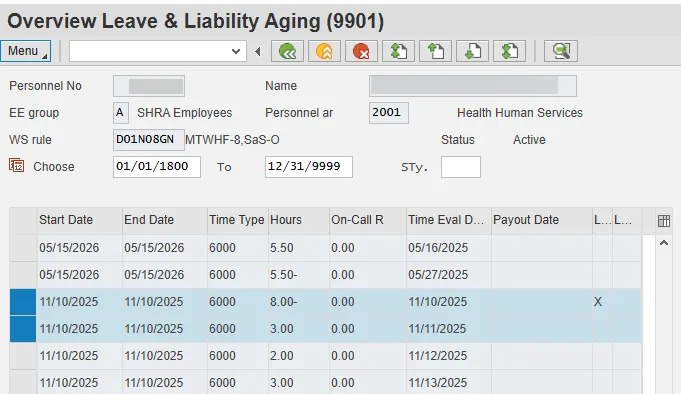
To continue the scenario from above, on 11/12/2025, the employee earns 2.0 hours of OT Comp and on 11/13/2025, the employee earns 3.0 hours of OT Comp, so IT9901 records for 2.0 hours and for 3.0 hours are created to fully repay the 11/10/25 liability.
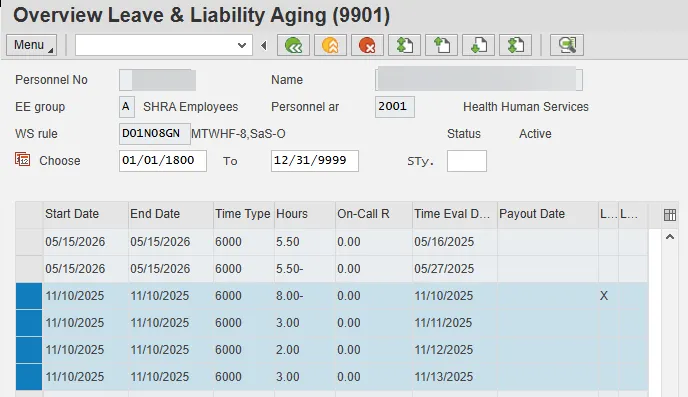
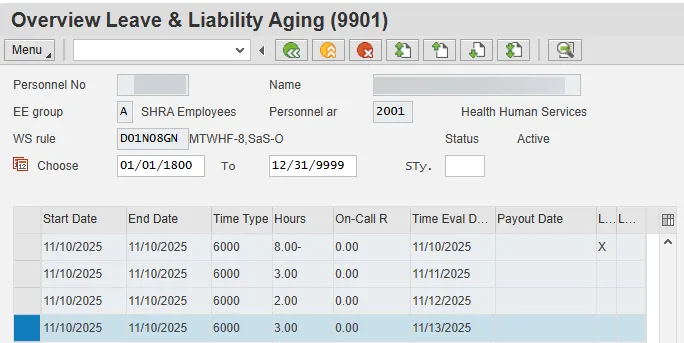
But, the employee actually earned a total of 4.0 hours of OT Comp on 11/13/2025. Because 3.0 of those hours were needed to repay the 11/10/2025 liability, another IT 9901 record for the remaining 1.0 hour is created as a normal accrual on 11/13/2025 with an age out date of the following year.
HOLIDAY LEAVE (SUBTYPE 6015) & HOLIDAY COMP (SUBTYPE 6005)
PREREQUISITES
For an employee to accrue holiday entitlements, the employee must be a positive time employee.
HOLIDAY LEAVE ACCRUAL RECORDS
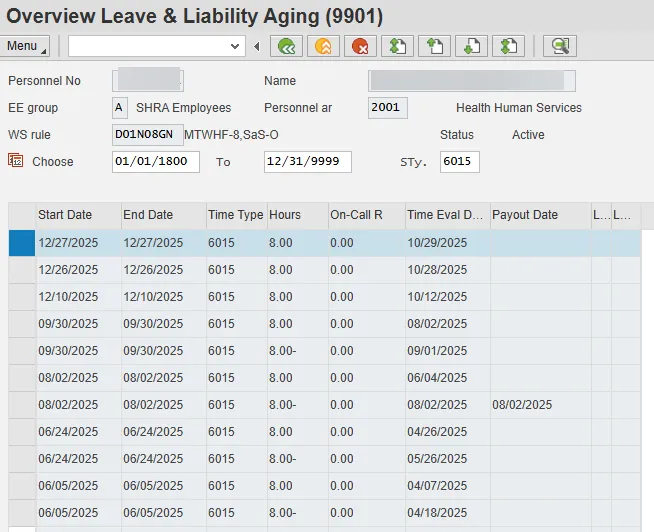
A holiday leave accrual record is generated thirty days before a holiday. When employees are hired or reinstated inside the 30-day window in advance of the holiday, the holiday accrual is triggered on the Reinstatement or Hire date. The highlighted record below represents a full-time employee's accrual for the 11/28/2025 Thanksgiving 2 holiday.

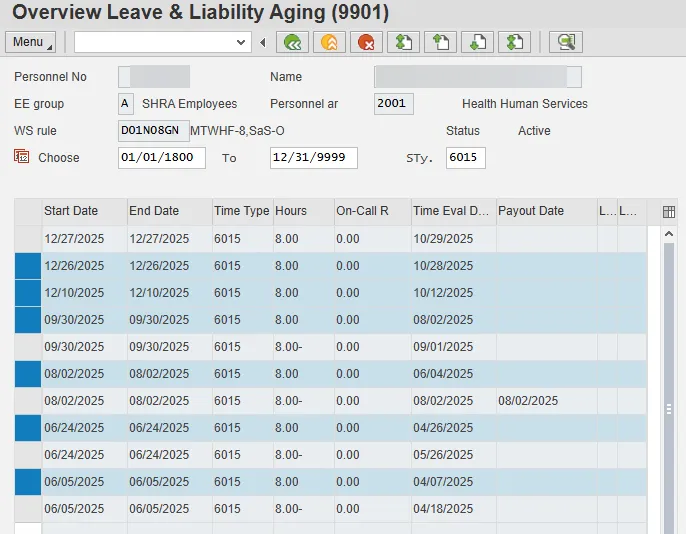
For holiday leave accruals, the Time Evaluation Date represents the day on which the entitlement was generated. Since the above employee is not a New Hire or Reinstatement, the entitlement is accrued thirty days in advance of the holiday. The 2025 Thanksgiving 2 holiday falls on 11/28/2025. The accrual is granted thirty days in advance of the holiday - on 10/29/2025. The Start/End Date for a holiday accrual record represents the end of the entitlement window (thirty days following the holiday). This date represents the date that any unused entitlement will roll to Holiday Comp. For the 11/28/2025 Thanksgiving 2 Holiday, any unused entitlement will roll to Holiday Comp on 12/27/2025.
The accruals for the 2025 Thanksgiving 1, Veterans Day, Labor Day, Independence Day, Memorial Day, and Good Friday holidays are highlighted below. Each entitlement has the 60-day window. Good Friday was accrued on 4/7/2025 with a 6/5/2025 expiration date. Memorial Day was accrued on 4/26/2025 with a 6/24/2025 expiration date. Independence Day was accrued on 6/4/2025 with an 8/2/2025 expiration date. Labor Day was accrued on 8/2/2025 with a 9/30/2025 expiration date. Veterans Day was accrued on 10/12/2025 with a 12/10/2025 expiration date. Thanksgiving 1 was accrued on 10/28/2025 with an expiration date of 12/26/2025.
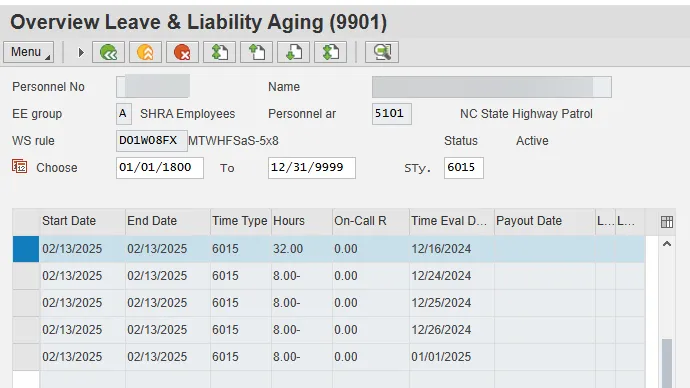
If an employee is hired or reinstated inside the 30-day window in advance of the holiday, the entitlement window for the holiday leave accrual will still be 60 days from the New Hire or Reinstatement date. In the example below, the employee was hired on 12/16/2024, twenty-three days after other employees accrued the Christmas 1 holiday. As a result, the new hire will have until 2/13/2025 to use the holiday entitlement instead of until 1/23/2025.
Additionally, since the employee’s hire date was also inside the 30-day accrual window for Christmas 2, Christmas 3 and the New Year’s Day holidays, EE’s accrual below is for the four holidays and so totals 32 hours. The new hire will have until 2/13/2025 to use all four holiday entitlements.
HOLIDAY DEDUCTION RECORDS
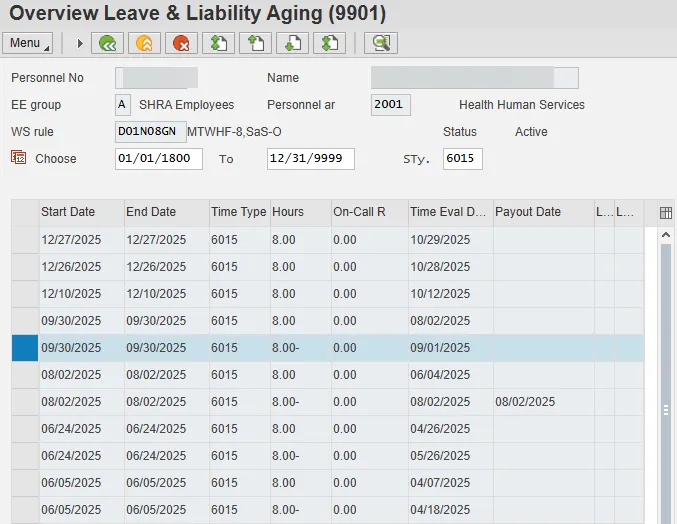
Holiday deduction records are generated when A/A 9300 (Holiday Leave) absences are processed. The highlighted record below represents a holiday deduction record.
Deduction records are characterized by a negative Hours value. The Time Evaluation Date represents the absence date in which the employee consumed the quota. The highlighted record above represents 8 hours of holiday leave used on 9/1/2025. When a holiday absence is processed, it is applied against the oldest aging record available that has not yet expired or been consumed. The Start/End Date of a deduction record will match the aging record for the entitlement consumed. In the above example, the Start/End Date is 9/30/2025, indicating that the holiday leave keyed on 9/1/2025 consumed an entitlement set to age out on 9/30/2025.
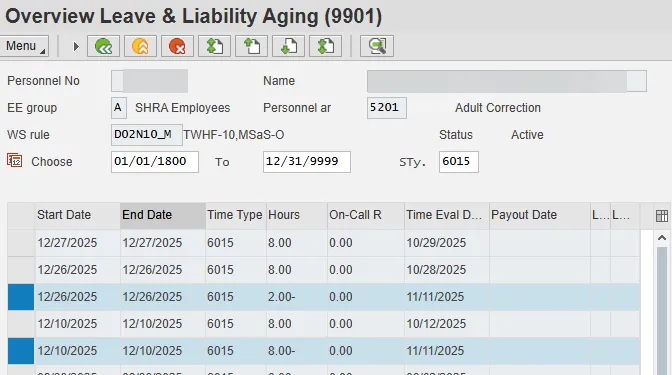
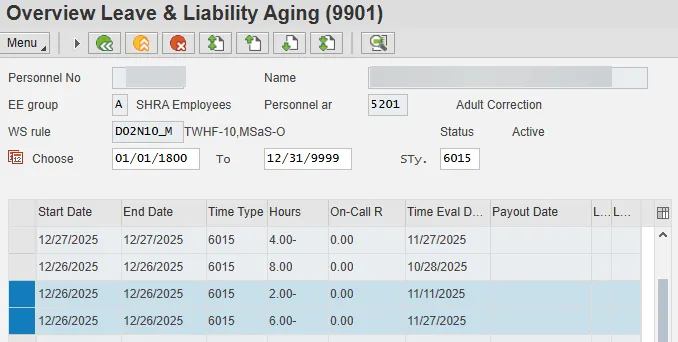
In some cases, a single day’s absence can consume multiple holiday entitlement records. This is common during the end of the year when an employee has multiple holiday entitlements for the various November, December, and January holidays. In the example below, the employee works 10 hour shifts and recorded 10 hours of A/A 9300 on Veterans Day 11/11/2025. That 10.0 hour entry deducted 8.0 hours from the Veterans Day holiday entitlement and 2.0 hours from the Thanksgiving 1 entitlement.
The remainder of the Thanksgiving 1 entitlement was consumed on 11/27/2025 when 6 hours were deducted from this entitlement.
If an employee works on a holiday (instead of recording holiday leave) and has not yet exhausted the related holiday entitlement prior to the holiday, the hours worked on the holiday (up to eight hours) generate a deduction to the holiday entitlement as well as an equivalent accrual to Holiday Comp Leave. Holiday entitlements that are consumed via time worked on a holiday appear as deduction records on IT9901. Attendance and absence entries should be viewed to determine whether a deduction record generated on a holiday is a result of recording A/A 9300 or working on the holiday. The IT9901 deduction record will look the same in either case.
Holiday deduction records are also generated when an IT2013 (Quota Correction) is created to decrease an employee’s Holiday Leave balance.
EXPIRING A HOLIDAY LEAVE ENTITLEMENT
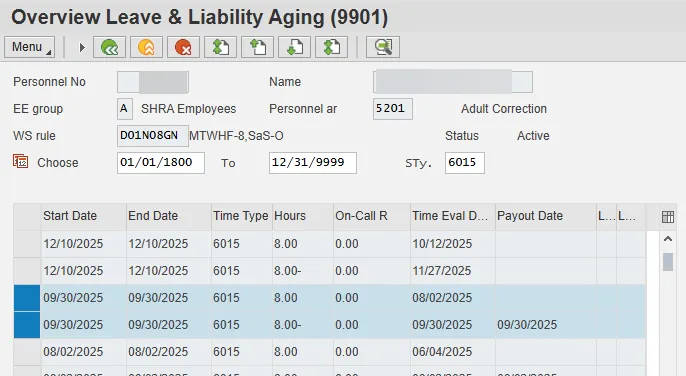
If a Holiday Leave entitlement is not consumed prior to the age out date, the remaining balance of the entitlement is rolled to Holiday Comp Leave. When an entitlement rolls to Holiday Comp, a date is populated in the Payout Date column. This date will always match the Start/End Date of the original entitlement record. The highlighted records below represent the remaining entitlement for the 2025 Labor Day holiday rolling to Holiday Comp. None of the 8.0 hours of the Labor Day entitlement have been consumed prior to the rollover date of 9/30/2025. So, on 9/30/2025, the 8.0 hours are rolled to Holiday Comp as indicated by the line item with the 9/30/2025 payout date.
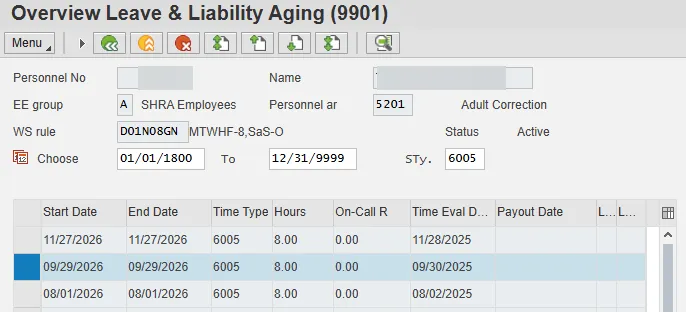
If an employee is eligible for Holiday Comp Leave accruals, a related accrual record is generated for Holiday Comp Leave and is represented on IT9901 subtype 6005 as shown below.
If an employee's position is set as immediate payout for Holiday Comp, then a related IT9901 is not generated. Instead, the remaining entitlement is paid in the employee's next paycheck as Holiday Comp Leave payout.
LIABILITY HOLIDAY LEAVE RECORDS
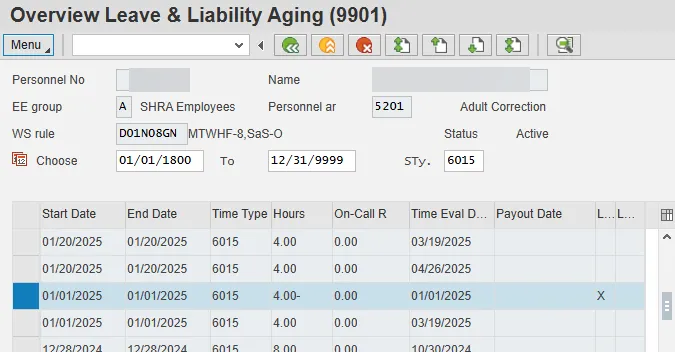
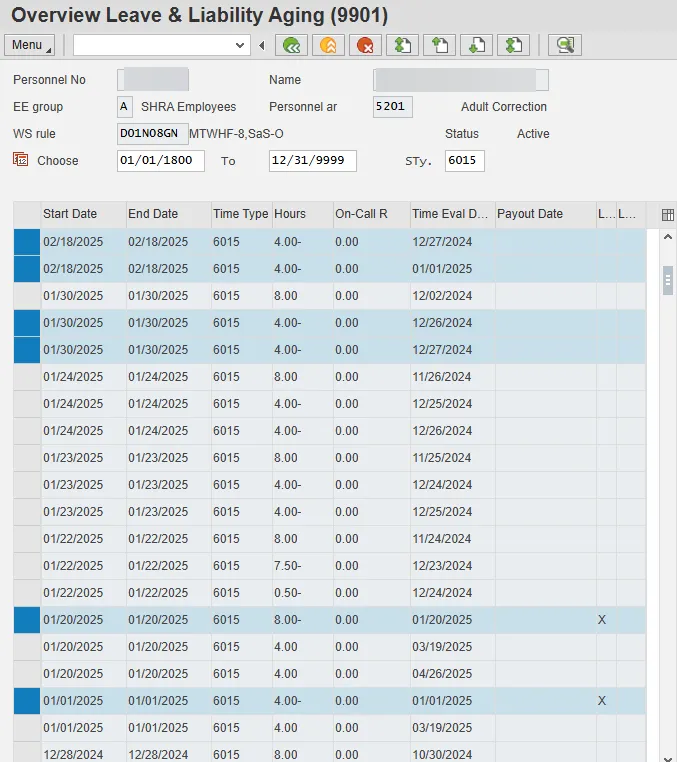
Scenarios can exist where an employee's Holiday Leave balance drops below zero. These scenarios represent liability situations. On the IT9901 records, a liability situation is represented when the Liability flag is tagged to an IT9901 record. The liability flag is an 'X' in the first 'L' column, as shown below. For liability records, the Time Evaluation Date represents the date on which the employee drops below zero for Holiday Leave. The Start/End Date is the same as the Time Evaluation Date. Finally, the Hours column will show the hours that the employee overdrew. In the example below, the employee recorded 4.0 hours of Holiday leave on 1/1/2025 for which there was no remaining entitlement.
By examining the IT9901s and the employee’s time entries, you can determine why the liability occurred. This employee accrued 8.0 hours for each of the three Christmas, the New Year’s, and the Martin Luther King holidays. Then, during the week of Christmas, the employee recorded 36.0 hours of holiday leave. Twenty-four of those hours exhausted the three Christmas holiday entitlements, so, as highlighted below, on 12/26/2024, 4.0 hours of holiday leave were deducted from the New Year’s entitlement; on 12/27/2024, the remaining 4.0 hours of the New Year’s entitlement were used and 4.0 hours of the MLK holiday entitlement were used. When the employee recorded 8.0 hours of holiday leave on the New Year’s holiday, the New Year’s entitlement had already been exhausted, so 4.0 hours were deducted from the remaining MLK entitlement which exhausted all the employee’s accrued holiday leave. That left the other 4.0 hours holiday leave recorded on 1/1/2025 as a liability. And then, when the employee recorded 8 hours of holiday leave on the MLK holiday, those hours also became a liability for a total of 12.0 liability hours.
In Holiday Leave liability situations, the employee's next holiday entitlement accrual will not generate a normal aging record. Instead, the accrual will be used to repay the liability. For liability repayment records, the Time Evaluation Date represents the date on which the liability was repaid and the Start/End Date matches that of the liability record for which the accrual is repaying.
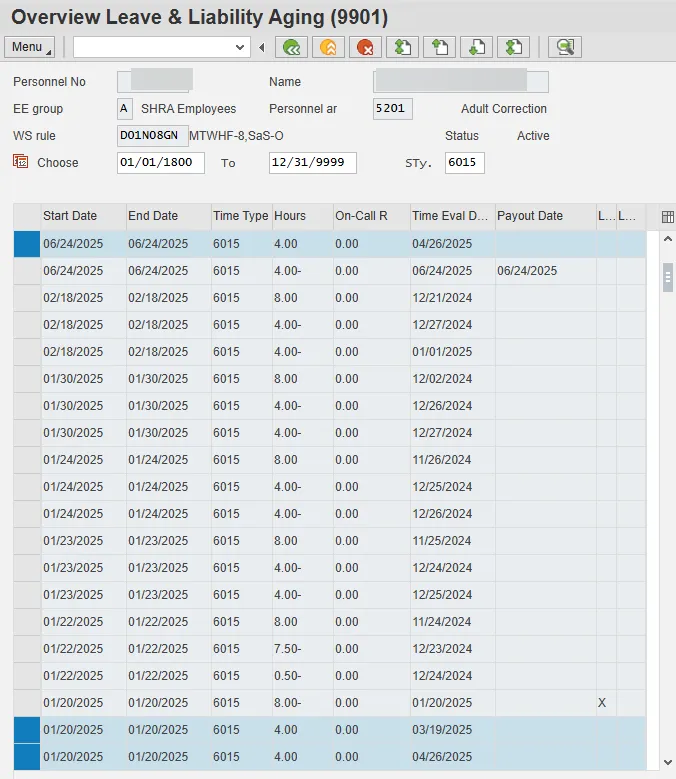
The employee in the example had an 8.0 hour and a 4.0 hour liability as of 1/20/2025. As shown below, on 3/19/2025, the 8.0 hour accrual generated for the Good Friday entitlement was used to repay the 4.0 hour liability from New Year’s and to pay 4.0 hours toward the 8.0 hour MLK liability. On 4/26/2025, the 8.0 hour Memorial Day entitlement was generated, but 4.0 hours were used to repay the remaining 4.0 hour MLK liability, so only 4.0 hours are represented as the Memorial Day holiday leave accrual on 4/26/2025 with a rollover date of 6/24/2025.
Liability Leave (7000)
The IT9901 subtype used for Liability Leave is 7000. Both Adverse Weather Leave liability and CDE Care Leave liability are tracked in the Liability Leave (7000) aging subtype.
ADVERSE WEATHER LIABILITY
PREREQUISITES
For an employee to accrue Adverse Weather Leave liability, A/A type 9545 (Adverse Weather Leave) is recorded. When an employee records Adverse Weather Leave, the employee incurs a liability for the number of leave hours taken. Per policy, the employee then has 90 days to make up the hours taken for the Adverse Weather event.
Note: The Adverse Weather Leave liability aging period was updated from 365 days to 90 days in the Adverse Weather policy revision effective 1/1/15; then was updated to 180 days from 9/27/2024 to 10/31/2024; and then was returned to 90 days effective 11/1/2024. So the aging period for an Adverse Weather liability will depend on what the aging period was on the date the liability was incurred.
ADVERSE WEATHER LEAVE LIABILITY RECORDS
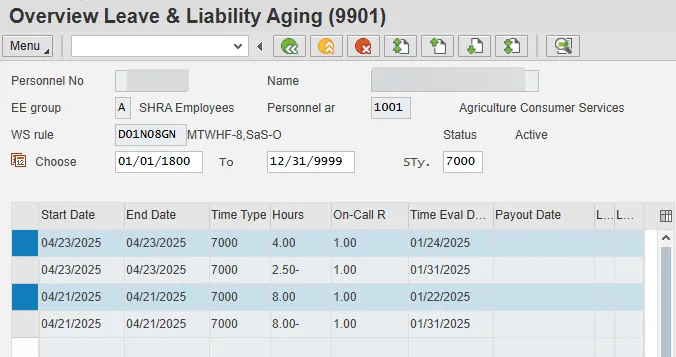
An Adverse Weather Leave liability accrual record is generated when an employee records Adverse Weather leave. The liability record is created on the day that A/A 9545 is recorded. The highlighted records below represent Adverse Weather Leave liability accrual records for Adverse Weather Leave taken on 1/22/2025 and 1/24/2025 for 8 and 4 hours respectively.
For Adverse Weather Leave liability accrual records, the Time Evaluation Date represents the date that the liability was incurred. The Start/End Date for the Adverse Weather Liability accrual record represents the aging limit applied to this type of liability record. In the example, the employee has until 4/21/2025 and 4/23/2025 to make up or repay the liability records.
ADVERSE WEATHER RECOVERY RECORDS
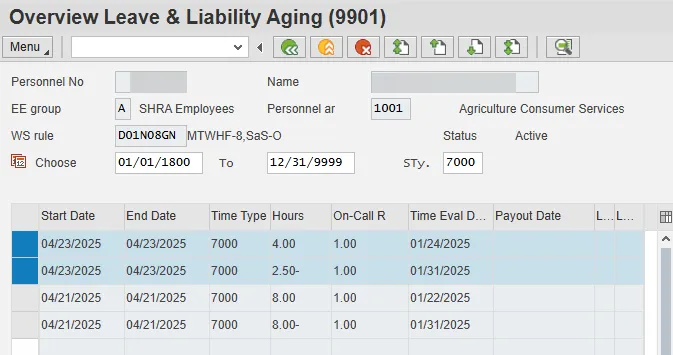
Adverse Weather Leave liability recovery records are generated when an employee makes up or repays a liability. In the example below, the employee made up 2.5 hours of the liability generated on 1/24/2025 on 1/31/2025.

Recovery records (similar to deduction records) are characterized by a negative Hours value. The Time Evaluation Date represents the date in which it was determined the employee has hours available to repay liabilities. When makeup hours are processed, the hours are applied to the oldest aging record available that has not yet expired or been fully recovered. The Start/End Date of recovery records will match the Start/End Date of the liability record being recovered. In the above example, the Start/End Date is 4/23/2025, indicating that the makeup hours identified on 1/31/2025 applied to a liability set to expire on 4/23/2025.
In some cases, makeup hours identified on a certain day can be applied to multiple liability records. In the scenario below, the employee made up 3.75 hours of Adverse Weather Leave on 2/13/2024. As a result, two separate liability records were fully or partially recovered. First, 0.25 hours were used to complete the recovery of the liability incurred on 1/18/2024. Then, the remaining 3.5 hours were applied to the liability generated on 1/19/2024.
An alternative way to view recovery records is to view the recovery records applied against a single liability record. In the example below, the 8.0 hour liability record generated on 1/19/2024 (set to expire on 4/17/2024) was recovered with makeup hours on 2/13/2024, 2/14/2024, 2/15/2024, 2/19/2024, 2/20/2024, and 2/27/2024 (the recovery records are highlighted below). The total of these recovery records is 8.0 hours, which corresponds to the value of the related liability record.
There are two IT2012 subtypes related to Adverse Weather Leave make up. Subtype ZAWR will recover from Approved Leave first, then take any remaining from LWOP. Subtype ZAWB will recover from Approved Leave hierarchy allowing Bonus Leave to be used before vacation leave, then take any remaining from LWOP. If either of these IT2012 subtypes is processed, the resulting recovery records on IT9901 are shown as deductions, similar to the employee making up time with hours worked.
EXPIRING ADVERSE WEATHER LIABILITY RECORDS
If a liability record is not recovered prior to the expiration date, a hard error is generated in Time Evaluation prompting the Leave Administrator to recover the remaining liability via an IT2012-ZAWR or IT2012-ZAWB. A Leave Administrator can view the IT9901-7000 records with a Start/End Date that matches the date of the hard error. The IT 2012-ZAWR or IT2012-ZAWB should be keyed for the amount of liability remaining for the date in question, or a combination of both recovering subtypes. If the IT2012 record is keyed correctly, the appropriate IT9901 deduction record is created and the hard error is removed allowing the employee to process in Time Evaluation. A confirmation message will generate in Time Evaluation noting the success of the IT2012 entry in recovering the expired liability.
COMMUNICABLE DISEASE EMERGENCY (CDE) CARE LEAVE
A/A code 9549 CDE Care Leave was active in the Integrated HR-Payroll system from 3/10/2020 to 8/14/2022, but it has been an inactive A/A type since then. When an employee recorded CDE Care Leave, they incurred a liability for the number of leave hours taken for CDE Care Leave. Per policy, the employee then had 730 days to make up the hours taken.
CDE CARE LEAVE LIABILITY RECORDS
A CDE Care Leave liability accrual record is generated when an employee records CDE Care Leave. The liability record is created on the day that A/A 9549 is recorded. For CDE Care Leave Liability accrual records, the Time Evaluation Date represents the date that the liability was incurred. The Start/End Date for the CDE Care Leave liability accrual records represents the aging limit applied to this type of liability record.
CDE CARE LEAVE TROUBLESHOOTING
When a CDE Care Leave liability is generated by creating a manual IT2013/Quota 61 record, the default aging limit date is set at 90 days. For this reason, the CDE Care Leave Aging Flag (ZCLV) must be set on IT2012 (Time Transfer Specification). The date of the IT2012 record should be the same date of the IT2013/Quota 61 record. The CDE Care Leave Aging Flag extends the aging limit to the standard 730 days per policy. The Start/End Date for the CDE Care Leave liability accrual records represents the aging limit applied to this type of liability record. If the Start/End date of the CDE Care Leave liability represents less than the standard 730 day aging period, then the assumption would be that the record was created using the manual method and would require the date override flag.
LIABILITY LEAVE SPECIAL INDICATOR
The On-Call Rate column is used to set a special indicator to differentiate between the Adverse Weather Leave liability and the CDE Care Leave liability. The special indicator for the Adverse Weather Leave liability is 1.00 and for the CDE Care Leave liability it is 2.00.