Schedule of Federal Assistance (SEFA) General Instructions
A Federal program may consist of more than one Federal award to a state agency.
- Funds received directly from a Federal awarding agency - list Assistance Listing (AL) # once.
- If some Federal awards for an AL number are received directly from a Federal awarding agency, and some are received indirectly (from non-State of North Carolina, pass-through entities), list the AL number once for the funds received directly and once for each pass-through entity awarding funds under the AL number.
- Do not include Federal awards received from State of North Carolina, pass-through entities. Exceptions to this include AL # 21.019 - Coronavirus Relief Funds (CRF) and AL #21.027 - Coronavirus State & Local Fiscal Recovery Funds (CSLFRF). Each FRU is required to report their own individual portion of federal funds if they were received directly from NC Office of the Governor.
- All expenditures should be reported as rounded dollar amounts. Do not include cents.
- Each agency has an assigned number of pre-populated entry lines. You will scroll down to your FRU section.
- Do not add or delete lines.
- If extra lines are needed email oscsingleauditreporting@ncosc.gov.
- Do not enter data in shaded areas as they are informational only or calculated based upon data entered in other areas.
- Portions of the workbook will turn from gray to white when entry is required based on the AL entered.
Each Federal program, under which your agency expended Federal awards for the fiscal year ended June 30, 20xx, should be included on the SEFA on cash basis. Report expenditures in the year in which they occur.
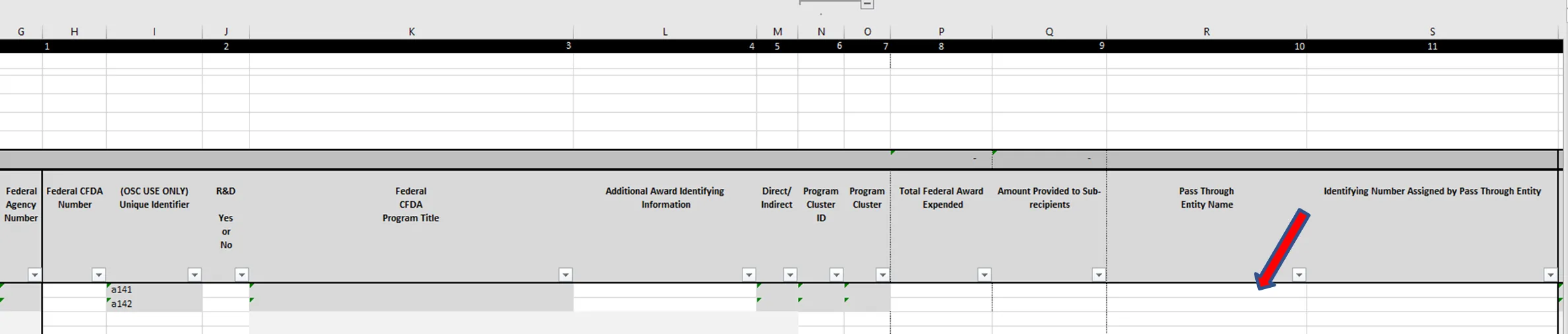
The Schedule of Expenditures of Federal Awards (SEFA) is divided into ten columns. Column Headers indicate the type of information required for each federal program. Column by column instructions for completing the SEFA are provided in the paragraphs below.
Grants Database Worksheet Tab
- Scroll down column B (FRU) to identify data entry rows for your agency.
- Only enter data in non-shaded areas.
- Do not enter data in shaded areas as they are information only or calculated based upon data entered in other areas.
- Hover over a cell for additional information.
- Use mouse to select cells for input or tab key to automatically move to next cell.
- Action Items columns provide requirements for additional required information based upon data entered.
Entry Date (Column A)
Enter the entry date as XX/XX/XXXX or XX-XX-XXXX.
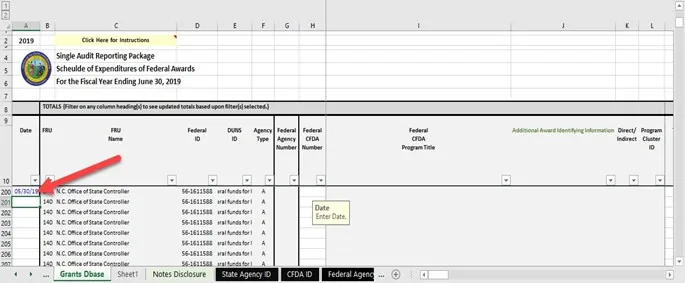
- You may copy and paste the date to fill out the column.
Financial Reporting Unit- FRU (Column B)
- Scroll to agency FRU and begin entering data.
FRU Name (Column C)
- Pre-populated
Federal I.D. & DUNS ID (Column D & E)
- Pre-populated.
- If the number needs to change contact OSC Single Audit Team at oscsingleauditreporting@ncosc.gov.
Agency Type (Column F)
- Pre-populated
Federal Agency Number (Column G)
The Federal Agency Number is the two-digit number representing the Federal agency which is the source of expended Federal awards for a Federal program. Note that the first two digits of a AL number indicate the source of funds for a Federal financial assistance program. For example, the “84” in AL # 84.038 indicates that the U.S. Department of Education is the source of funds for the Federal Perkins Loan Program.
- See the “Federal Agency ID” tab for a list of Federal agencies and their corresponding Federal Agency Numbers.
- Only agency numbers on the “Federal Agency ID” tab should be used.
AL # (Column H)
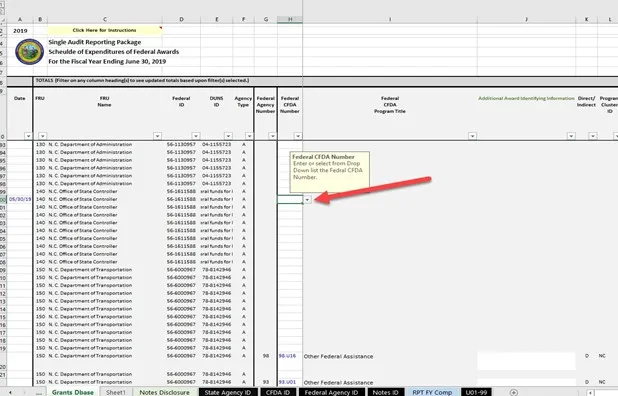
- Choose AL # from dropdown list inside each cell.
- The Federal AL number is the number assigned to a Federal program in the Catalog of Federal Domestic Assistance (CFDA). The website is https://sam.gov (external site).
- The AL number should be provided by the Federal awarding agency, if a Federal award is received directly; and by the pass-through entity, if a Federal award is received indirectly. The AL number usually appears on the program/grant document
- If you are unable to locate the AL number on the program/grant documentation, you should contact the funding agency (the Federal awarding agency if funds were received directly, or the pass-through entity if funds were received indirectly).
- If the AL number is not available, which is sometimes the case for new Federal programs, research and development programs and cost-type contracts, refer to the instructions below.
- “AL I.D.” tab will be updated July 1st. The drop down list for AL # will pull form the “AL ID” tab.
Programs with No AL Number or the AL Number is Unknown
If the three-digit AL extension is unknown, select the Federal ID two-digit number from the AL drop down list to indicate the federal agency the funds were received from followed by “U “to indicate “unidentified”.
Example: The first federal program with an unknown three-digit extension would be U01 for all award lines associated with that program, the second would be U02, and so on up to U99.
Additional Award Identifying Information
Additional information is required to be in “Additional Award Identifying Information” column if the AL number is unknown. Once an unidentified AL number is selected from the AL dropdown list “U01-99”, a message will appear in the “Action Items” column (columns Q & R) to complete Column J (Additional Award Information). Enter another description (up to 50 characters) to identify the award other than the AL number (e.g., program year, contract number, state issued numbers, etc.).
Programs that are part of the R&D Cluster and the AL Number is Unknown
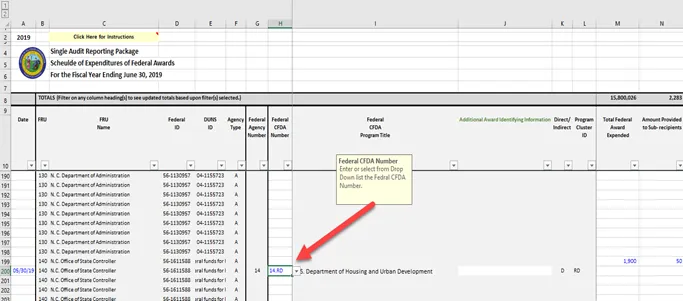
If the Federal program is part of the Research and Development (R&D) cluster and the AL number is unknown, select the two-digit Federal ID number of the federal agency the funds were received from followed by “RD” in the dropdown list in the AL column.
For more information visit the GovReg website (external link).
Unique Identifier (Column I) OSC USE ONLY
R &D (Column J)
- Indicate Yes or No if this a Research or Development cluster grant.
AL Title (Column K)
- Automatically populates base on AL # selected.
- AL title list can be found on the “AL ID” tab. Titles are updated annually after June 30th to reflect current programs per sam.gov site.
Per OMB Uniform Guidance, the AL title should be provided by the Federal awarding agency, if a Federal award is received directly; and by the pass-through entity, if a Federal award is received indirectly. The AL number usually appears on the program/grant document.
Additional Award Identifying Information (Column L)
- Grayed out initially.
- Will turn white for entry if an “XX.U01-99” AL # is selected to indicate the AL # is “unidentified”.
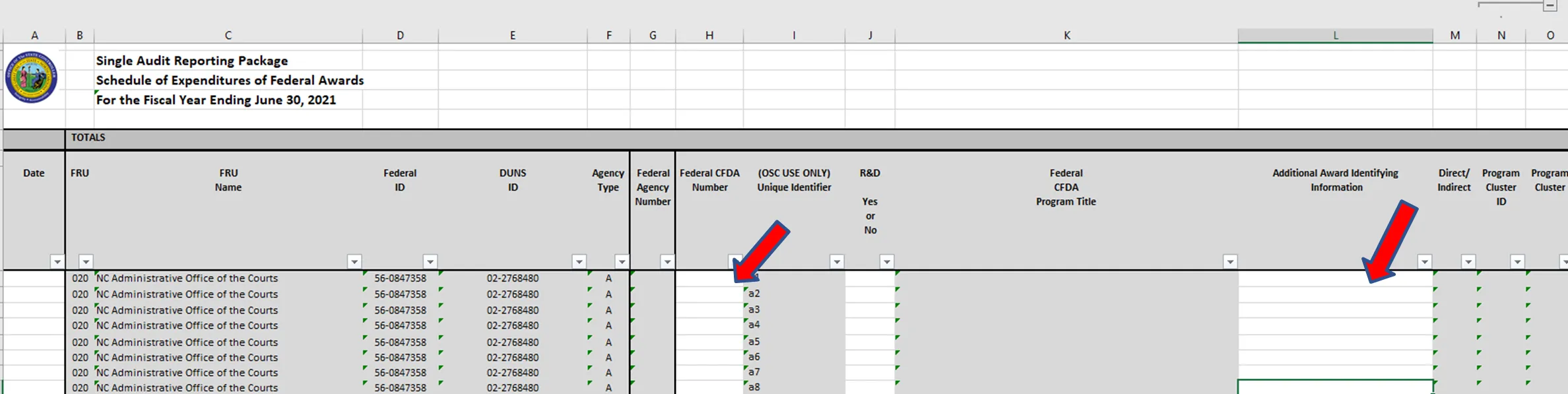
- Column “L” information is required. It will accommodate up to 50 characters, numbers or symbols.
Column M (Direct/Indirect)
- Automatically populates based on entry in columns “R” & “S”.
- If Column “R” (Pass Through Entity Name) is entered. Column S must be filled out with an “Identifying Number Assigned by the Pass -Through Entity.
- A “D” indicates Federal program funds received Directly from a Federal awarding agency.
- An “I” indicates Federal program funds received from a non-State of North Carolina, pass-through entity, other than a Federal government agency. For example, consider AL # 47.076, if funds were received directly from the National Science Foundation (a Federal agency), you would use a “D”. If funds were received from Duke University (a non-State of North Carolina, pass-through entity), you would use an “I”.
Important Note: Column M will be “D” for direct unless there is a Pass-through entity name and/or number in Columns S (Identifying Number Assigned by Pass -Through Entity), then Column M will be “I” for indirect.
Program Cluster ID (Column N)
- Automatically populates based upon Federal AL Number entered.
- Federal programs included in program clusters (per Part 5 of the Compliance Supplement), except for the R&D cluster, are listed in ascending AL number order on the “AL ID” tab in the worksheet. (Note that the OMB Uniform Guidance Compliance Supplement is updated on an annual basis in July).
- Part 5 of the OMB Uniform Guidance Compliance Supplement does not identify the Federal programs which comprise the R&D cluster. The entity making the award (the Federal awarding agency for funds received directly, and the pass-through entity for funds received indirectly) should inform the recipient “if the award is R&D.” If the Federal program is R&D, based on information provided by the awarding entity, Cluster ID, “RD” will automatically populate.
- If a Federal program is not listed on the “Cluster ID” tab, the Cluster ID, “NC” will populate automatically in the Column L (Program Cluster ID).
Program Cluster (Column O)
- Pre-populated based upon information entered in Column N.
Total Federal Awards Expended (Column P)
- Enter total Federal Award Expended during the current fiscal year.
- Report expenditures on cash basis.
- Enter whole numbers only. No Decimal Amounts.
Note: Additional federal award expenditure information available on the SharePoint site.
Amounts Provided to Subrecipients (Column Q)
- Enter subrecipient amounts provided during the current fiscal year.
- Report on cash basis.
- Enter whole numbers only. No Decimal Amounts.
Pass Thru Entity Name & Identifying Number Assigned by Pass Through Entity (Column R-S)
- For Federal awards received as a subrecipient, the name of the pass-through entity and identifying number assigned by the pass-through entity is to be included on the SEFA. A pass-through entity shall provide the subrecipient with the award number (the award number/identifying number assigned by the pass-through entity usually appears on the program/grant document).
- If your agency received Federal awards from a non-State of North Carolina entity, other than a federal government agency, please provide the name of the pass-through entity in Column R, and the award number/identifying number assigned by the pass-through entity in Column S.
- If you are unable to locate the award number/identifying number assigned by the pass-through entity on the program/grant documentation, you should contact the pass-through entity. If (after contacting the pass-through entity) you are unable to obtain the award number/identifying number assigned by the pass-through entity, please email your documentation of the pass-through entity’s response to your request to obtain the award number/identifying number assigned by the pass-through entity.
Action Items (Columns T - V)
- Message will appear if further action is required based upon entries.
Notes Disclosure Worksheet Tab
General Information and Non-Cash Assistance Notes Disclosure
- Only enter data in non-shaded areas.
- Responses are required for ALL non-shaded areas on every row when an FRU is entered in the FRU field.
- Based upon user input, shaded areas change to meet required reporting requirements.
- Select or click in any cell for additional information about that cell.
- Use mouse to select cells for input or tab key to automatically move to the next cell.
Entry Date (Column A)
- Enter the entry date as XX/XX/XXXX or XX-XX-XXXX format only.
- You may copy and paste the date to fill out the column.
Financial Reporting Unit “FRU” (Column B)
- Pre-populated.
FRU Name (Column C)
- Pre-populated
Federal I.D. & DUNS ID (Column D & E)
- Pre-populated.
- If the number needs to change contact OSC Single Audit Team at oscsingleauditreporting@ncosc.gov.
Responsible Official Name (Column F)
- The Responsible Official is the individual responsible for financial reporting (usually a fiscal/finance officer, controller, or business manager).
Column G – Enter Responsible Official Phone Number
Column H – Enter Responsible Official Email Address Column I - Enter Package Preparer Name
Column J - Enter Package Preparer Telephone Number
Column K – Enter Package Preparer Email Address
Column L – Enter Package Preparer FAX Number
Loan Information (Column M – AQ)
Enter loan information. The columns will initially be grayed out. Each section will turn white for entry based on “Yes” or “No” answers in each section.
Specific instructions for completing the SARP Worksheet Loan Section are provided in the dialogue boxes within the workbook;
If your agency is a university or community college, please provide amounts associated with new loans made under AL # 84.032 (Federal Family Education Loans) and AL # 84.268 (Federal Direct Loan) during the fiscal year.
The Schedule of Expenditures of Federal Awards should include notes that describe the significant accounting policies used in preparing the schedule. In order to satisfy this requirement, we must identify the types of Federal non-cash assistance received by the State of North Carolina and disclose the basis of accounting used to recognize these transactions on the Schedule of Expenditures of Federal Awards.