Purpose
The purpose of this job aid is to explain Infotype IT9834 – Employee Grievance Data and several related BI reports including 0034 – Employee Grievance Data, B0057 – Grievance Overview, and B0059 Grievance Summary.
The IT9834 infotype was designed with a focus on streamlining information and providing more meaningful data. Additionally, it was built with the intention of being a “working” document that allows the user to enter data as events occur.
Data must be entered the day an event occurs. The 15-calendar day clock starts the day after the alleged event took place.
End dates must be entered after resolution at each step. For example – if a potential grievance is resolved at the Informal Discussion step the end date must be entered.
The purpose of this infotype is to track and report events occurring in the EEO Informal Complaint and Grievance process, and the Policy Violation Grievance process beginning with the informal complaint step through the disposition of a complaint at the Office of Administrative Hearings (OAH).
The data captured will reflect the State’s activity for employee complaints and grievances. The data will also be used to determine training and/or education needs for employees.
The Employee Grievance Policy can be found on OSHR’s website.
The Process
There are 11 steps to complete this process.
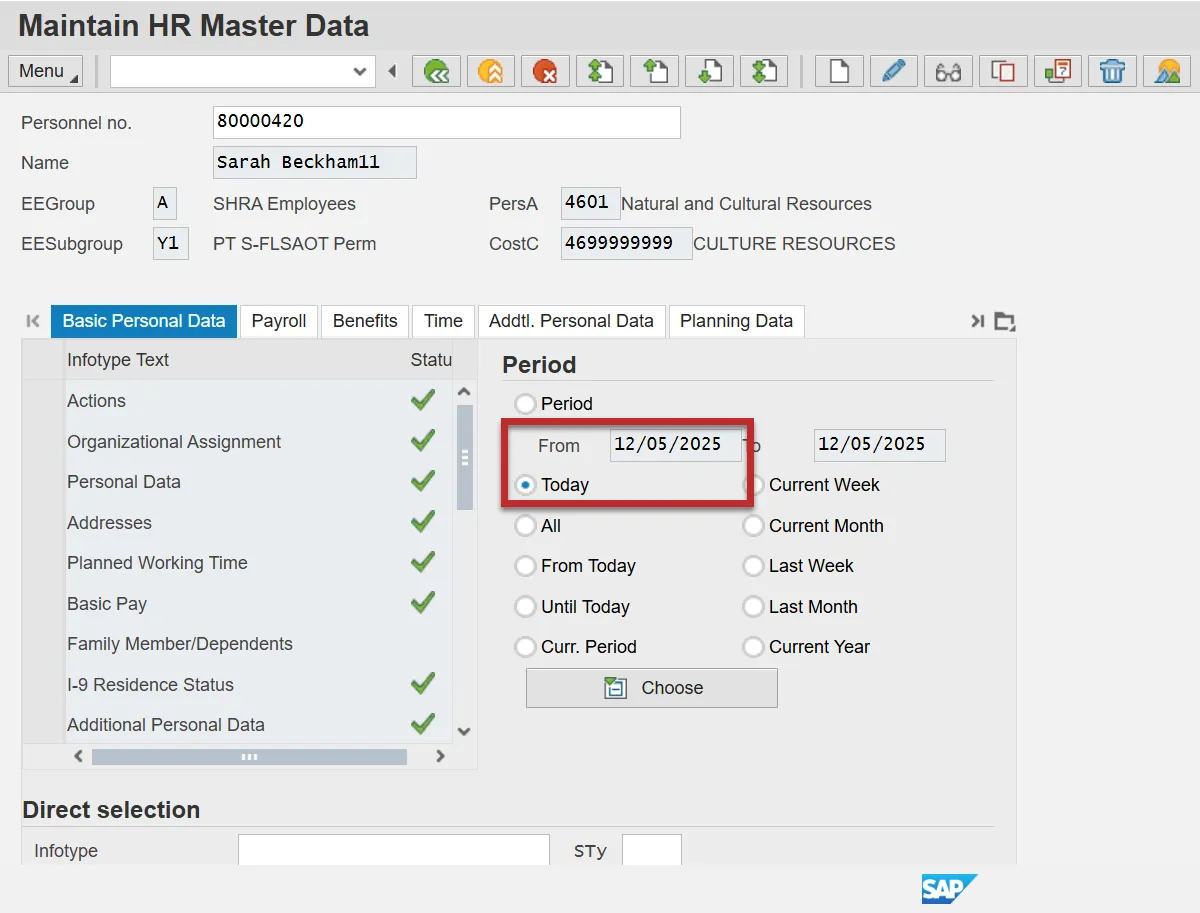
Step 1: Processing begins on the PA30 – Maintain HR Master Data screen.
Step 2: Click the Period radio button in the Period section and enter today’s date.
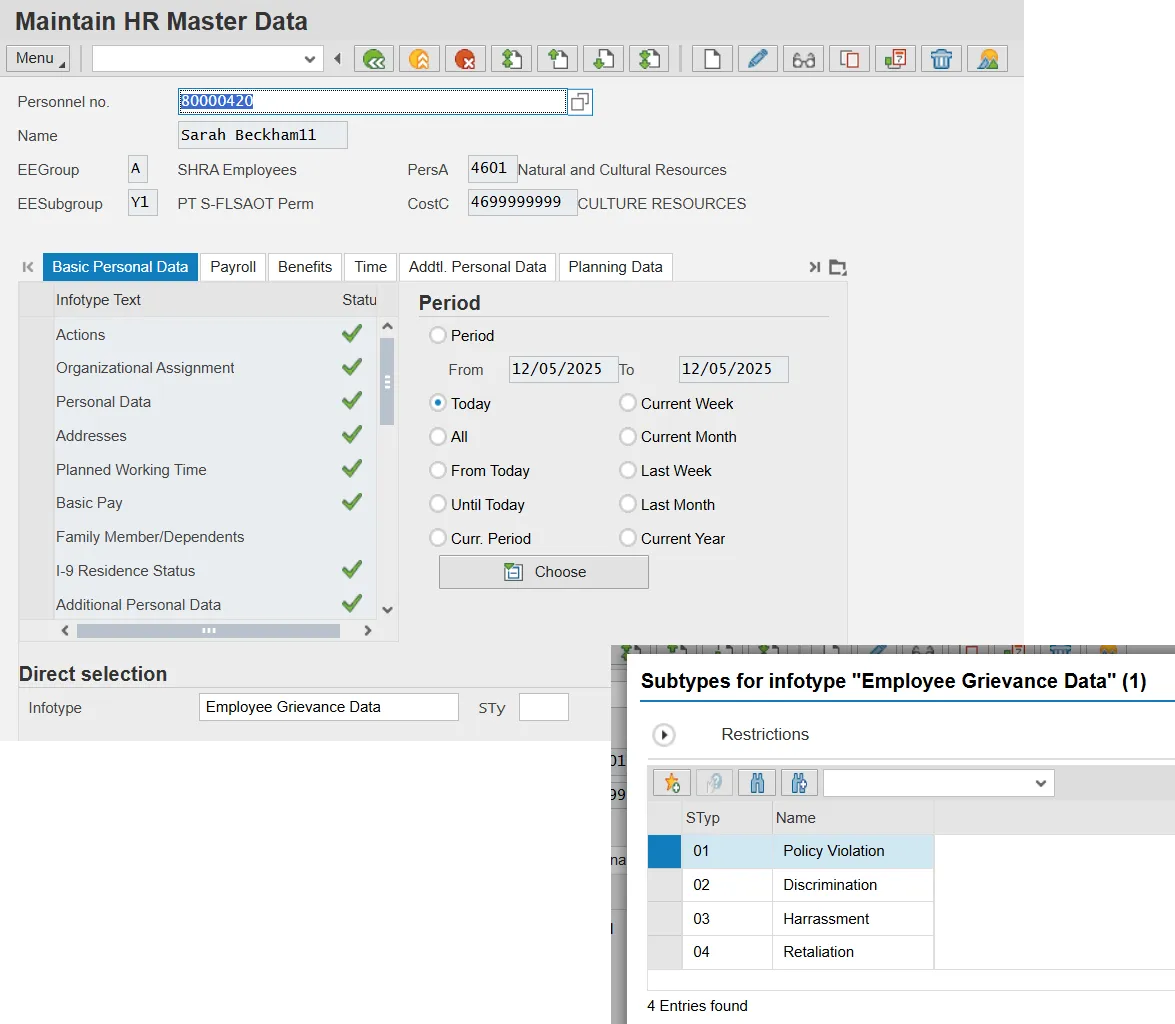
Step 3: In the Infotype field in the Direct selection section, enter 9834.
Step 4: Click the Sty (subtype) field and select the appropriate subtype from the list.
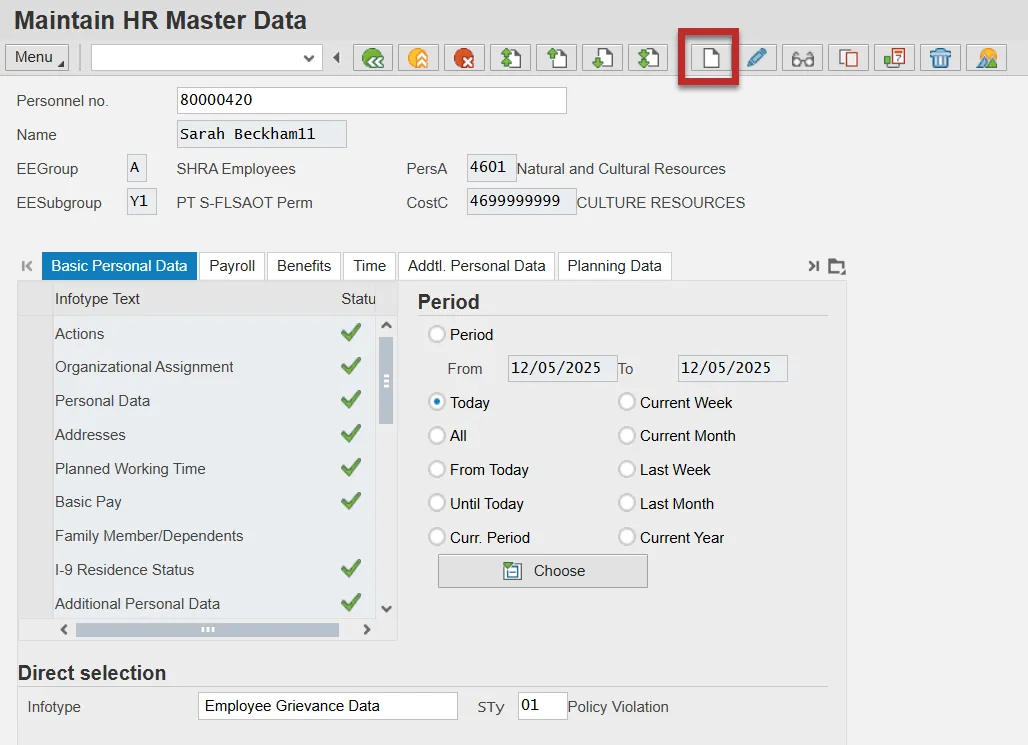
Step 5: Click the Create (F5) button.
Grievable Ussue
The first entry in each record will be the Grievable Issue which is the basis for the grievance. There are four possible entries for the Grievable Issue:
- Policy Violation (01)
- Discrimination (02)
- Harassment (03)
- Retaliation (04)
You may select the grievable issue by typing the corresponding number in the entry field if not already defaulted from the PA30 entry screen (see numbers above). Once you have entered the appropriate number in the entry field, the name of the grievable issue you have selected will display beside the entry field when you click Enter.
Step 6: Enter the Start date.
Information: The Start Date is the date the first entry was created. Once this date is saved, it cannot be changed.
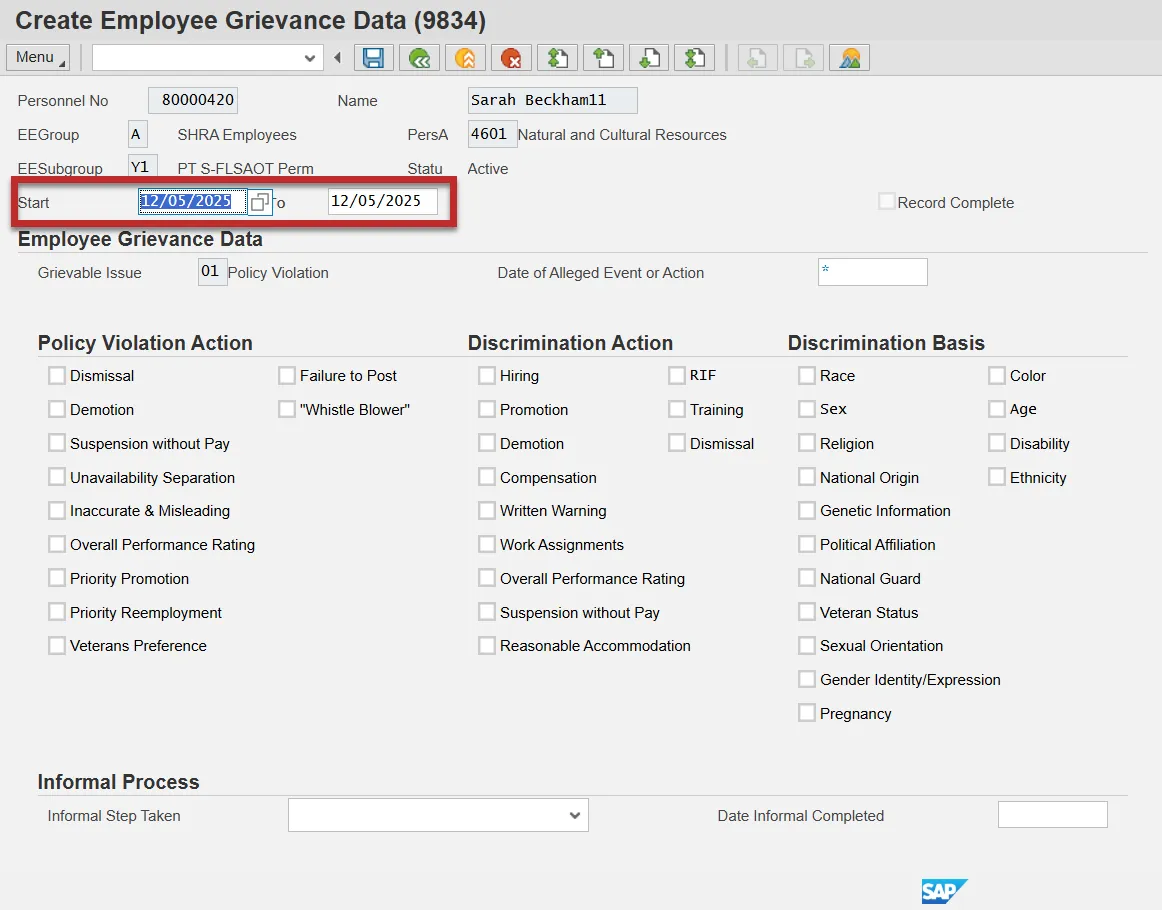
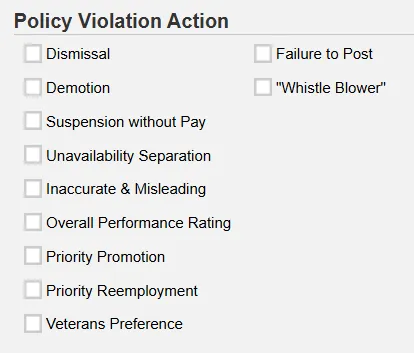
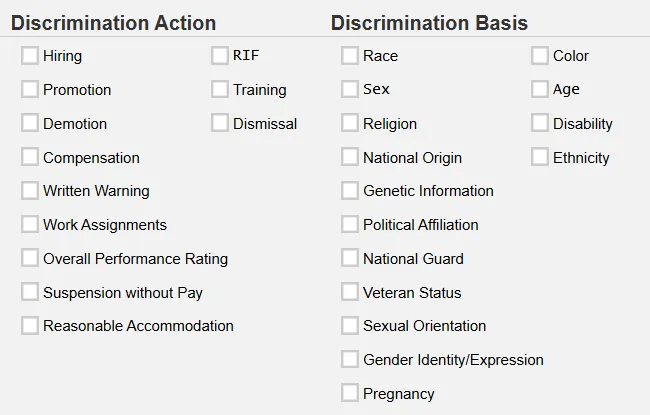
Step 7: Check the appropriate box in the Policy Violation Action, Discrimination Action and/or Discrimination Basis sections, depending on the grievable issue.
For each grievable issue chosen, there will be a corresponding check box to be completed. All check boxes will be visible, but your entry will be restricted to the applicable boxes for the grievable issue you selected. The record will not allow you to save unless you have checked an item in the appropriate box.
The check box entries for each grievable issue are as follows:
- Policy Violation
- Must make one selection from the Policy Violation Action box.
- Do not make any selections in the Discrimination Action or the Discrimination Basis boxes.
- Discrimination
- Must make one selection from the Discrimination Action box and one selection from the Discrimination Basis box.
- Do not make any selections from the Policy Violation Action box.
- Harassment
- Must make one selection from the Discrimination Basis box.
- Do not make any selections from the Policy Violation Action or the Discrimination Action boxes.
- Retaliation
- Must make one selection from the Discrimination Action box.
- Do not make any selections from the Policy Violation Action or Discrimination Basis boxes.
Date of Alleged Event or Action
Step 8: Enter the date of the alleged event or action.

The Date of the Alleged Event or Action is the date of the event/action that prompted the grievance. This date is critical information as it begins the timeframes for the entire grievance process.
Informal Step Taken
Step 9: On the next entry into this infotype, click the Change (F6) button to maintain the record.
The employee has 15 calendar days from the date of the alleged event to file an EEO informal complaint or a Policy Violation grievance. The 15 calendar day clock starts the day after the alleged event took place. For example, the Event took place on January 1, 2019. The employee has until close of business on January 16, 2019 to file an informal complaint or formal grievance document.
Step 10: Select the Informal Step Taken from the drop-down box.
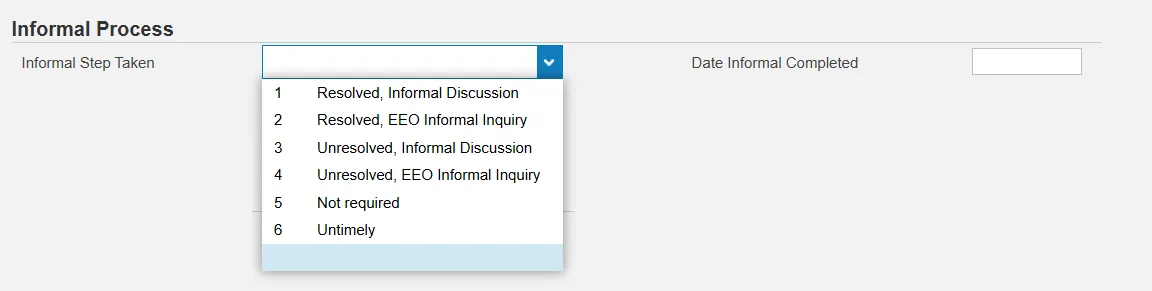
The Date Informal Completed is the date of the written response of the outcome of the Informal Discussion or the date of the written response from the EEO Informal Inquiry to the complainant.
Note: A date must be recorded for both resolved and unresolved outcomes.
Date of Formal Grievance
Step 11: On the next entry (and each entry after), click the Change (F6) button to maintain the record.

Information: The Grievance Filed Timely field is grayed out and will calculate automatically.
The Date Formal Grievance Filed is the date that the formal grievance was filed with the agency following the Informal Discussion or EEO Informal Inquiry.
Informal Discussion: A grievance must be filed within 15 calendar days of the Date of the Alleged Event or Action unless the parties agreed in writing to an extension of time during the Informal Discussion. Any extension must not exceed 15 calendar days.
A formal grievance for policy violations may not be filed unless the Informal Discussion with the immediate or other appropriate supervisor in the employee’s chain of command or other appropriate personnel that has jurisdiction regarding the alleged event or action has been completed. Disciplinary action grievances, to include dismissal, demotion, suspension without pay, as well as non-disciplinary separation due to unavailability bypass the Informal Discussion and proceed directly to the formal internal grievance process.
EEO Informal Inquiry: A complaint for unlawful discrimination, harassment or retaliation must be filed within 15 calendar days of the Date of the Alleged Event or Action. A formal EEO grievance cannot be filed unless the EEO Inquiry has been completed. If the complaint is not successfully resolved, the complainant may continue the process by filing a formal grievance within 15 calendar days of the written response from the EEO Informal Inquiry.
Untimely: An untimely filing of a Step 1 Grievance is a grievance filed after the 15 day filing deadline has expired. Example: An EEO Informal Inquiry written response is dated and received by the employee on January 14, 2019. The employee files a formal grievance on January 31, 2019. The grievance is untimely. The employee’s filing deadline was close of business on January 29, 2019.
Step 1 – Result/Mediation

Step 1 is Mediation. The results of mediation will be one of the following:
- Resolution: An agreement was reached. The grievance has ended.
- Impasse: No agreement was reached. The grievant may file Step 2 within five calendar days.
- Withdrawn: The grievant chose to withdraw the grievance. The grievance has ended.
- Postponed: The mediation was postponed due to extenuating circumstances.
- No Show: The grievant did not attend the mediation. The grievance has ended.
- Untimely: The grievant did not file within the designated timeframe requirement.
A grievant who does not attend the mediation (i.e., no show), forfeits the right to proceed with the internal grievance process.
For Resolution, Impasse, and No Show, Step 1 results, the Date Step 1 Completed will be the date of the mediation.
For Withdrawn and Postponed Step 1 results, the Date Step 1 Completed will be the date that the grievant withdrew the grievance or the date the agency agreed to postpone the mediation.
For Untimely Step 1 results, the Date Step 1 Completed will be the expiration date of the filing deadline.
If a grievance is resumed or withdrawn after postponement, the Step 1-Result and Date Step 1 Completed entries will be changed to reflect the new outcome.
It is important to include this date for all Step 1 results.
Examples of Comments
- Resolution Comment:
S. Sally 8-19-19
Per the Memorandum of Agreement, The Disney Agency, represented by respondent, Walt Disney, and the grievant, Mickey Mouse, reached a resolution allowing the grievant to resign for personal reasons in lieu of dismissal, effective August 1, 2019. - Impasse: No Comment needed
- Withdrawn: No Comment needed
- Postponed Comment:
S. Sally 8-19-19
The Disney Agency and the grievant, Mickey Mouse, agreed to postpone the mediation scheduled for August 19, 2019 due to the grievant being ill. The mediation has been rescheduled for August 23, 2019. - No Show: No Comment needed
- Untimely: No Comment needed
Step 2 - Filed?

Within five calendar days of the date of the mediation, the grievant must file Step 2 with the agency if he/she would like to proceed with the grievance process.
An Impasse is the only Step 1 Result that will allow the grievant to file Step 2.
Information: It is imperative that this field be completed with a Yes or No following each impasse entry.
If Step 2 is filed within five calendar days of the date of mediation, it is timely. The grievance may proceed.
If Step 2 is filed at any date after the five-calendar day timeframe, it is untimely. The grievance cannot proceed.
Information: It is imperative that this field be completed with a Yes or No following a ‘Yes’ selection in the Step 2 Filed entry.
Step 2 – Result/Final Agency Decision (FAD)

An untimely filing of a Step 2 Grievance is a grievance filed after the five-calendar day filing deadline has expired. Example: The mediation ended in an impasse on February 5, 2019. The grievant was given a Step 2 appeal form and filed on February 13, 2019. The Step 2 appeal is untimely. The employee’s filing deadline for Step 2 (within five calendar days of the date of mediation) was 5:00 pm on February 10, 2019.
Step 2 is a hearing before a hearing officer or hearing panel. The results of the hearing will be one of the following:
- Upheld: Alleged action upheld/unchanged
- Reversed: Alleged action reversed
- Modified: Alleged action modified
- Withdrawn: Grievant chose to withdraw grievance. The grievance has ended.
- Resolved Prior to FAD: Agreement reached before FAD was issued. The grievance has ended.
- No Show: The grievant did not attend the hearing. The grievance has ended.
- Untimely: The grievant did not file within the designated timeframe requirement.
The Date FAD Issued is the date that the grievant is issued the FAD following the hearing. The internal grievance process has ended.
If the grievant is not satisfied with the FAD, the grievant can file a Petition for a Contested Case Hearing in the Office of Administrative Hearings (OAH) in cases where the grievable issue can be appealed. If the FAD is not issued within the 90-calendar day timeframe, the grievant can proceed directly to OAH without receiving a FAD.
Examples of Comments
- Upheld: No Comment needed
- Reversed Comment:
S. Sally 9-24-19
The FAD reversed the dismissal issued on September 1, 2019 and reinstated the grievant, Mickey Mouse, to his former position as Disney Character, effective October 1, 2019. Mickey Mouse will receive back pay and full benefits. - Modified Comment:
S. Sally 9-16-19
The FAD modified the original 10-day disciplinary suspension without pay issued to the grievant, Mickey Mouse, on September 2, 2019 to a five-day disciplinary suspension without pay. The grievant will be reimbursed for five days of disciplinary suspension without pay. - Withdrawn: No Comment needed
- Resolved Prior to FAD Comment:
S. Sally 9-16-19
Prior to the Step 2 Hearing, the Disney Agency and the grievant, Mickey Mouse, reached agreement that Mickey Mouse would be allowed to resign for personal reasons in lieu of dismissal, effective September 12, 2019. - No Show: No Comment needed
- Untimely: No Comment needed
Appealed to OAH?

A grievant may appeal to OAH within 30 calendar days of receiving the FAD in cases where the grievable issue can be appealed. A grievant can also appeal to OAH after 90 calendar days from the formal grievance filing date if they do not receive a FAD, per policy.
OAH Final Decision
An Administrative Law Judge will conduct a hearing and render a Final Decision. The Final Decision will be one of the following:
- Petitioner: FAD upheld/unchanged
- Respondent: FAD reversed
- Modified: FAD modified
- Withdrawn: Petitioner chose to withdraw grievance. The grievance has ended.
- Resolved Prior to Decision: Agreement reached before final decision. The grievance has ended.
- Dismissed at OAH: Case was dismissed at OAH, e.g., untimely filing, lack of jurisdiction
The Decision Date is the date that the Final Decision was issued to the petitioner by the Office of Administrative Hearings.
Examples of Comments
- Petitioner: No Comment needed
- Respondent Comment:
S. Sally 9-16-19
OAH reversed the Disney Agency’s FAD to uphold the dismissal issued on April 12, 2019. The grievant, Mickey Mouse, will be reinstated to his former position as Disney Character, effective October 1, 2019. Mickey Mouse will receive back pay and full benefits. - Modified Comment:
S. Sally 9-16-19
OAH modified the Disney Agency’s FAD to uphold the 10-day disciplinary suspension without pay issued to the grievant, Mickey Mouse, on April 3, 2019 and reduced it to a five-day disciplinary suspension with pay. The grievant will be reimbursed for five days of disciplinary suspension without pay. - Withdrawn: No Comment needed
- Resolved Prior to Decision Comment:
S. Sally 9-16-19
In a meeting before the OAH decision was rendered, the Disney Agency agreed to allow the grievant, Mickey Mouse, to resign for personal reasons in lieu of dismissal effective September 1, 2019. - Dismissed at OAH Comment:
S. Sally 9-16-19
OAH dismissed appeal filed by Mickey Mouse September 1, 2019 due to untimely filing.
Reporting
BOBJ Reports
Detailed Report
- B0034 – Employee Grievance Data - This report lists all Grievable Issues filed by active employees. It includes all associated detail for each grievance basis along with status information such as informal and formal steps taken. Provides jump to 'B0022: Comments' report.
- Report Uses: This data can be used to track and report events occurring in the EEO Informal Complaint and Grievance process, and the Policy Violation Grievance process beginning with the informal complaint step through the disposition of a complaint at the Office of Administrative Hearings (OAH). The data captured will reflect the State’s activity for employee complaints and grievances. The data also will be used to determine training and/or education needs for employees.
Summary Reports
- B0057 – Grievance Overview - This report shows the total number of grievances and corresponding percent calculations (based on Grievance Count). The counts and percentages are broken down by processing steps for each of the four Grievable Issue types (Policy Violation, Discrimination, Harassment, and Retaliation).
- Report Uses: The data summarized in this report will reflect the state’s activity for employee grievances and will be used to determine agency and OSHR action for manager and employee training and/or education with the goal of reducing the need for employees to file grievances.
- B0059 Grievance Summary - Report shows by Agency, the number of Discrimination grievances (based on Reason Count) and corresponding percent calculations. The counts and percentages are broken down by each type of Discrimination Basis.
- Report Uses: The data summarized in this report will reflect the state’s activity for employee grievances and will be used to determine agency and OSHR action for manager and employee training and/or education with the goal of reducing the need for employees to file grievances.