Purpose
The purpose of this job aid is to review the Workflow Tracker tool.
Overview
Workflow is the electronic approval process for making changes to person and position data in the system. The Workflow Tracker is a tool which shows who initiated, who’s approved/rejected, and who the next approvers are in the process for a workflow item.
Procedure
The Workflow Tracker can be accessed from your SAP Business Workplace Inbox and Outbox as well as on the Decision Step screen.
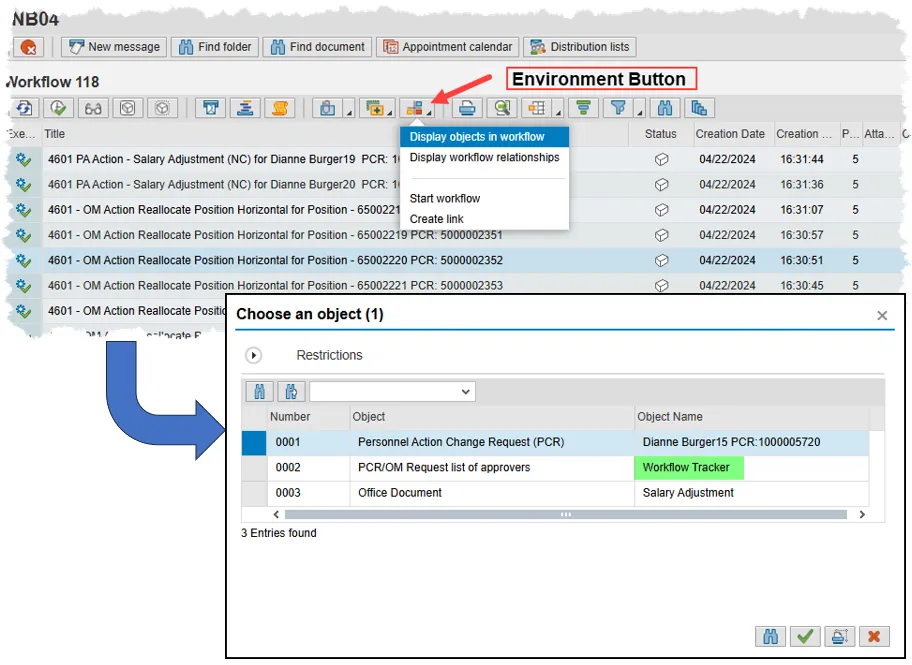
To view the Tracker from your Inbox or Outbox, use the Environment button, then click Display objects in workflow in the drop-down menu. In the ensuing pop-up, simply double click the line item labeled Workflow Tracker in the Object Name column.
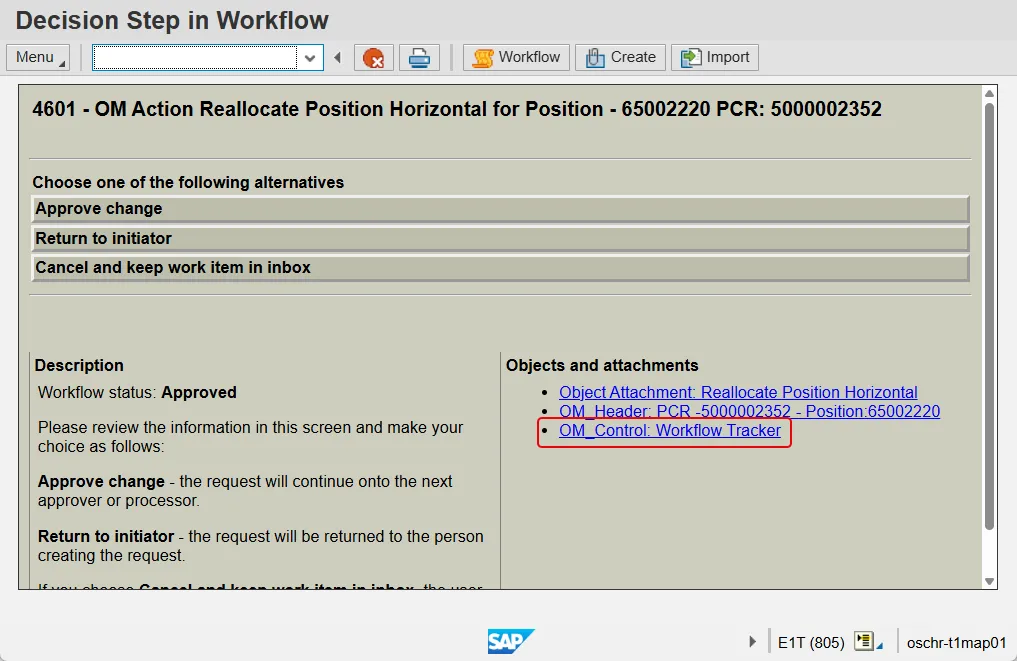
Or, on the Decision Step screen, there will be an area labeled ‘Objects and Attachments’ with two or more hyperlinks on the bottom right. The Workflow Tracker will always be the link on the bottom.
Once open, the Workflow Tracker has two sections: Heading and Routing Table.
Heading Section
The Heading section is at the top of the Workflow Tracker and includes many useful pieces of information including the current status and approval level. Below is a description of each data field and what it represents:
- Request ID – The 10-digit PCR number (Personnel/Position Change Request). PA PCRs will start with a ‘1’ while OM items start with a ‘5’.
- Status – This is the overall status of the workflow item and can be one of 6 values.
- Created (D) – The PCR has been saved by the initiator but has not yet been sent to workflow
- In Process (N) – The PCR has been sent to workflow but has not yet been reviewed by an approver.
- Approved (A) – The most recent action taken on this request is approval. It does not indicate that all necessary approvals have been attained.
- Rejected (R) – The PCR has been sent back to the initiator for further review.
- Canceled (C) – After receiving the PCR back in their inbox, the initiator has chosen to cancel the workflow request.
- Completed (M) – The workflow item is completed.
- Approval level - The approval level indicates which group of approvers currently has the responsibility to review and act upon the PCR. The six below are the pre-completion, non-error levels within which most PCRs are found.
- DA1 (Division Approval) – This is an optional level which some agencies have elected to implement, and others have not. Division Approvers will work within the same agency as the initiator.
- AA1 (Agency Approval) – Every single PCR, in both OM and PA will need review by an Agency Level approver. These approvers will work in the same agency as the initiator.
- OA1 (OSHR Approver) – An OSHR approver works at the Office of State Human Resources. The only PA action/reason combination that OSHR needs to approve is a Separation/Pay in lieu of notice (ZG/21). OSHR does not approve any OM actions.
- BA1 (OSBM Approver) – An OSBM approver works at the Office of State Budget and Management. The only action reviewed at this level is a request to create a non-temporary new position.
- FA1 (Funding Approver) – Most actions require funding approval, though not all. A Funding Approver will work at the same agency as the initiator.
- SOM (OM Shared Services Processing) – Better known as BEST Shared Services. These approvers work at OSC and are the last step for all OM requests.
- Action Type - The technical code and text of the requested action. (For OM PCRs, this field will simply be labeled 'Action')
- Reason – Contains the Reason for the proposed PA action. OM PCRs will not have this field.
- Agency – The personnel area and name of the agency originating the request.
- Org. Unit – The number and name of the organizational unit containing the subject position.
- Creator – The personnel number and name of the initiator of the action.
- Employee – The personnel number and name of the employee who is the subject of the proposed PA action. (This field does not exist for OM PCRs.)
- Position – The number and name of the relevant position.

(The screenshot above is from the training database and does not reflect actual records in the Integrated HR-Payroll System.)
Routing Table
The routing table displays the history of the Workflow item, and if it is not in completed status will show the remaining levels of approval required. It will also indicate the names of the approvers who will have or who may have had access to the workflow item. Below is a description of the columns displayed in the routing table.
- Seq – (Sequence) Three-digit numbers are associated with approvers and convey the order in which the PCR will proceed. A single digit number will indicate a touch of the PCR by the initiator.
- Role - The approval level, such as Agency Approver or Funding Approver, is indicated in the role column. A key to the codes in this column can be found behind the matchcode button in the Approval Level field in the Heading section.
- Agent ID – This column contains personnel numbers of the initiator and approvers in the Workflow process.
- Name/Description – The name of the employee associated with personnel number in the Agent ID column.
- Act – (Action) A single letter key indicating the action taken by the person listed in the Agent ID & Name/Description columns. They are described in Desc bullet item.
- Desc – (Description) Indicates the action taken by the person listed in the Agent ID & Name/Description columns. There are 5 possible values:
- P – Processed: Associated with the Initiator level and indicates that the request has been sent to workflow.
- A – Approved: Indicates that the approver on the same line has approved the PCR to go to the next step.
- R – Rejected: Indicates that the approver on the same line has sent the PCR back to the initiator for review.
- O – N/A: Once an approver either approves or rejects a workflow item, all other approvers at the same level will have this indication.
- Blank – Indicates that no one at this level of approval has taken action on the PCR.
- Cmnt – (Comment) When a PCR is rejected, the approver is required to furnish a note for the initiator to review. The existence of the note is indicated by an X in this column. To read, highlight the line with the gray box on the left of the line and click the Notes button at the bottom of the screen.
- Actual – When an initiator or approver takes action on a Workflow item, their personnel number appears here.
- Name - When an initiator or approver takes action on a Workflow item, their name appears here.
- Act Date/Act Time – (Action Date/Action Time) Indicates when the PCR left the inbox of the approver or initiator on the same row. It indicates when the workflow item was Processed, Approved or Rejected.
- CR Date/CR Time – (Creation Date/Creation Time) Indicates when the PCR arrived in the inbox of the approver or initiator on the same row.
- Miscellaneous – The rest of the columns in the Routing Table can be safely disregarded.
