Purpose
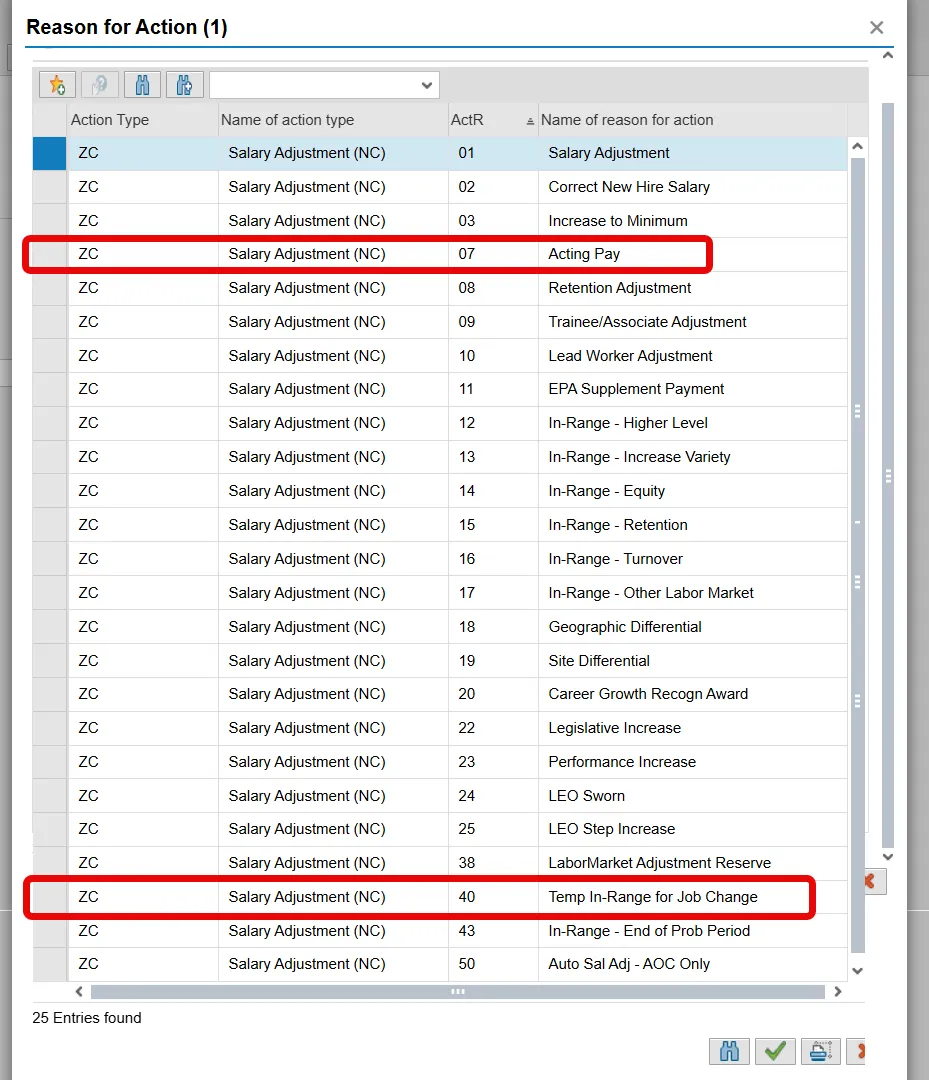
The purpose of this job aid is to explain how to execute a Salary Adjustment for an employee receiving Acting Pay or a Salary Adjustment for a Temporary In-Range Job Change.
Background and General Information
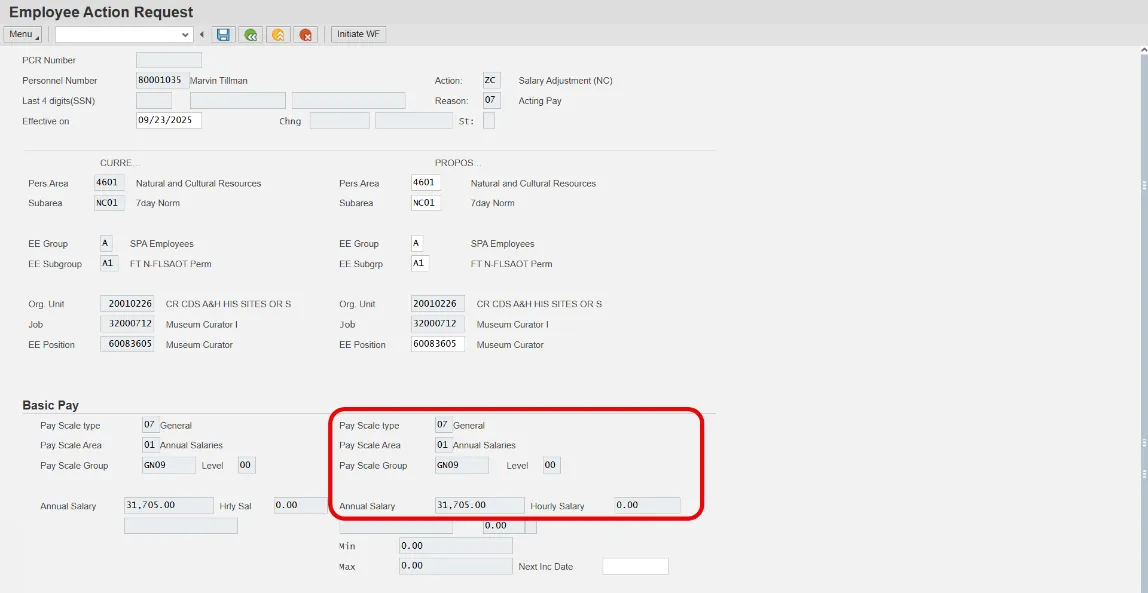
Employee’s base pay/annual salary in infotype 0008 Basic Pay, should not change with a Salary Adjustment action with reason 7 Acting Pay or reason 40 Temp In-Range for Job Change. Instead, the agency HR should communicate with the agency payroll to create temporary increase payments in infotype 2010 (Employee Remuneration Info) wage type 1424 (Temporary Higher Duty Pay).
Note: This Temporary Pay Increase only applies to a Salary Adjustment ZC with reason 7 or 40. This Temporary Pay Increase does not apply to a Promotion action Z1 with the reason 03 Acting Promotion.
Processing the Action
The agency HR must process the appropriate Salary Adjustment Action.
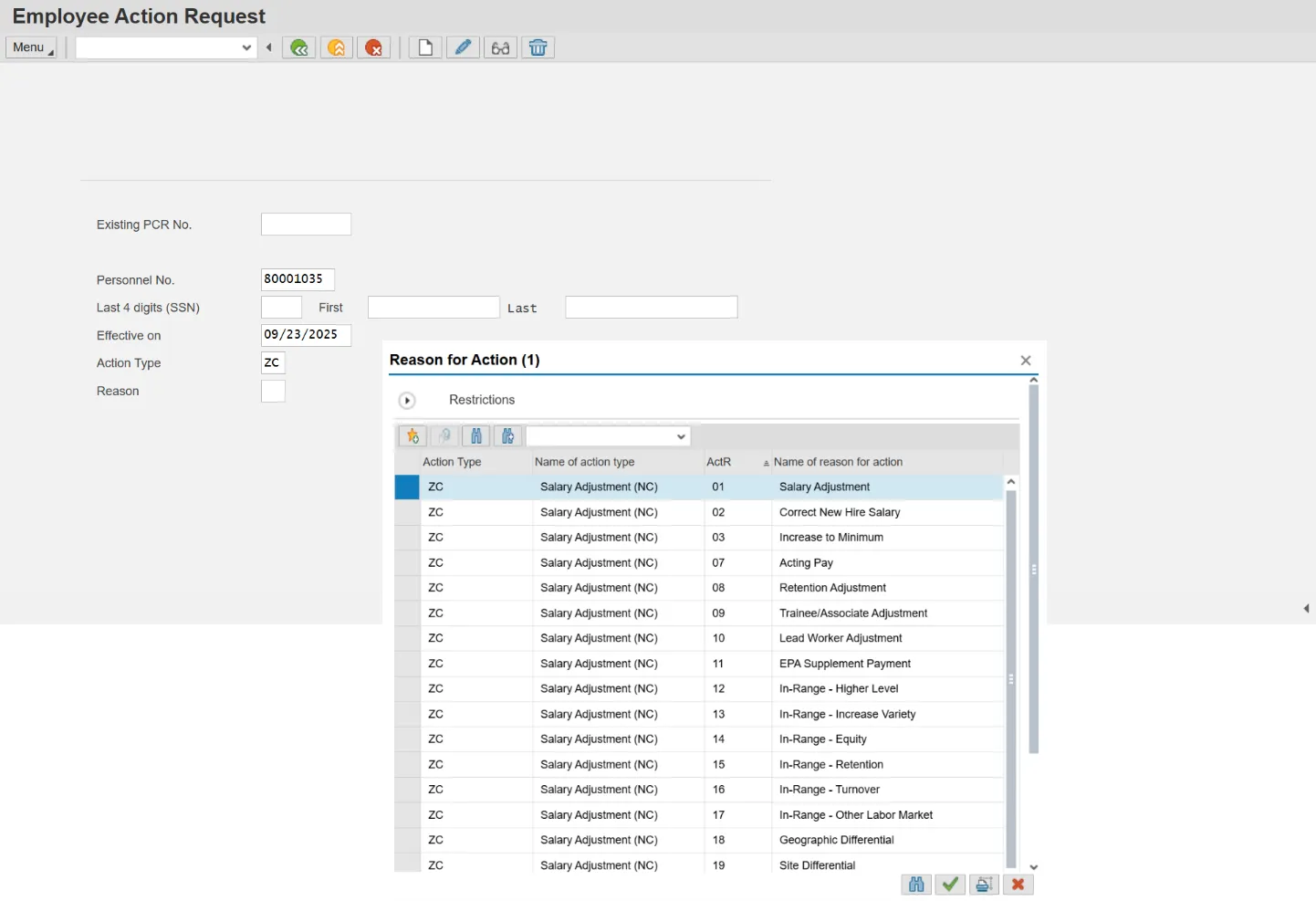
Once the correct employee, action, and effective date have been entered the agency HR will select the correct reason for the Salary Adjustment Action. Applicable Reasons include 7 (Acting Pay) or 40 (Temp In-Range for Job Change).
After selecting the valid Reason code, the Annual Salary field for the Salary Adjustment Action should appear unavailable for changes. The base pay will not change for Salary Adjustments with Reason code 7 or 40.
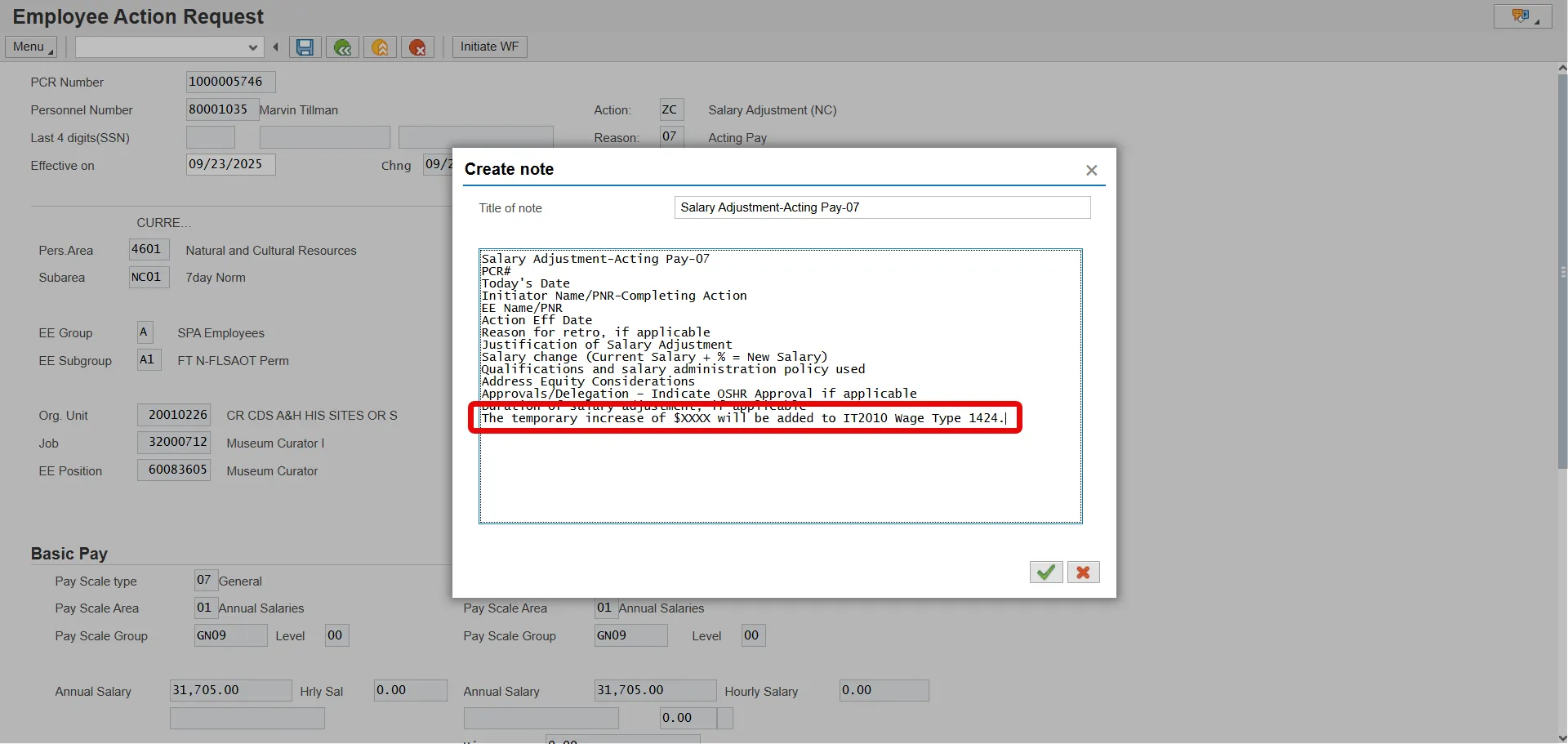
After saving, the agency HR must include the notes on the official action notes template. In addition, they must also include the following statement “The temporary increase of $XXXX will be added to IT2010 Wage Type 1424".
After processing the action, the agency HR should then coordinate with their Payroll Department to enter the employees’ temporary pay increase in infotype 2010 wage type 1424. After the temporary pay increase has been satisfied the agency HR must communicate with the payroll department to delimit the Wage Type with the same effective date as the Cancel Pay Action.
Calculating Acting Pay
The agency determines temporary pay increase amount for the employee. The amount is then divided up based on the employee’s payroll area.

Example: Employee in Monthly Payroll Area
An employee with an annual salary of $50,000 is to receive an additional 10% for Acting Pay per pay period. The employee is paid on a monthly schedule. To calculate the amount of acting pay, the employee’s annual salary is multiplied by the percentage of acting pay. The result is divided by 12. This provides the employee with $416.66 temporary pay increase per pay period for acting pay.

Example: Partial Month Acting Pay
An employee with an annual salary of $50,000 is to receive an additional 10% for Acting Pay starting February 10, 2020. The employee is paid on a monthly schedule. To calculate the amount of acting pay for the month of February, the employee’s annual salary is multiplied by the percentage of acting pay. The result is divided by 12. This provides the employee with a $416.66 monthly acting pay increase. To account for a partial month, the acting pay increase is then divided by the number of scheduled workdays for the month. In February there are 20 scheduled working days, $416.66/20 workdays = $20.83 acting pay per workday. The employee qualifies for acting pay on scheduled working days beginning on February 10. This means that the employee will receive acting pay for 15 days for the month of February. Multiply the amount of acting pay per workday by the number of days the employee works with eligibility, $20.83 X 15 workdays = $312.45 Acting pay for the month of February.
Partial Month Acting Pay

Example: Employee in Biweekly Payroll Area
An employee with an annual salary of $50,000 is to receive an additional 10% for Acting Pay per pay period. The employee is paid on a biweekly schedule. To calculate the amount of acting pay, the employee’s annual salary is multiplied by the percentage of acting pay. The result is divided by 26. This provides the employee with $192.31 temporary pay increase per pay period for acting pay.

Temporary Increase Payment
Temporary In-Range or acting pay increases are to be entered through Infotype 2010/Wage Type 1424. The Basic Pay (IT0008) base pay/annual salary should not be changed when processing the Temporary In-Range or Acting Pay actions. It is extremely important that the agency HR works with the agency Payroll to schedule the beginning and end of the temporary pay increase. The agency Payroll must create a record in IT2010/wage type 1424 for each payment of the temporary increase. Infotype 2010/Wage Type 1424 is not an infotype for reoccurring payments; however, payments can be future dated. The steps below serve as a guide to explain how to create a Temporary pay increase under acting pay or temporary in-range.
There are 8 steps to complete this process.
Step 1. Login to SAP GUI.
Step 2. Access PA30.
Step 3. Search for the employee
Step 4. Enter 2010 in the infotype field and 1424 in the subtype field.
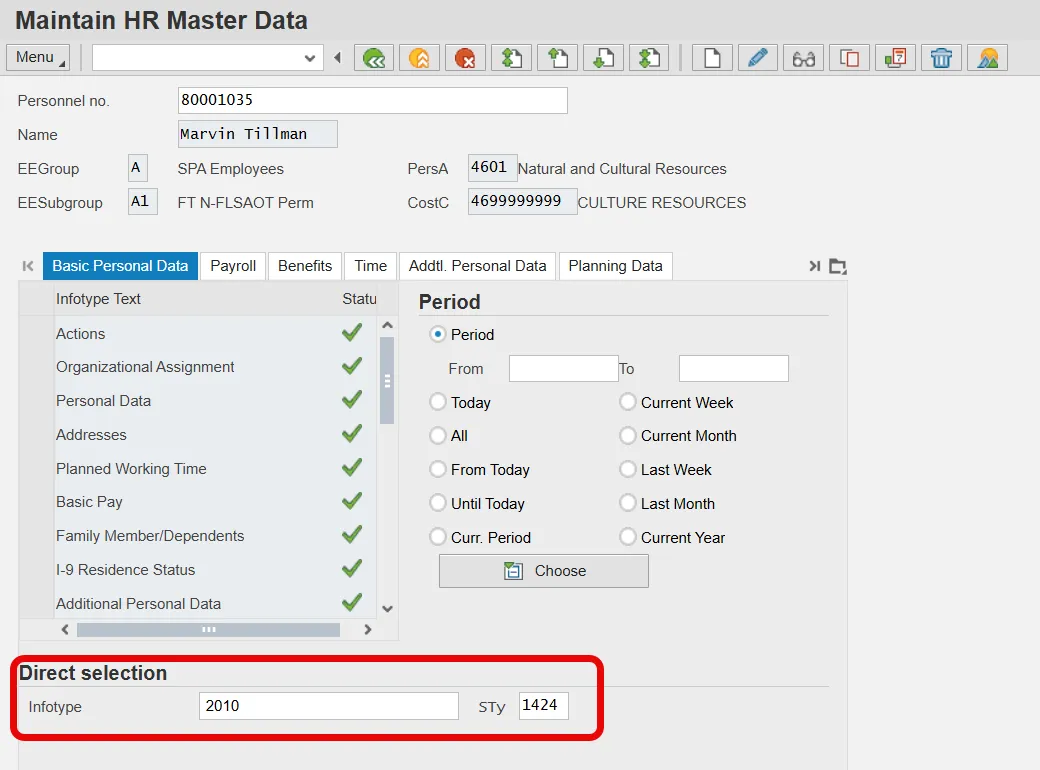
Step 5. Select the Create Icon.
Step 6. Enter a date. The date should be within the current pay period.
Step 7. Enter the amount to be paid based off your calculation.
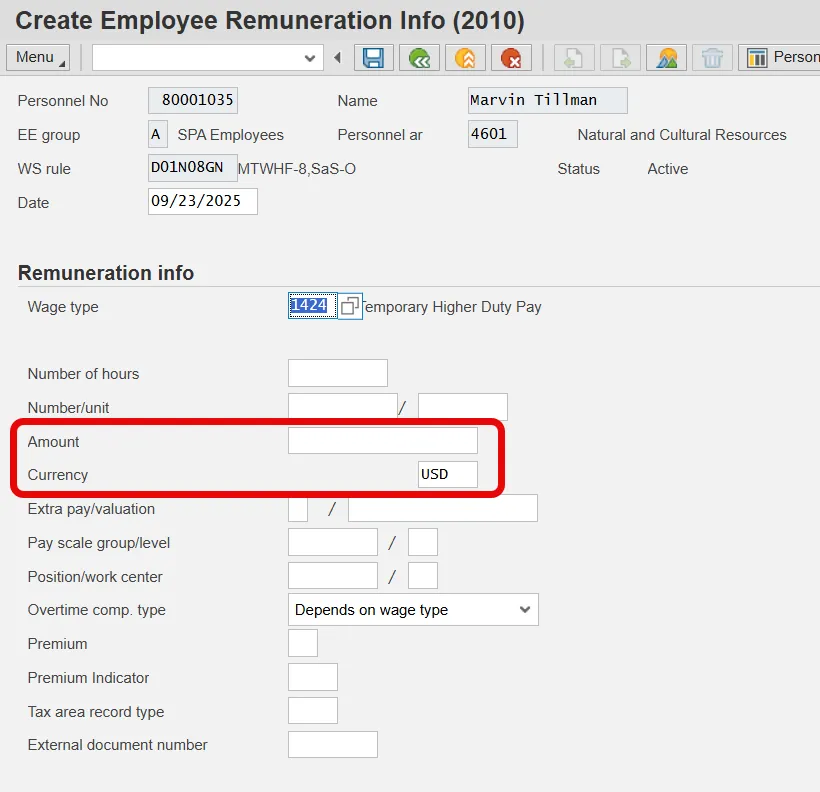
Step 8. Select the Save Icon to save the entry.