Purpose
The purpose of this job aid is to define the fields that are included in the Create New Position (position action 100) screens and tabs. The fields are listed in the order they display on the SAP screen, reading left to right from each row.
Position Data on the General Tab
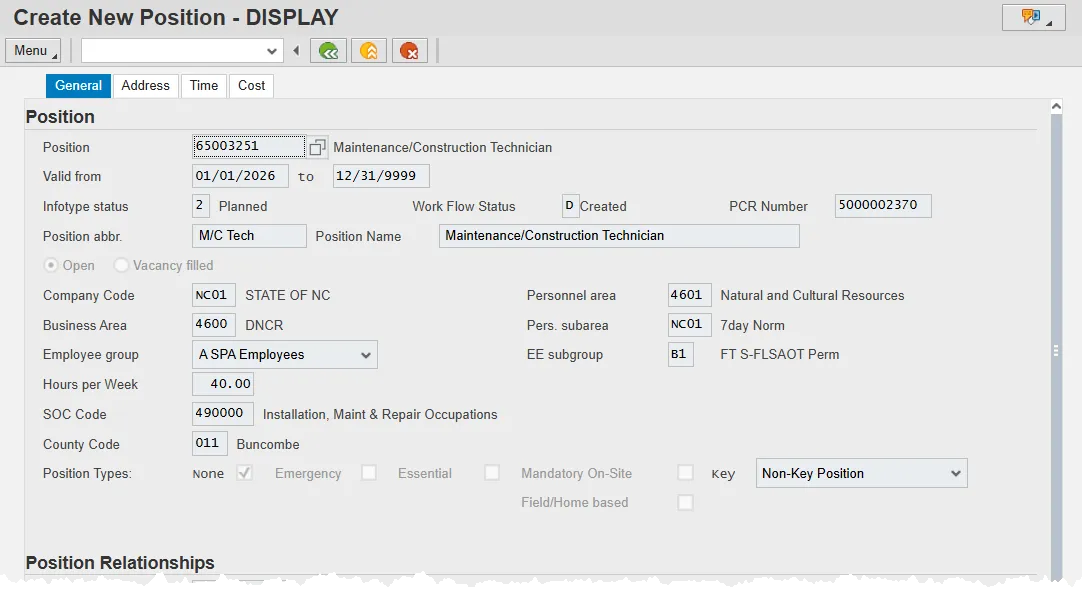
- Position – The SAP eight-digit position code (perform a search for the correct position title) for the position to be maintained.
- Valid from – Beginning date of the organizational assignment which identifies the start of a validity period. For existing Legacy positions, the start date was established as 01/01/1900.
- Note: The Validity period, also referred to as the effective date range, identifies the lifespan assigned to an object or an infotype record, or the period of time that these items "exist." Validity periods consist of a start date and end date.
- Valid to – Contains a date that identifies the end of the validity period which is the ending date of the organizational assignment; if the assignment is ongoing, the “end of time” 12/31/9999 is entered.
- Infotype status – Identifies whether the infotype is in planned or active status. Position infotypes will remain in planned status until all approvals have been obtained.
- Work Flow Status – This field, automatically populated by SAP, displays the current status of a workflow item, such as “N” for in progress, “A” for has been approved by one or more approvers, “R” for rejected, and M for complete.
- PCR Number – (Position/Personnel Change Request) Stores the searchable, SAP generated ten-digit number used to designate a workflow item. OM PCRs will begin with a 5; PA PCRs will begin with a 1.
- Position abbr. – Name of the Position abbreviation. Position short text is a 12-character field. Not all 12 characters have to be used. Start each short text word with a capital letter and follow the naming conventions of your agency.
- Position Name – Full description of Position Name, up to 40 characters long. Also known as the Working Title of the position.
- Open – Indicates that the position is vacant.
- Vacancy Filled – Indicates that the position is held by an employee.
- Company Code – Represents the highest levels of the organizational structure. Use NC01 for all agencies, except for Transportation and Employment Security Commission. Their code is NC02. All agencies except DOT and ESC use NC01.
- Personnel Area –The Personnel Area is tied directly to the company code and is used by Payroll to identify the specific agency for which the employee works. A company code can include one or more Personnel Areas. Personnel Area is important for selecting dates for reporting. Personnel areas determine where wages and salaries are posted and from where they are paid. Some examples are:
- For Company Code NC01
- 1401 – State Controller
- 1601 – Environmental Quality
- Z101 – State Human Resources
- 8701 – School of Science & Math
- For Company Code NC02
- 1501 – Department of Transportation
- For Company Code NC01
- Business Area – In most cases, represents the agency. The exceptions are:
- Justice (SBI)
- HHS (403-b)
- CCPS (Highway Patrol)
Note: A Business Area is a unit within a company code used by Finance to complete set of income statements and balance sheets. The Business Area represents a separate area of operations or responsibilities within an organization.
- Pers. Subarea – The personnel subarea is a code that defines various working schedules so that Time Management can define groups of specific time entry rules. Some examples include:
- NC01 – 7-day Norm
- NC04 – 7-day El/Ap
- NC07 – 7-day Temp
- NC09 – 7-day External
The Personnel subarea groups similar jobs to conform to time and attendance rules. There are five key elements that determine an employee’s Personnel Subarea assignment: - Calendar assignment
- Relationship to the state (regular vs. temp vs. elected vs. contractor)
- Quota accrual rules/requirements
- Work schedule rule (to restrict the available work schedules)
- Working period (which defines the overtime period)
See the Personnel Area and Subarea job aid that is available on the OSC website for detailed information concerning the relevant PSAs associated with each Personnel Area.
- Employee Group – Assigns the appointment type and establishes rules for calculating leave and managing pay. Some field values include:
- A – SHRA Employees (Subject to State Human Resources Act)
- K – EHRA Employees (Exempt from State Human Resources Act)
- O – Supplemental Staff (temporaries, pick-up firefighter, National Guard, contractor, etc.)
- P – SHRA Bi-weekly (Subject to State Human Resources Act, in a bi-weekly pay period)
See the Employee Groups and Subgroups job aid that is available on the OSC website for detailed information.
- EE subgroup – The Employee Subgroup field:
- Defines the position work status (full time, part time) and the position work schedule.
- Determines detailed and specific calculation rules for employee pay.
- Defines if the position is subject or not subject to the Fair Labor Standards Act Overtime Provisions (FLSAOT).
Some examples of the EE subgroup for SHRA Employees EE Group include: - A1 – FT N-FLSAOT Perm (Full time, not subject to FLSA overtime, permanent)
- B3 – FT S-FLSAOT TL (Full time, subject to FLSA overtime, time-limited)
- Y1 – PT S-FLSAOT Perm (Part time, subject to FLSA overtime, Permanent)
See the Employee Groups and Subgroups job aid that is available on the OSC website for detailed information.
- Hours per week – Represents the budgeted number of hours per week for the position.
- SOC Code – Stores the Standard Occupational Classification occupational code for the position. SAP assigns the SOC code for graded positions. For banded positions, the SOC code will be determined by the agency.
- County Code – Contains the three-digit code for the county where the position is located.
- Position Types – The State has five separate designations for positions which are defined as follows:
- Emergency – A position designated by an agency that is mandatory/essential to agency operations during adverse weather or other conditions of a serious nature that prohibit some employees from reporting to work but do not necessitate the closing of state offices and facilities; or a position designated that is mandatory/essential during emergency conditions that necessitate the closing of state offices or curtailing of operations. These designations are related only to the “Adverse Weather and Emergency Closing” policy in the State Personnel Manual.
- Essential – A position designated by an Executive Branch Department Head with the approval of the Office of State Budget and Management, as exempt from an Executive Order prohibiting the filling of positions. Essential positions include positions directly related to law enforcement and public safety, classroom instruction, and the custody or care of persons for whom the state has a constitutional duty to serve. Administrative and support positions are not deemed essential, but the Office of State Budget and Management may designate additional positions as an Essential Position depending upon the circumstances of each request.
- Key – A position that requires specialized knowledge that is unique within the organization. The specialized knowledge is essential for the organization to meet the goals and objectives that are linked to its mission or statutory requirements. The loss of an employee in a key position would lead to immediate difficulties in getting the work accomplished.
- Field/Home-Based – Positions which are required to work outside the agency or university worksite based on the service they provide or the nature of work. The work of field/homebased positions is mostly performed by traveling to various locations, within a region or working from home.
- Mandatory On-site - Position occupied by employees in permanent, probationary, or time limited appointments that are required to report to a designated worksite (particularly when all other positions are restricted from coming into the workplace), other than their personal residence, and only for those specific dates and times that such onsite reporting is required during a public health emergency. These positions include, but are not limited to, positions that directly impact public health and patient care; public safety; operation of critical infrastructure and facilities; operation and safety of sensitive research labs and ongoing care for research animals, and the custody or care of persons or property for whom the state has a duty to continue to serve.
A position can be designated with more than one type. If no types are applicable, select None.
Position Relationship Data on the General Tab

- Org Unit – Contains the eight-digit number that represents the organizational unit to which the position belongs.
- Job - Contains the eight-digit number for the job assigned to the position.
- Reports To – Contains the eight-digit position number that represents the supervising (chief) position for the organizational unit.
Pay Grade Tab on the General Tab
Note: The fields on this tab are automatically populated from the Planned Compensation infotype record for the assigned job.
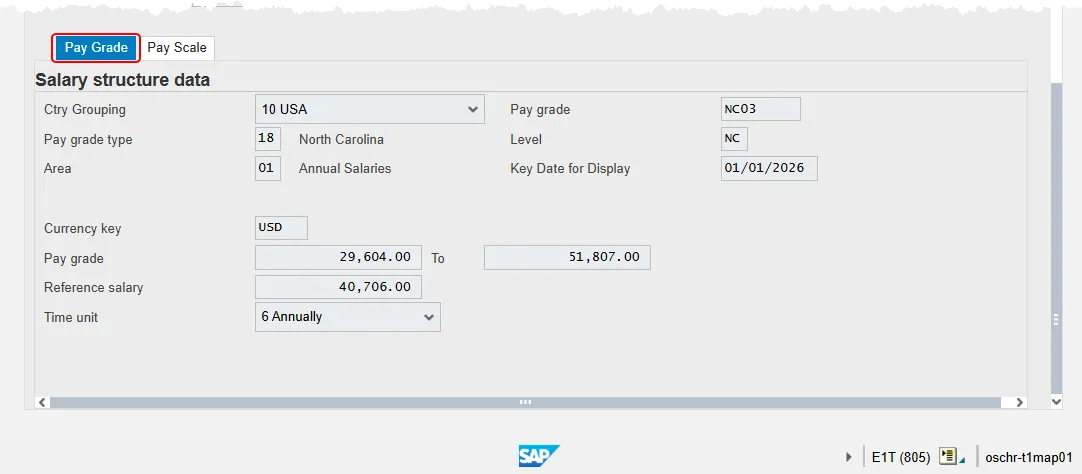
- Ctry Grouping – Indicates the country that is used in the Human Resources components of SAP. Accept USA as the default value.
- Pay Grade – The code for a group of similar jobs for employee compensation. A pay grade is defined by the country, the pay grade type and the pay grade area. A pay grade can be divided into several pay grade levels.
- Pay Grade Type - Distinguishes between the different types of pay grade structures, such as:
- 01 Graded
- 02 Banded
- 03 Flat Rate
- 04 T-Grade
- 05 X-Grade
- Level - Defines the code for the salary range within the pay grade. Each level has a minimum and a maximum amount.
- Area – Distinguishes the salary structure. Some examples include:
- 09 Flat Rate Judicial
- 14 Flat Rate Judicial Hourly
- Key Date for Display - Defaults to today’s date. This field confirms that the data displayed on the tab is current.
- Currency key – Accept USD, for US dollars as the default value.
- Pay Grade – Stores the minimum and maximum of pay range.
- Reference Salary - Contains an absolute amount that can be used as a reference point in the pay grade. The reference salary represents the midpoint of the pay grade. This field is populated by the Planned Compensation infotype record for the Job.
If the position is banded, the reference salary is one market index (journey) of the band.
Example:
The minimum paid for the pay grade is USD 4000 and the maximum paid is USD 6000. The reference salary in your organization represents the midpoint. In this case, the reference salary would be USD 5000. - Time unit – Determines which unit of time is used to calculate/display amounts in compensation administration. Values can be:
- Monthly
- Annually
- Hourly
- Weekly
Pay Scale Tab on the General Tab
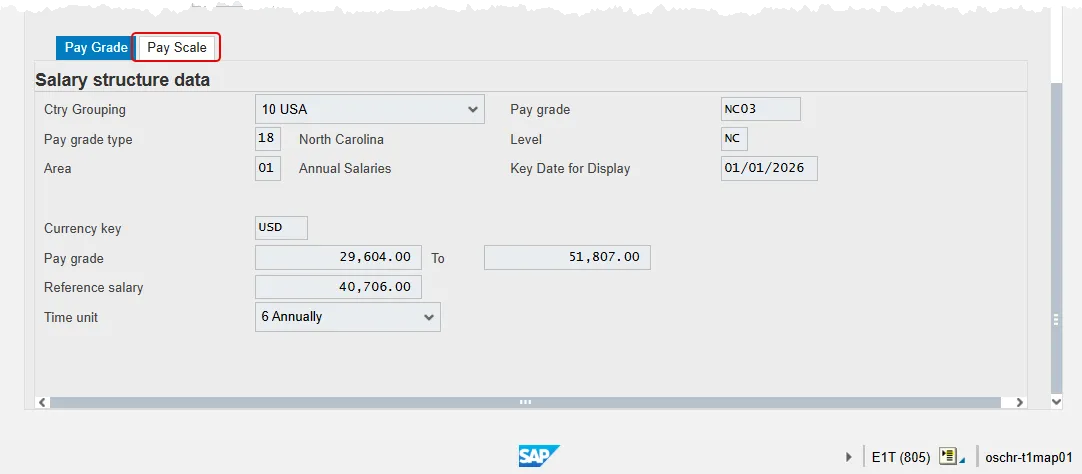
The Pay Scale tab has been deactivated and is no longer in use by the Integrated HR-Payroll System. Clicking on the tab will not produce any results.
Address Tab
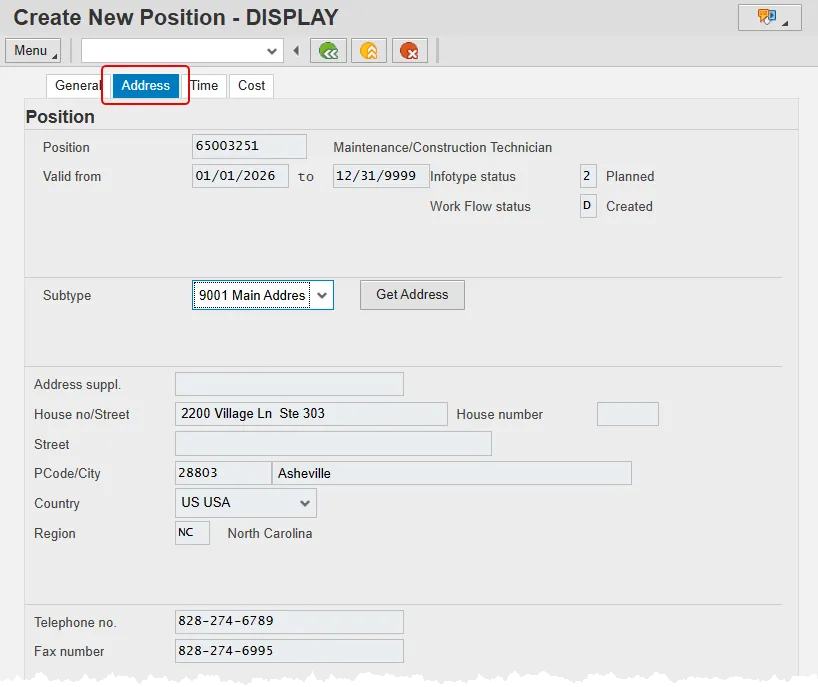
- Subtype - Expansion of the infotype record to store additional information. For Addresses the subtypes are:
- Courier
- Mailing address
- Main address
- Address suppl. – Leave blank. This field is not used by the Integrated HR-Payroll System.
- House no/Street - Identifies the street name up to a maximum of 30 characters.
- House number - Identifies the street number up to a maximum of 6 characters.
- Street – Leave blank. This field is not used by the Integrated HR-Payroll System.
- PCode/City – Contains the postal (zip) code for the address and the city. For example, 27609 Raleigh.
- Country – Identifies the country. Accept USA, for United States of America as the default value.
- Region – Contains the two-digit character code for a state.
- Telephone no. – Identifies the phone number for the workstation or desk assigned to the position.
- Fax number – Identifies the fax number assigned to the position.
Time Tab
Note: To activate a time setting to the position, you must either select the indicator or enter a value in the listed field.
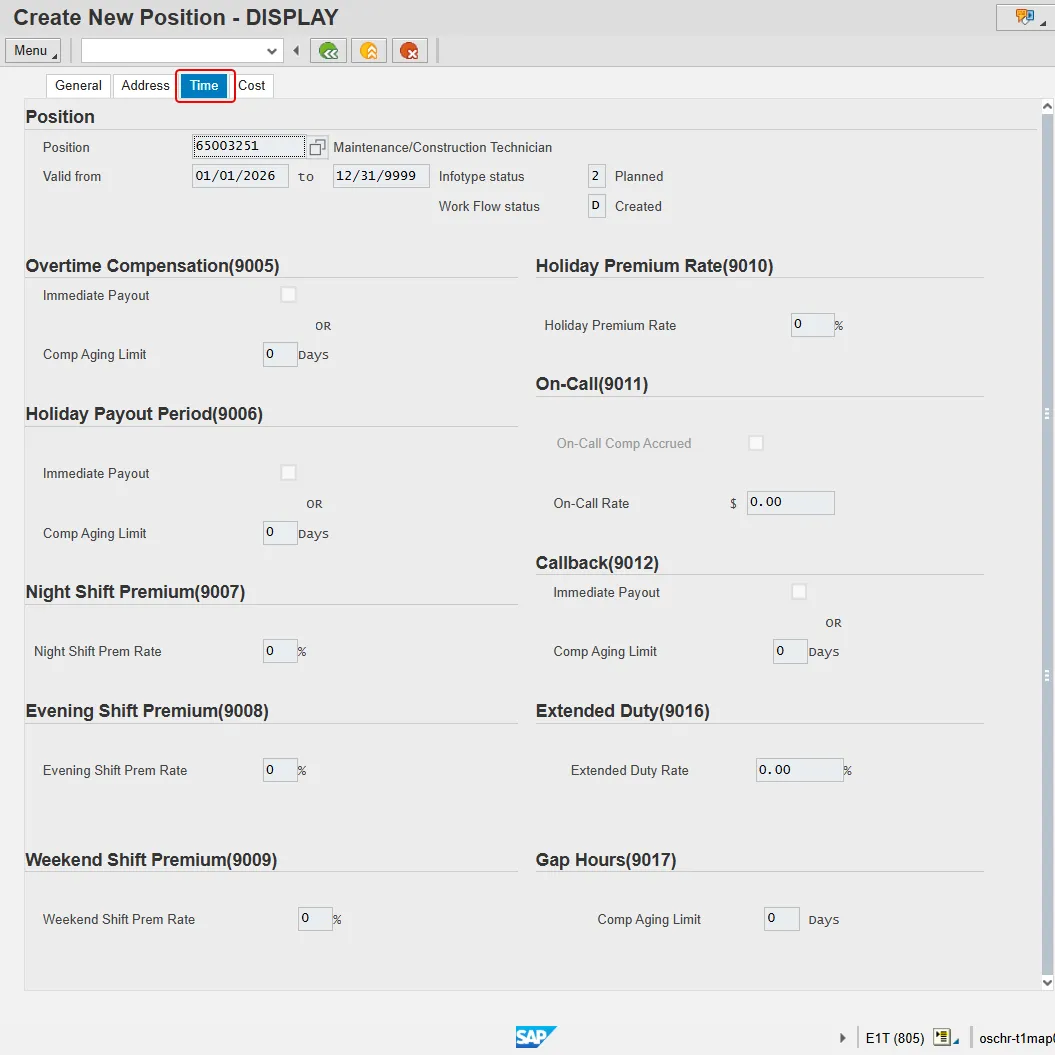
- Overtime Compensation (9005)
- Immediate Payout – Indicates if OT is to be paid out immediately.
- Comp Aging Limit – Indicates if overtime compensatory time is to be paid out (FLSA Subject only) or expired (FLSA Not-subject only) at a point earlier than 12 months from when it was earned. The Comp Aging Limit field should be populated with the corresponding number of days (30 days, 60 days, etc.). The default is 365 days. If no record exists, the default value of 365 applies.
- Holiday Payout Period (9006)
- Immediate Payout – Indicates if Holiday compensatory time is to be paid immediately.
- Comp Aging Limit – Indicates if holiday compensatory time (equal time off for time worked on a holiday) is to be paid out at a point earlier than 12 months from when it was earned. The Comp Aging Limit field should be populated with the corresponding number of days (30 days, 60 days, etc.). The default is 365 days. If no record exists, the default value of 365 applies.
- Night Shift Premium (9007)
- Night Shift Prem Rate – Indicates the night shift premium rate. Note: If OSHR has approved a rate other than the default of 10%, the rate as a percentage must be entered in the rate field.
- Evening Shift Premium (9008)
- Evening Shift Prem Rate – Indicates the evening shift premium rate. Note: If OSHR has approved a rate other than the default of 10%, the rate as a percentage must be entered in the rate field.
- Weekend Shift Premium (9009)
- Weekend Shift Prem Rate – Indicates the weekend shift premium rate. Note: If OSHR has approved a rate other than the default of 10%, the rate as a percentage must be entered in the rate field.
- Holiday Premium Rate (9010)
- Holiday Premium Rate - Indicates if the position is eligible for holiday premium rate. Note: If OSHR approved a rate other than the default of 50%, the rate as a percentage must be entered in the rate field.
- On-Call (9011)
- On-Call Comp Approved – Indicates if the time is to be collected as On-Call comp time.
- On-Call Rate – The OSHR approved on-call rate, expressed in dollars and cents.
- Callback (9012)
- Immediate Payout – Indicates if Callback time is to be paid out immediately.
- Comp Aging Limit – Indicates if Callback compensatory time is to be paid out at a point earlier than 12 months from when it was earned. The Comp Aging Limit field should be populated with the corresponding number of days (30 days, 60 days, etc.). The default is 365 days. If no record exists, the default value of 365 applies.
- Extended Duty (9016)
- Extended Duty Rate – The approved rate expressed as a percentage for extended duty.
- Gap Hours (9017)
- Comp Aging Limit – Indicates if Gap Hours compensatory time is to be paid out at a point earlier than 12 months from when it was earned. The Comp Aging Limit field should be populated with the corresponding number of days (30 days, 60 days, etc.). The default is 365 days. If no record exists, the default value of 365 applies.
Cost Tab
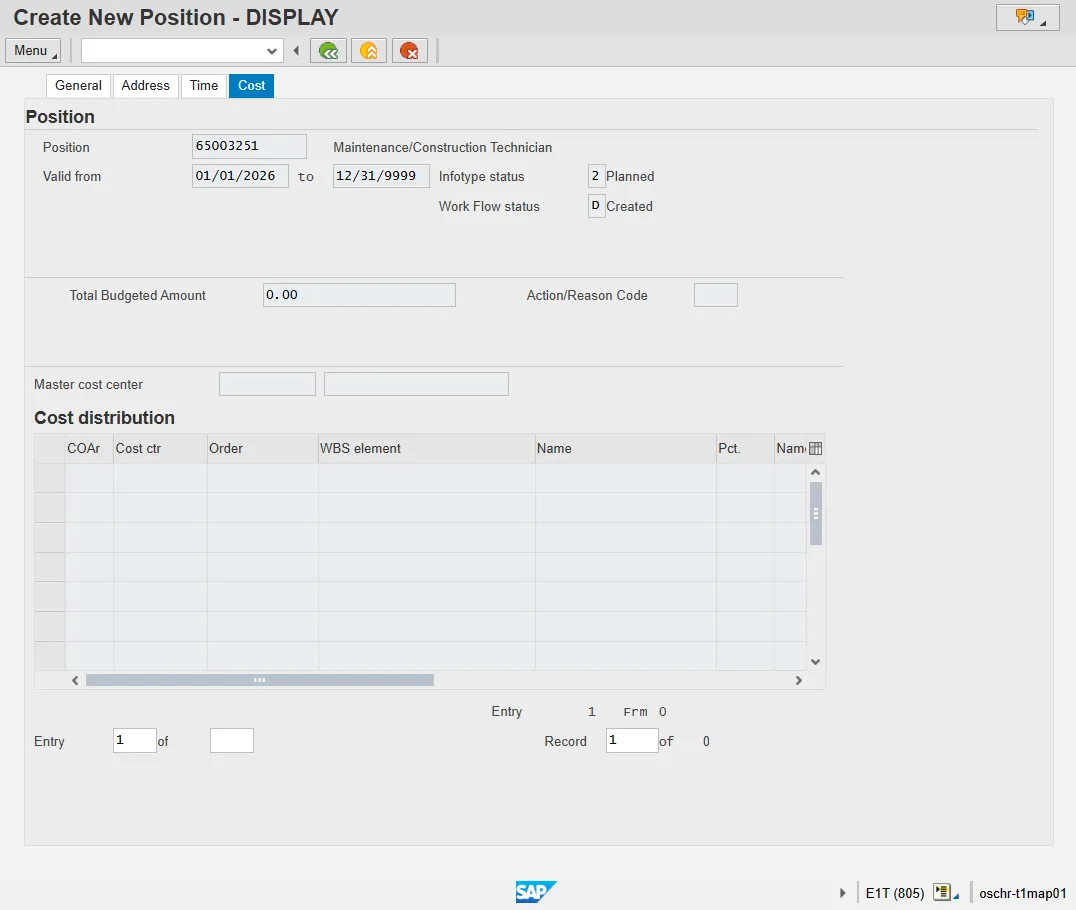
The Cost Tab is completed by the Agency Funding Approver. OSC Help Document FN-08 has detailed instructions for those who are tasked with this assignment. Non-funding approvers can click into the tab, but none of the fields will be editable.