Purpose
The purpose of this Quick Reference Guide (QRG) is to provide the step-by- step process regarding NCFS Accounts Payable Year-End Accrual Process.
Introduction and Overview
This QRG covers how to create and manage an invoice for NCFS Accounts Payable Year-End Accrual Process.
Creating a New Invoice
There are 6 steps to complete this process.
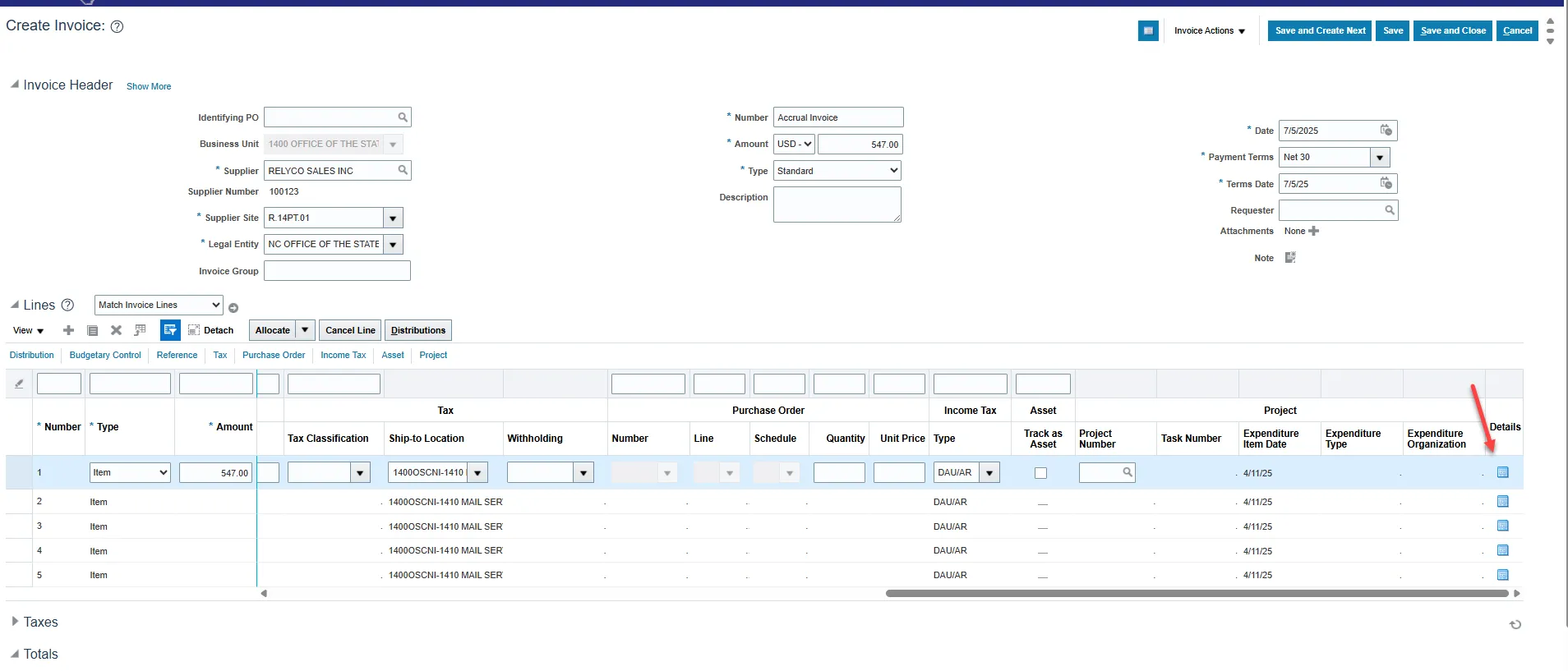
Step 1. When creating an invoice, scroll to the end of the invoice line and click on the Details button.
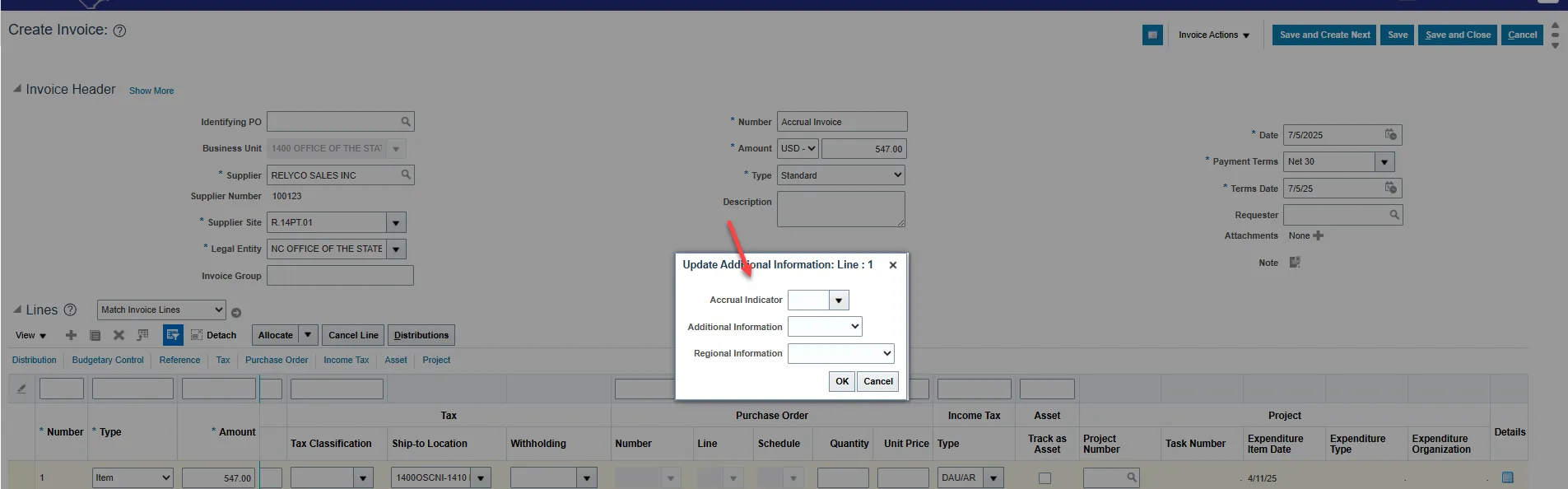
Step 2. Click on the Accrual Indicator drop box.
Step 3. Select the appropriate Accrual Indicator for the invoice line.
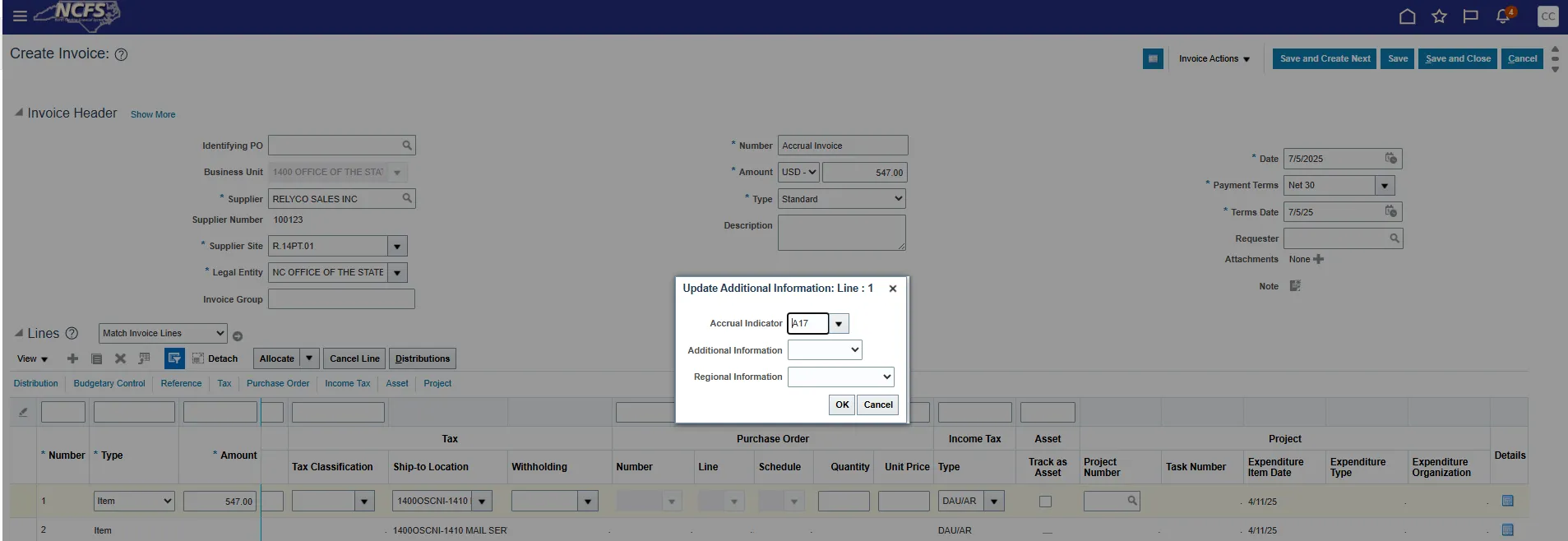
Step 4. Click OK.
Step 5. Click Save.
Step 6. Continue to process the invoice to add more lines or to validate and approve.
Managing Invoice to Add Accrual Indicator
There are 4 steps to complete this process.
Step 1. Under Edit Invoice, click the Details button to add the Accrual Indicator.
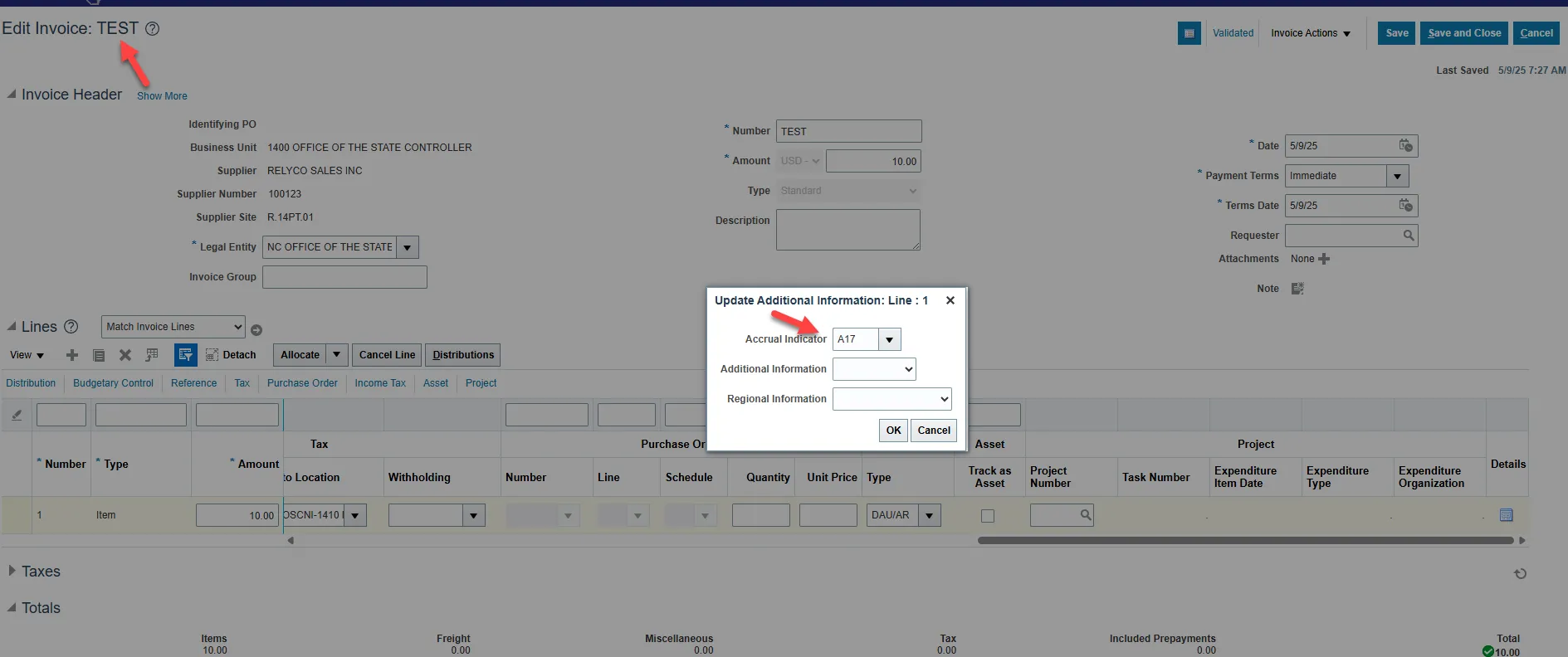
Step 2. Click OK.
Step 3. Click Save.
Step 4. Continue to process the invoice to add more lines or validate and approve.
Accrual Indicators
Accounts Payable Accrual Indicators
| A10 | 21110000 Accounts Payable |
| A11 | 21111000 Due to Employees |
| A12 | 21121000 Accrued Salaries and Wages |
| A13 | 21122000 Withholdings and Employer Matching Payable |
| A15 | 21132500 Intergov Pay - Other States |
| A16 | 21131000 Local Government Payable |
| A17 | 21132000 Federal Agency Payable |
| A18 | 21191000 Obligation for Workers Compensation |
| A19 | 21192000 Accrued Vacation |
| A21 | 21194000 Accrued Sales Tax Payable |
| A22 | 21195000 1099 Withholding |
| A23 | 21196000 Escheats Payable |
| A25 | 21231000 Inter-Gov't Payable - Due to General Fund |
| A26 | 21231100 Inter-Gov't Payable - Due to Special Revenue Fund |
| A28 | 21231300 Inter-Gov't Payable - Due to Capital Improvement Fund |
| A29 | 21231400 Inter-Gov't Payable - Due to Enterprise Fund |
| A30 | 21231500 Inter-Gov't Payable - Due to Internal Service Fund |
| A33 | 21231800 Inter-Gov't Payable - Due to Pension Trust Fund |
| A34 | 21231900 Inter-Gov't Payable - Due to Agency Fund |
| A35 | 21241000 Inter-Gov't Payable - Due to General Fund |
| A36 | 21241100 Inter-Gov't Payable - Due to Special Revenue Fund |
| A38 | 21241300 Inter-Gov't Payable - Due to Capital Improvement Fund |
| A39 | 21241400 Inter-Gov't Payable - Due to Enterprise Fund |
| A40 | 21241500 Inter-Gov't Payable - Due to Internal Service Fund |
| A43 | 21241800 Inter-Gov't Payable - Due to Pension Trust Fund |
| A44 | 21241900 Inter-Gov't Payable - Due to Agency Fund |
| A45 | 21250000 Due to Primary Government Agencies |
| A46 | 21260000 Due to Component Units |
| A47 | 21622000 Accrued Interest Payable |
| A48 | 21711000 Deposits Payable - Contract Retainage |
| A49 | 21712000 Deposits Payable - Federal Government |
| A50 | 21713000 Deposits Payable - NC Funds and Government Units |
| A51 | 21714000 Deposits Payable - Patient Deposits |
| A52 | 21715000 Deposits Payable - Student Deposits |
| A53 | 21716000 Deposits Payable - Tenants Deposits |
| A54 | 21717000 Deposits Payable - Due to Deferred Compensation Plan Participants |
| A55 | 21719000 Deposits Payable - Funds Held for Others |
| A56 | 21232000 Intra-Gov't Payable - Due to Permanent Fund |
| A57 | 21232100 Intra-Gov't Payable - Due to Private Purpose Trust |
| A58 | 21242000 Intra-Gov't Payable - Due to Permanent Fund |
| A59 | 21242100 Intra-Gov't Payable - Due to Private Purpose Trust |
| A60 | 21521000 Medical Claims Payable |
| A70 | 21241500 Inter-Gov't Payable - Due to DOA Motor Fleet Mgmt |
| A71 | 21241500 Inter-Gov't Payable - Due to DOA Temp Solutions |
| A72 | 21241500 Inter-Gov't Payable - Due to DIT Telecommunications |
| A73 | 21241500 Inter-Gov't Payable - Due to DIT Computer Services |
| A74 | 21241100 Inter-Gov't Payable - Due to Correction Enterprise |
| A75 | 21241000 Inter-Gov't Payable - Due to OSC Workers' Comp |
Reports
- RPT-RTR-172 - NC AP Accrual Reclass Report
- Used to review AP invoices keyed through June to verify accruals.
- RPT-RTR-177 - NC AP Accrual Injections Report
- Used in July to review invoices and it contains two tabs:
- Tab 1 – Displays detailed invoice information for all invoices entered in July.
- Tab 2 – Summarizes accrual invoices by account combination and liability account to use for Journal upload.
- Used in July to review invoices and it contains two tabs:
Wrap-Up
Provides answers regarding how to create and manage an invoice for NCFS Accounts Payable Year-End Accrual Process.